Comp is one of the biggest cost lines on the P&L, and nobody truly owns it.
It runs on spreadsheets and vibes, mostly wrapped in good intentions.
It breaks quietly until a rep escalates, and it costs the business three ways at once: financial exposure Finance can’t see, operational burden RevOps can’t escape, and rep distrust Sales can’t afford.
AI was supposed to help with that.
So far, most of what it offers comp teams is an empty (yet confident) answer.
Ask a general-purpose model to design a plan, and you’ll get something that reads well. You won’t know how it compares to plans that have worked, what it will cost once reps start selling against it, or whether it matches your CRM data.
Today we’re launching a new QuotaPath built to fix that.
It starts with a new homepage, anchored by two product updates: Atlas embedded in QuotaPath and the QuotaPath MCP.
Atlas now lives inside QuotaPath
Atlas is QuotaPath’s AI revenue strategist, and it’s now embedded directly in QuotaPath.
The best comp advice depends on two kinds of data:
What good looks like across the market,
And what’s actually happening in your plans.
Atlas combines QuotaPath’s benchmark intelligence with your own commission data, so you know what good comp plans look like and how yours measure up.
With Atlas embedded, you can:
Measure quota attainment and see which plans are pulling their weight
Detect commission anomalies before they turn into disputes
Track cost of commissions and effective rates as the period runs
Grade an existing plan, pressure-test a change, and push it into your live QuotaPath workspace
Build briefs that bring data, assumptions, and recommendations together for Sales, RevOps, and Finance
Ask questions on deals, plans and more
Atlas is built on 10+ years of compensation plan guidance and experience. When it recommends a quota-to-OTE ratio or flags an accelerator, that recommendation comes from tens of thousands of comp plans.
Try Atlas
You can use Atlas for free up to a certain number of prompts for real-time plan feedback and more.
But we also recognize the importance of leaders who want QuotaPath to connect to their LLM systems – where they’re already working.
That’s why our QuotaPath MCP is now live.
Connect QuotaPath to your LLM of choice, then design, build, and deploy comp plans from there. The plan you build lands in QuotaPath, where it runs against your live CRM data like every other plan.
This is built for technical RevOps managers who want to build comp into their existing stack architecture instead of managing another siloed tool.
Three ways to run comp
Not everyone is a builder at heart, and we understand that.
That’s why we’ve redesigned QuotaPath to support builder-first techies and leaders who want to fully offload their commission processes to our team.
See below.
In QuotaPath. Build plans, automate commissions, and give reps real-time visibility into what they’ll earn. QuotaPath connects to 40+ native integrations across your CRM, ERP, accounting, and data warehouse systems, so every commission is calculated from the records RevOps and Finance already use.
With Atlas or your LLM. Use Atlas inside QuotaPath, or the QuotaPath MCP from your own
LLM, to design plans, measure performance, and make data-backed changes.
With our team. If you’d rather not run comp yourself, QuotaPath’s managed services puts a human in the loop: someone who owns the outcome and improves the process. Our comp experts can run every period close, improve every plan, and stand behind every payout.
What this means for your comp plans
A comp plan should improve every quarter.
Most don’t, because the people who could improve them don’t have the time, the data, or a safe way to test a change before it hits payroll.
The new QuotaPath gives them all three. Atlas shows you what’s working. The MCP lets your team work in the tools they prefer. And QuotaPath runs the calculation underneath, so reps can trust the number they see.
That’s what we mean by Commissions Handled. Outcomes Delivered.
Streamline commissions for your RevOps, Finance, and Sales teams
Design, track, and manage variable incentives with QuotaPath. Give your RevOps, finance, and sales teams transparency into sales compensation.
At the Operators’ Guild Summit in Chicago, I opened my session with a show of hands: who already runs a consumption- or usage-based revenue model, and who expects to soon.
About a third of the room raised their hands.
Sure, that was a smaller sample size, but it lines up to what’s happening on a much larger scale. For instance, in ICONIQ’s 2026 State of AI report, the share of AI builders using consumption-based pricing jumped from 35% to 42% in just six months.
AI-embedded products are moving revenue from pre-booked contracts to consumption. Most comp plans haven’t caught up.
I’ve worked across data science, marketing, RevOps, and sales leadership, and I’ve reviewed more than 500 comp plans in the past five years.
My session answered one question for finance and revenue leaders: how do you use incentive comp to win high-quality customers and protect margin at the same time?
Key takeaways
Shift your model. When profit varies widely, comp on profit instead of revenue. Separate quota retirement from the payment schedule. Pay a percentage up front and the rest over time.
Invest in scoring. Propensity to expand is central to this model. Predicting 12-month profitability is what makes upfront payment possible.
Treat the comp plan as the lever. Reward sellers for closing great-fit customers, and use the plan to drive the right behavior across your entire go-to-market org.
Here’s the framework I shared.
Streamline commissions for your RevOps, Finance, and Sales teams
Design, track, and manage variable incentives with QuotaPath. Give your RevOps, finance, and sales teams transparency into sales compensation.
For most of the SaaS era, incentive comp rested on three assumptions.
You comped on revenue. Each role earned a percentage of booked revenue. The moment a deal was signed, everyone knew what variable comp it would generate.
You paid on bookings. Cash collection was reliable, so paying at signature made sense. Reps got rewarded right away, and finance could plan around it.
You knew your margin. Most revenue was created equal. Commission spend was a predictable line in the margin stack.
That predictability produced benchmarks most operators still use. A seller’s quota landed at 3.5 to 5 times their OTE, putting AE commissions at roughly 10% to 14% of revenue. Quota was a function of deal volume and ACV. Total commission cost stayed under 20% of ARR.
Here’s the practical benchmark I use to break that spend down by role:
The model worked because the inputs held still. Consumption pricing moves all of them.
Consumption pricing breaks the old model
In a usage-based model, two customers who sign the same contract can end the year in very different places.
That variability touches every assumption comp was built on.
Traditional SaaS
Consumption and usage-based
Revenue
ARR is a stable, predictable unit
Usage varies customer by customer
Gross margin
Consistent, typically 75% to 80%
Can swing 20 to 40 points based on how customers use the product
Commission trigger
Close the deal, book revenue, pay commission
Land and expand drives success and the commission schedule
The upside is real.
Deloitte found that usage-based companies grew revenue 38% faster year over year than the broader SaaS index, and PwC notes that shifting from seat-based to hybrid, usage, or outcome models “can reset your revenue engine.”
But for a CFO or COO, the shift also raises three hard questions:
How should I design my org in a land-and-expand model?
How and when should I pay my team?
What behavior am I trying to motivate?
The answers point to a different kind of comp plan.
1. Extend seller responsibility (and comp) past the signature
In a classic handoff model, the AE closes the deal and walks away. Implementation takes the first couple of months, account management carries the customer to renewal, and the AE has no stake in what happens after signature.
That works when revenue is locked at signing. In a consumption model, the real revenue shows up after the deal closes, as the customer adopts and expands. So the AE needs to own the relationship through the first renewal, with CS and account management executing underneath.
Their comp should measure adoption and expansion along the way. That’s why rewarding post-sale involvement is a core rule of engagement for usage-based plans.
2. Pay on profit when margin varies
ARR stops being a reliable commission unit when:
AI token costs spike mid-contract
Customer usage patterns are unpredictable
Two deals with the same ARR carry very different margins
I recommend using 12-month projected gross profit.
It rewards your team for bringing in healthy-margin customers. The catch: you need a way to assign and track profitability for each customer.
3. Predict usage and profit at the point of close
Here’s the core challenge. Four customers can start at the same $500 a month and land in completely different places a year later.
If you can predict where a customer will land, you can comp on it. That takes work from two teams.
Marketing and data build an ICP tied to propensity to adopt, then a scoring model applied at signature. The score combines propensity to use with the projected margin profile, and it drives both quota retirement and the release of commissions.
Sales sees predicted annual profit during the sales cycle, so AEs can prioritize high-margin deals. Projected 12-month profit retires quota on its own track, separate from the payment schedule.
Here’s an example scoring model I shared:
Input
Example value
Weight
Platform fee (direct revenue anchor)
$10,000
40%
Project utilization
75 projects per year
25%
Pilot adoption rate
20 of 250 total headcount (8%)
20%
Expansion potential
230 seats addressable
15%
The output: $12,000 in projected 12-month profit, with a medium confidence rating. That number is what the AE retires quota against.
4. Separate quota retirement from the payment schedule
In traditional SaaS, quota retirement and commission payment happen at the same moment. In a consumption model, they need their own timelines. Quota retires at close, based on projected profit, so reps see credit for the deals they win. Payment follows a schedule that reflects how revenue actually arrives.
5. Pay part of the commission at close and the rest as invoices come in
When it comes to commission payment terms, both extremes create problems. Paying 100% on bookings leaves finance exposed to cash flow surprises. Paying 100% on cash received drips commissions out over months and kills motivation.
My recommended zone sits in between: 50% at closed-won and 50% as year-one invoices come through. Reps get a meaningful reward at signature, and the business pays the rest as revenue actually arrives.
When profit is hard to predict
Not every business can score profitability at signature yet. For those teams, I recommend one of two fallback options.
Anchor on the committed portion of the deal. Retire quota and release commissions on minimums or platform fees, then pay the rest on cash received.
Release less up front. Pay out a smaller share of projected 12-month gross profit at signature to account for the range of possible outcomes.
The second option also explains why the right upfront split varies. The less confident you are in your profit prediction, the smaller the share you should release at close.
Use your comp plan to show sellers what great looks like
Usage-based pricing can feel like a black box to sellers at the point of sale. Reps disengage when they can’t predict their comp. And plan complexity kills performance.
A well-built plan solves for that. In my view, great looks like this:
Quota retires on projected 12-month gross profit, with a split payout schedule
Roles, responsibilities, and payment schedules are clearly defined for every seller
Design your plan with Atlas
I closed the session with a live demo of Atlas, QuotaPath’s comp intelligence layer for consumption pricing, variable margins, and AI-era go-to-market teams. Atlas is trained on tens of thousands of comp plans and revenue outcomes in QuotaPath.
You can design any plan against your own revenue plan and business model, then push it into QuotaPath to pay commissions.
In the demo, I gave Atlas this prompt:
I’m the CFO of a $10 million ARR business launching a new AI-powered consumption-based product with varying margins on a customer-by-customer basis. I’m trying to design a compensation plan for my account executives that protects the margin of the business while properly rewarding the AEs for closing great deals. Help me design this.
Atlas came back with a complete plan:
Plan element
Recommendation
Cost impact
Primary pay basis
Year-one expected gross profit dollars for the AI product
Aligns payout directly with margin
Deal structure
Split the deal into fixed commit or platform fee and variable usage
Rewards predictable revenue while controlling volatility
Payout timing
25% to 30% at booking, 70% to 75% as usage revenue is invoiced or collected and margin is realized
Limits overpayment on under-consumed or low-margin deals
Margin eligibility
Set a minimum margin floor for full credit and accelerators, with approval required below it
Protects the business from uneconomic deals
Accelerators
Keep them modest, such as 1.0x to target, 1.25x above 100%, and 1.5x above 125%
Avoids margin leakage at the high end
Quality modifiers
Small uplifts for prepay, annual commit, multi-year, and ICP fit
Rewards great deals without overcomplicating the plan
The 25% to 30% upfront split sits below my 50% benchmark. That lines up with my fallback advice: the less certain the profit prediction, the less you release at close.
QuotaPath is the Varicent competitor that pays back fastest: its return on investment takes 5 months in G2 data, against 20 for Varicent. Performio and Everstage follow on payback speed. CaptivateIQ and Salesforce Spiff fit mid-market buyers looking for a modern commission engine. Xactly and Anaplan are the closest swaps for programs that need Varicent-level depth.
All eight are judged on fit and on the cost and speed of switching.
Editor’s note: QuotaPath, the publisher, ranks its own product first. The ranking uses payback times from G2 reviews. We didn’t test competing products hands-on.
Key takeaways
QuotaPath leads because it has the quickest payback by G2’s numbers (5 months) and bundles implementation and ongoing support into its platform fee.
Varicent switchers can move plans into QuotaPath without engineering help. The AI-Powered Plan Builder builds plans from uploaded documents, and admins edit them by drag and drop.
On G2, only QuotaPath and Salesforce Spiff list a price. The other six alternatives, like Varicent, quote by deal.
For a January 1 go-live, a QuotaPath or Everstage switch can begin in October, six months after a Varicent-length rollout would need to start.
Varicent competitors at a glance
The last row shows Varicent’s figures. Oracle and Forma.ai follow under Notable mentions.
Table 1. Eight picks and one benchmark
#
Tool
Best for
Pricing model
Months to ROI on G2 (responses)
G2 rating (reviews)
1
QuotaPath
CRM-based plans live within a quarter
$35 or $50 per user per month plus a platform fee
5 (43)
4.8 (416)
2
Performio
Mid-market pay programs that lean on reporting
Quote
7 (8)
4.4 (1,075)
3
Everstage
Teams adding sales planning
Quote
8 (8)
4.8 (2,224)
4
Salesforce Spiff
Sales Cloud customers
$75 per user per month
10 (29)
4.6 (3,136)
5
CaptivateIQ
Intricate, fast-changing plans
Quote
11 (13)
4.7 (3,492)
6
Xactly
Pay design built on peer data
Quote
15 (15)
4.2 (1,098)
7
Anaplan
Finance-led planning programs
Quote
15 (6)
4.6 (490)
8
SAP SuccessFactors Incentive Management
Existing SAP customers
Quote
27 (9)
4.1 (190)
Benchmark
Varicent
Planning and pay in one suite
Quote
20 (16)
4.5 (628)
Linked in Table 3, the entries, and the Varicent section.
Your sales and HR records already sit in Oracle’s cloud applications
4.0 stars on G2 across 112 reviews, the lowest of any tool here
Forma.ai
You want AI-led quota setting tied directly to commission administration
65 G2 reviews, under half of any ranked tool’s count
How long does Varicent take to implement?
About 8 months, according to G2, and ROI arrives at 20 months on the same measure. Varicent holds a 4.5 G2 rating from 628 reviews. Enterprise buyers make up its largest reviewer segment. Varicent backs rollouts with a professional services group of more than 100 experts and a network of implementation partners. Six of the eight alternatives here also rate as easier to set up. The two exceptions are Salesforce Spiff and SAP.
Varicent’s platform connects sales planning with incentives, two jobs most alternatives split across products. Flexibility (31 mentions) and support (24) top its G2 praise. Gartner named Varicent a Leader in its 2026 Magic Quadrant for sales performance management for the eighth straight time. Varicent says it ranked first in all three Critical Capabilities use cases.
Teams whose commissions run on CRM deals and standard plan rules recover their software cost sooner on one of the faster tools in this ranking.
“Not found” means we couldn’t locate it on the vendor’s site.
Each month of rollout is another payout run on the old process, or two on semi-monthly payroll. A January plan year, plus one parallel run, means starting around October on the fastest tools and around April on Varicent or SAP. That timing follows the advice in QuotaPath’s post on implementing in Q4.
What to look for in a Varicent alternative
A switch slows down when the new tool can’t run a job Varicent handles today, such as territory carve-ups or commission expensing.
Plan rules: List every rule your plans pay on, from SPIFs to manager overrides. Any rule a tool doesn’t model turns into a manual workaround.
Planning scope: Decide where territory design and quota setting will live once Varicent is gone, then check the planning column in Table 3.
Pricing model: Use a published per-user rate to price next year’s headcount without a sales call.
Plan ownership: Ask whether your own admins or an outside team will build and change plans after go-live, and what that work costs.
Accounting output: Confirm the tool produces schedules for contract-linked commissions, which you generally capitalize and amortize under ASC 340-40.
AI that does the work: Have the vendor’s AI convert one of your plan documents into a live plan during the demo. Some tools in QuotaPath’s AI compensation software summary handle an uploaded PDF.
How we ranked these Varicent competitors
We started from the Varicent alternatives that G2, Gartner Peer Insights, and Capterra list, including QuotaPath on G2. Eight dedicated commission and sales performance platforms made the ranking.
G2 reports months to ROI for all nine tools, and that figure sets the order. Rollout time breaks the one tie. Because four ROI figures rest on fewer than 10 responses, Table 4 reruns the ranking without them. First place stays with QuotaPath. Gartner placements and star ratings appear in the entries as context.
Time to value (G2): 2 months to implement, 5 months to ROI
Best for: Revenue teams on HubSpot or Salesforce that run commissions with a small RevOps staff
Skip it if: Your comp program is enterprise-scale or heavily regulated
QuotaPath’s pricing page lists Growth at $35 per user per month and a $525 monthly platform fee that includes the first five users. ASC 606 reporting starts on Growth. Premium costs $50 per user and an $800 fee and adds payroll sync through Rippling, its one HRIS connection.
Admins build plans themselves in the AI-Powered Plan Builder, which turns a written comp plan into working logic and handles later changes in a drag-and-drop editor. Atlas, an AI strategist built on QuotaPath’s 10+ years of comp data, comes with the Strategic service.
G2’s verdict highlights its real-time commission visibility and automatic CRM syncing. The recurring complaint in that verdict is occasional homepage lag and load failures.
Moving plans from another commission tool
AlphaSense switched from its previous commission platform to QuotaPath within 90 days and saw immediate operational ROI, according to QuotaPath’s migration guide. Its compensation lead said:
“I spun up seventy-five percent of our plans, and I got them working by myself.”
Cara Hickey, Senior Manager of Global Sales Compensation, AlphaSense
If your admins can’t take on a migration, QuotaPath’s services team can build and maintain your plans.
Pros
Cons
Setup and support included in the platform fee Coverage for complex mechanics such as ramps and clawbacks
Gartner Magic Quadrant 2026: Included (listed as Salesforce)
Time to value (G2): 3 months to implement, 10 months to ROI
Best for: Sales Cloud orgs that prefer one vendor for CRM and commissions
Skip it if: Your CRM is HubSpot or another non-Salesforce system
Salesforce sells Spiff as a paid add-on to a Sales Cloud license at $75 per seat monthly, the rate G2 lists.
Reps raise commission disputes as tickets inside Spiff, and admins answer through comments and email alerts. Standalone commission tools get a fuller comparison in QuotaPath’s Spiff alternatives guide.
Time to value (G2): 3 months to implement, 11 months to ROI
Best for: Mid-market and enterprise teams whose complex plans change often
Skip it if: Nobody on your team can run a spreadsheet-style modeling engine
CaptivateIQ offers separate Incentives and Planning products. The new Compensation Builder Agent drafts plans from scratch. Reported rollouts on G2 run about a month past the window CaptivateIQ advertises.
Time to value (G2): 5 months to implement, 15 months to ROI
Best for: Large enterprises that design pay around compensation benchmarks
Skip it if: Admins have to be productive in their first few weeks
Xactly’s benchmarks draw on more than 20 years of compensation data, by the company’s count.
Among the enterprise suites, it shares the fastest payback with Anaplan. A separate Commission Expense Accounting module automates commission amortization for ASC 606 compliance.
Pros
Cons
Quicker rollout than Anaplan or SAP Five products that span planning and commissions
A 4.2 G2 rating, under the other three Leaders Slow loading in 34 reviews, an unintuitive interface in 29
Gartner Magic Quadrant 2026: Included (listed as SAP)
Time to value (G2): 8 months to implement, 27 months to ROI
Best for: Companies standardized on SAP that want commissions inside the same stack
Skip it if: You need ROI within 12 months
Formerly SAP Commissions, it’s integrated within SAP’s ecosystem. A switch from Varicent to SAP saves no implementation time.
SAP’s feature page points to commission estimates and leaderboards for reps.
Pros
Cons
Effective dating for retroactive plan changes Vendor-stated AI plan optimization
Support scores under Xactly’s (7.7 vs 8.3 on G2) Technical expertise needed for high-volume data loads
Next steps: Switching from Varicent before your plan year starts
These six steps run from planning to cutover:
Read your latest start date off Figure 1 and shift it to match your plan year.
Export every active plan document and list the data sources behind each one.
Shortlist two or three tools that fit your program’s rules and budget.
Rebuild your most complex plan in the finalists’ trials or sandboxes.
Run one full payout cycle in parallel and reconcile every line before cutover.
Name the person who signs off on payouts during that parallel run.
Run step four in QuotaPath’s 14-day free trial. Its setup call pairs you with a product specialist who configures your plans and syncs deal data.
Disclaimer:Facts reflect vendor and review sites on November 2, 2026. G2 averages shift as reviews arrive. Vendors can contact QuotaPath to correct an outdated detail.
Frequently asked questions
Does Varicent publish its pricing?
Varicent’s average discount on G2 is 10%, five points under QuotaPath’s 15%. Request implementation and partner fees as separate lines to compare first-year costs. Without a published price list, the final number comes out of negotiation. Salesforce Spiff also costs less than Varicent in G2’s comparison.
Can QuotaPath replace Varicent’s territory and quota planning?
Partly. QuotaPath’s trial includes Atlas, its AI layer. Test its planning models on your real account data before you switch off Varicent’s modules. Teams that redraw hundreds of territories a year should run a dedicated planning tool alongside QuotaPath for commissions.
How do you move commission history out of Varicent?
Ask Varicent for structured exports of crediting rules and payout history, disputes included, during the contract term. Keep that history for auditors, and load only open balances, like unrecovered draws and clawback exposure, into the replacement. Hold read-only access until that year’s audit closes.
What’s the difference between ICM and SPM software?
ICM software calculates and pays incentive compensation, from crediting deals to approving payouts. SPM software adds sales planning and performance analytics, the scope Gartner evaluates. If commission runs are all your team uses Varicent for, an ICM tool is enough.
RevOps teams increasingly ship their own internal tools using AI coding assistants, also known as vibe coding. According to GoNimbly, about 75% of new enterprise applications now involve low-code/AI-assisted development, evidence of vibe coding’s rise within RevOps teams.
The availability of low-code and AI-assisted development have made DIY tooling feel accessible to non-engineers. For instance, Luke Cullimore, Senior RevOps Manager at Birdie, says outright, “I’m building out a lot of vibe-coded applications that we’re using across the go-to-market team.”
If Luke is comfortable building his own tools everywhere else, why would he refuse to build commissions and pay for QuotaPath instead? Because commission logic is the one GTM system where “good enough” DIY code creates compounding, expensive risk because it touches pay.
So, when Luke’s manager asked if they could’ve built QuotaPath themselves using the same AI tools, Luke replied, “I would not consider doing that for commission… you’d grossly underestimate the database structures you’d need to manage version control.”
“It would actually be way, way, way more complex than people think… you’d spend more time figuring that stuff out than actually building it as a first version,” Luke said.
Why commission breaks DIY tools
Birdie’s actual complexity consisted of 40+ reps, 6+ comp plan types, and payout eligibility tied to invoice-paid status (via Snowflake) rather than deal-closed date, while attainment is still measured against close rate. For example, a deal could be “6 months old, that was part of someone’s quota 6 months ago, that actually is still not due to be paid,” said Luke, creating a version-control problem that’s simple to describe and brutal to build correctly.
Before QuotaPath, Luke built SQL queries feeding “a bunch of very difficult-to-maintain spreadsheets,” which made the RevOps team “so reluctant to make any changes to comp plans” that sales sentiment toward incentive structures got worse over time.
Building, operating, and maintaining your own tool is costly and time-consuming. For instance, Birdie took 2–3 weeks to originally build the spreadsheet/SQL system, then a full day every month to run it, plus up to 2–3 days per quarter for the more complex plans. That’s a recurring cost, not a one-time build.
It’s a common build-vs-buy blind spot for teams to price the build, not the maintenance. Yet the hidden costs of building your own commission tool come after creation, not during initial development, because internal tools can cost 3-10x more to maintain than expected. In fact, GoNimbly says roughly 90% of software costs are incurred after launch.
What you lose when you skip the partnership
A vendor relationship gives you compensation-design expertise you won’t get from a codebase. Luke said, “If you try to build something yourself, you completely lose that thought leadership and partnership that comes from working with a dedicated vendor.”
For example, before Birdie even signed, QuotaPath reviewed their draft comp plans, including an overly complex MME annual/quarterly hybrid quota, and helped them redesign it into something workable. Whereas a competitor, Everstage, reportedly said a similar plan simply “won’t work” and left it at that.
Luke’s comparison was “you could jump in and start making changes live on the call” vs a competitor’s “we’ll take it away and come back to you.” This exemplified the level of service and support that makes the difference when you choose to buy the right commission tool.
The payoff: what buying right actually looks like
Buying the right tool, rather than building your own, shows up in payout cadence, rep trust and engagement, and implementation speed. For example, Birdie saw a shift in payout cadence. Previously, Birdie’s reps on quarterly plans with unpaid invoices might wait “until the end of Q2 or Q3” to get paid on Q1 deals. With QuotaPath, Birdie moved everyone to monthly payouts tied to real invoice activity.
The new payout cadence improved rep trust and engagement. According to Luke, “The sales team really appreciates the visibility into their payroll,” and he now fields more questions from reps, which he describes as a sign of engagement, not confusion.
Implementation speed is clearer-cut and more predictable when you buy a purpose-built tool than building your own, accelerating time to value. For instance, Birdie fully met their aggressive onboarding timelines. “The clear onboarding steps that you guys outlined were seamless,” Luke said.
Try QuotaPath for free
Try the most collaborative solution to manage, track and payout variable compensation. Calculate commissions and pay your team accurately, and on time.
The spreadsheet that used to track quota stops working. The CRM has three versions of the same deal. Sales, marketing, and customer success all report different numbers for the same quarter, and nobody can say for certain which one is right.
That wall has a name: Revenue Operations, or RevOps.
RevOps aligns sales, marketing, and customer success around one system, one data set, and one process for how revenue gets tracked, forecasted, and paid out.
Most companies don’t have the internal bandwidth or the specialized expertise to build that function from scratch, which is exactly why RevOps agencies exist. Outside partners who come in, assess the mess, and build what a growing team can’t build alone.
QuotaPath sits close to this world.
As a compensation management platform, we sell to and partner with RevOps agencies constantly, which gives us a firsthand view of who’s doing strong work in the space. This post covers what a RevOps agency actually does, what to look for in a partner, and a rundown of eight agencies worth knowing.
Streamline commissions for your RevOps, Finance, and Sales teams
Design, track, and manage variable incentives with QuotaPath. Give your RevOps, finance, and sales teams transparency into sales compensation.
A RevOps agency’s work starts with the systems most teams already live in, just poorly. That means CRM implementation and migration, most often Salesforce or HubSpot, and the unglamorous job of keeping data clean and connected across every tool a revenue team touches.
From there, the work moves into GTM systems architecture: lead routing that gets prospects to the right rep, quote-to-cash workflows, forecasting models leadership can trust, and attribution that shows which channels are actually driving pipeline. Agencies also handle process design, getting sales, marketing, and customer success to operate off the same definitions instead of three separate spreadsheets.
Increasingly, that scope includes AI-enabled workflow automation and agentic tooling layered onto the existing stack, not replacing it. For companies not ready to hire a full-time RevOps head, many agencies also offer fractional or embedded leadership: a senior operator who runs the function part-time until the company is ready to bring it in-house. (If you’re weighing whether now’s the right time to bring one in at all, we’ve written about when it makes sense to hire a RevOps agency.)
Picking the right partner matters more than most companies realize going in. The agency you choose effectively becomes the architect of how your revenue gets tracked, forecasted, and paid out, and that architecture is expensive to redo once it’s in place.
What to look for in a RevOps partner
A few questions will tell you more than any pitch deck:
Platform depth. Does their Salesforce or HubSpot expertise (or both) match your actual stack, not just the platforms they’d prefer to sell?
Stage fit. Have they worked with companies at your size, whether that’s early-stage fractional support or an enterprise-scale rebuild?
Comp and forecasting experience. Do they have a real track record with quota and compensation workflows, not just marketing and sales automation?
Engagement model. Are they offering ongoing management, or a one-time implementation that leaves you on your own the moment it ships?
References. Can they point to client references or case studies in your industry, not just logos on a homepage?
The 8 agencies
The first six build and run the full RevOps function, embedded or managed, spanning CRM architecture, forecasting, and now AI-enabled workflows.
1. RevPal
RevPal offers RevOps-as-a-Service for high-growth B2B SaaS companies, typically Series B and growth-stage organizations with 80 to 140-plus employees.
Their scope covers managed and embedded RevOps capacity, Salesforce and HubSpot implementation, AI workflow automation, and forecasting and attribution work.
Worth noting upfront: RevPal has worked directly with QuotaPath as a client, which makes their process a credible, firsthand data point rather than a claim we’re taking on faith. Their differentiator is OpsPal, a proprietary diagnostic tool that assesses RevOps health across pipeline hygiene, data completeness, and workflow coverage before any work begins. Learn more at RevPal.
2. Iceberg
Iceberg (branded Iceberg RevOps) is a sales and marketing operations consultancy built around a simple premise: turn fragmented, chaotic ops into integrated systems.
They work through two engagement models: a fully embedded ops team or on-demand specialists brought in for a specific initiative. Their positioning leans into outcomes, chaos to clarity, with particular emphasis on marketing ROI visibility and reporting leadership can trust.
For a team that has outgrown ad hoc reporting and needs someone embedded in daily workflow decisions rather than a ticket queue, Iceberg is worth a look. Visit Iceberg RevOps for more.
3. ForgeWorks
ForgeWorks is a RevOps consulting firm centered on CRM implementation and integration across HubSpot and Salesforce.
Their services extend into revenue automation, including commission automation, lead routing, and CPQ, alongside sales enablement and business intelligence work. What sets them apart is the blend of traditional RevOps strategy with newer capabilities like custom APIs and AI agents, useful for teams whose CRM has grown past what standard workflows can handle. Explore their work at ForgeWorks.
4. Go Nimbly
Go Nimbly is a RevOps consultancy for growth-stage SaaS companies, with a client roster that includes Intercom, Superhuman, Watershed, Zendesk, Twilio, and Plaid.
Their scope spans the full RevTech stack, from CRM and integrations through AI-enabled GTM architecture and quote-to-cash design. Go Nimbly positions itself around building systems that hold up as complexity grows, rather than one-off tool implementations, and their client list reflects the size of organization they’re built for.
If you’ve outgrown a lighter-touch agency, Go Nimbly has the track record for higher-stakes environments. See more at Go Nimbly.
5. Op Methods
Op Methods designs GTM systems, technology, and process for mid-market to enterprise companies. Their platform-agnostic approach (HubSpot, Salesforce, Marketo, and combinations of the three) sets them apart from agencies that specialize in just one CRM.
They’ve built a white-glove, partnership-first reputation backed by certifications across major platforms, which makes them a particularly good fit for companies remediating a failed implementation elsewhere rather than starting from zero. Learn more at Op Methods.
6. Polaris Ops
Polaris Ops is an AI-first RevOps consultancy built for mid-to-enterprise technology companies and PE and VC portfolio firms, with clients including Chili Piper, Eventric, and Veho.
Their work splits into three lanes: AI readiness audits, GTM engineering as a service, and managed RevOps functions, all built on Salesforce and HubSpot.
They describe themselves as operators rather than consultants, focused on building, automating, and optimizing the workflows that connect revenue systems, with particular attention to the data architecture AI-driven growth actually requires.
That makes them a strong option for companies carrying real technical debt across a fragmented stack who need a rebuild, not another audit. Visit Polaris Ops to learn more.
The next two lean into HubSpot specifically, pairing platform implementation with broader marketing and brand work.
7. Bluleadz
Bluleadz is a HubSpot consulting firm built around what they call a GTM Operating System, spanning sales, marketing, and service in one framework. Their target customers are mid-market companies in the roughly $5M to $100M ARR range, concentrated in SaaS, healthcare, manufacturing, and financial services. Bluleadz holds Elite HubSpot Partner status, the platform’s highest tier, and backs it up with an 8-Pillar GTM Framework and a strong review record: 4.9 stars across more than 1,100 reviews in the HubSpot Marketplace. For a company standardized on HubSpot that wants one partner across the entire funnel, Bluleadz is a strong fit. Visit Bluleadz for more.
8. Vonazon
Vonazon is a full-service marketing and technology agency with deep HubSpot implementation expertise, plus broader marketing services: account-based marketing, SEO, web design, and brand work. They hold HubSpot Elite Solutions Partner status and have recently pushed further into agentic AI services within HubSpot workflows. Their enterprise case studies, including work with Lumenis and PerkinElmer, point to a team comfortable running Salesforce-and-HubSpot revenue engines for larger, more complex organizations. See their work at Vonazon.
Where QuotaPath fits in
RevOps agencies build the systems. But compensation is one of the highest-stakes, most error-prone pieces of that system, and it’s often the piece that gets bolted on last.
QuotaPath is the tool many of these agencies implement alongside or after CRM and GTM work, so comp plans, quotas, and payouts stay accurate as the rest of the stack matures. Atlas, QuotaPath’s AI layer, combines benchmark intelligence with a company’s own commission data, so RevOps leaders can see how their comp plans measure up while they’re being redesigned, not months after a new system goes live. RevPal is a case in point: a RevOps agency that also runs its own comp function on QuotaPath, which is as close to a firsthand endorsement as this list gets.
Final thoughts
Choosing a RevOps agency isn’t a small decision. The partner you pick shapes how revenue gets tracked, forecasted, and paid out for years, not quarters.
If you’re evaluating partners and want to talk through which one might fit your stack, or how compensation should factor into that conversation, reach out to QuotaPath. We work alongside RevOps agencies every day, and we’re glad to share what we’ve seen work.
Need a commission calculator? Ask Claude to build it.
Claude should have one ready in 5 to 10 minutes. You can input your deal amount, apply a rate, and add a couple of tiers.
And it’ll look great – leaving many Revops teams wondering why they are paying for commission software versus just running their own tool using Claude or ChatGPT?
It’s the classic build vs. buy debate now fully wrapped around AI.
But the question isn’t if AI can write commission logic. (It can.)
The question is where AI should sit in your comp process.
Our answer: on top of a governed comp platform, connected to real plan and payout data. This way you avoid rebuilding from scratch in a chat window or a spreadsheet.
Below, we cover what AI is good at in sales compensation, where a homegrown calculator breaks, and how admins are using QuotaPath’s Atlas and the QuotaPath MCP to get the speed of AI without giving up a system of record.
AI is great at comp work. It’s bad at being your comp system.
AI models are strong at the thinking parts of compensation: reading a plan document, explaining how an accelerator works, modeling “what if” scenarios, drafting rep-facing FAQs, and spotting where a plan rewards the wrong behavior.
They struggle with anything that touches a paycheck.
A calculator built in a chat window has no memory of last quarter’s plan version, no audit trail, no permissions, and no live connection to your CRM or billing data. Every answer depends on whatever you pasted in that day.
AI is strong at
A DIY AI calculator struggles with
Explaining plan mechanics in plain language
Version control when plans change mid-year
Modeling scenarios and plan changes
Clawbacks, splits, and retroactive adjustments
Summarizing attainment and payout trends
Audit trails finance and auditors will accept
Drafting plan docs and rep communications
Access controls on sensitive pay data
Answering ad hoc questions fast
Staying in sync with CRM, billing, and payroll
None of the items in the right-hand column are things a better prompt fixes. They’re infrastructure.
Admins still want AI in their comp workflow. So where does it go?
The better setup: a system of record, with AI on top
Think of it in two layers.
Layer 1: the system of record. This is where plans, quotas, rates, deals, and payouts live, with version history, approvals, permissions, and integrations to your CRM and billing tools. It has to be right every pay period. It’s what QuotaPath does.
Layer 2: the AI layer. This is where you think, ask, model, and communicate. In QuotaPath, that layer shows up two ways:
Atlas, inside QuotaPath. Atlas is QuotaPath’s AI revenue strategist. It’s built on QuotaPath’s data from tens of thousands of comp plans, and it helps you benchmark plans, stress-test scenarios before rollout, design plans around company objectives, and answer questions about team performance. Learn more about Atlas.
The QuotaPath MCP, inside the AI tools you already use. MCP (Model Context Protocol) is an open standard that lets AI assistants like Claude connect to business systems. With the QuotaPath MCP, your AI assistant can work with your actual QuotaPath plan and payout data instead of a spreadsheet you exported last Tuesday.
The difference: When you ask a question, the AI isn’t recalculating commissions from scratch.
Instead, it reads from the same governed numbers your reps, finance team, and payroll already trust.
Other comp vendors are starting to ship MCPs too, which is a good sign for admins. So when you evaluate one, look past the checkbox.
Ask what the AI is connected to: just a ledger of payouts, or plan design expertise, benchmarks, and live data in one place?
The QuotaPath Admin Flywheel: AI all year, not just at plan time
Most comp tools treat AI as a one-time event.
Help me write next year’s plan. Fin.
Comp admins don’t work that way. Their year is a loop, and every stage benefits from AI when it’s connected to the same data.
Design. Use Atlas to benchmark plans against tens of thousands of others and stress-test scenarios before rollout.
Launch. Roll plans out in QuotaPath with quotas, rates, and rep visibility from day one.
Run. Commissions calculate on governed logic tied to your CRM and billing data. This is the part you don’t hand to a chatbot.
Analyze. Use the MCP to ask questions of live comp data in the AI assistant you already use.
Adjust. Bring what you learn back to Atlas to fix what isn’t working mid-year, not 12 months later.
Each turn makes the next one faster. That’s the flywheel, and it only spins when AI and the system of record live together.
What admins can build instead of a calculator
The best use of AI in comp isn’t rebuilding the math. It’s building the things around the math that admins never had time for. A few ideas, all running on QuotaPath data through the MCP:
A weekly attainment brief. Ask your AI assistant to summarize who’s ahead, who’s behind, and who’s one deal from an accelerator, then drop it into your Monday sales leadership notes.
A rep-question triage. Pull a rep’s current plan and earnings when a “why is my payout this number?” question comes in, so you can answer in minutes instead of digging through statements.
A plan-change impact check. Before you change a rate or quota, model what last quarter would have paid under the new terms.
A board or finance summary. Turn commission expense, attainment distribution, and cost of sale into a draft narrative for your CFO.
A mid-year health check. Flag reps whose attainment pattern suggests the plan isn’t driving the behavior you designed it for, then take those findings to Atlas to redesign.
Try the most collaborative solution to manage, track and payout variable compensation. Calculate commissions and pay your team accurately, and on time.
AI is changing how comp admins work. It already is. But the win isn’t a faster way to rebuild the commission engine you already have. It’s a smarter layer on top of it: one that designs better plans, answers questions in seconds, and turns comp data into decisions all year long.
When a software purchase comes up late in the year, most teams push it to January. A new year feels like the right time for a new system.
For commission software, that timing usually backfires. A Q1 start means January commissions get calculated in the old spreadsheet while the new tool is still being configured. Finance ends up running two processes at once, and the first payout of the year carries the most risk.
Q4 is when next year’s plan, this year’s data, and the budget are all being reviewed together. That makes it the best time to rebuild how commissions get calculated. Below are five reasons to start in Q4, how to handle the capacity crunch, and a timeline that makes January 1 your go-live date.
Commission timing is a Finance decision
Commissions affect cash forecasting, sales expense, payroll accuracy, rep trust, and whether the annual operating plan holds up. Those are all finance concerns, so the timing of a commission implementation is a finance decision too.
In Q4, Finance is already reviewing these numbers for next year. Implementing then lets you align calculation rules, commission expense forecasts, and governance in one pass instead of revisiting them in February.
Streamline commissions for your RevOps, Finance, and Sales teams
Design, track, and manage variable incentives with QuotaPath. Give your RevOps, finance, and sales teams transparency into sales compensation.
By Q4 you can see the whole year: how attainment was distributed, what you spent on commissions, and how many overrides, clawbacks, quota exceptions, and payout disputes came up along the way.
That’s the dataset you want when you design next year’s plans. Implementing in Q4 lets you configure the new system with a complete record of what worked and what didn’t. A Q1 start often means designing from partial data or from memory.
A useful exercise: count every manual exception your team made this year. Each one points to a rule that the plan or the system should handle next year.
2. The annual plan is being finalized anyway
Quotas, OTE, territories, crediting rules, and payout policies typically get approved in Q4. Plan changes are close to universal. According to Alexander Group survey data reported by WorldatWork, 97% of companies changed their sales compensation plans heading into 2026, up from 86% the year before.
If you implement in Q1, you’re configuring software around decisions that were made without the system in mind. If you implement in Q4, the plan and the process get built together, and the technology can shape the plan instead of being retrofitted to it. Tools like Atlas, QuotaPath’s AI comp consultant, let you model plan changes and test their cost while the plan is still a draft. Our year-end GTM comp planning playbook covers how to tie those plan decisions to company goals.
3. You avoid carrying spreadsheet debt into the new year
A Q1 implementation almost always means calculating January, and often February, commissions by hand while the new system is being set up. That’s two processes to maintain, two sets of numbers to reconcile, and the highest error risk in your first payouts of the year.
Starting in Q4 gives you time to validate the logic, clean historical data, and enter January with a process that already works.
4. January 1 gives you a clear cutover point
A new fiscal year gives you one date for plans, quotas, assignments, and reporting to switch over. That’s much easier to govern than a mid-year change, when several plans and exceptions are already in effect and some deals span both the old and new rules.
The most expensive commission errors tend to come from year-end accelerators, large deals, multi-year contracts, manager rollups, and manual adjustments. Most of these show up in Q4.
Running those real cases through the new system before the year starts lets you catch problems while they’re still test results. Consider a large multi-year deal paid at the wrong accelerator tier. Found in December, it’s a configuration fix. Found in production, it’s an overpayment, a clawback conversation, and a rule that keeps misfiring until someone notices.
The tradeoff: Q4 is busy
Q4 is also close to planning and budgeting season, and Finance teams have limited capacity.
You don’t need a full launch in Q4. You need to finish design and validation in Q4 and go live in January.
A phased approach works well:
October to November: Align on plan design, collect and clean data, and configure the calculation logic.
December: Run a controlled parallel calculation. Calculate commissions in both the old process and the new tool, then reconcile the differences.
January 1: Make the new system your system of record.
Most of the work in these phases is decisions and validation. Configuration can largely sit with your vendor’s implementation team. Our guide to what to expect during a commission system migration walks through each phase, including how to structure parallel runs.
Q4 also leaves time to prepare people for the change. In a WorldatWork and OpenSymmetry survey reported by SHRM, half of respondents said training sales managers and getting their support is critical to a compensation program’s success. December is a better time for that training than the week January statements go out.
Q4 vs. Q1 at a glance
Q4 implementation
Q1 implementation
Data baseline
Full-year actuals
Partial or prior-year data
Plan alignment
Built with the new plan
Retrofitted to an approved plan
January payouts
Run in the new system
Calculated in spreadsheets
Cutover
Clean January 1 switch
Transition mid-stream
Edge-case testing
Year-end deals tested first
Found in production
Try QuotaPath for free
Try the most collaborative solution to manage, track and payout variable compensation. Calculate commissions and pay your team accurately, and on time.
Implementing in Q4 makes the new fiscal year a controlled reset. Implementing in Q1 usually means managing the old process while trying to build the new one.
You’re ready to start in Q4 if:
Next year’s comp plan is in draft or close to final.
You have this year’s commission and deal data available.
Someone in Finance or RevOps can own the project through January.
If that describes your team, the best time to start is this quarter.
Talk to QuotaPath about a Q4 implementation timeline, or use Atlas to stress-test next year’s plan before it’s finalized.
To handle commission disputes with sales reps, ground each ruling in the signed plan and the deal record, and explain each payout to the rep line by line. Because that ruling binds anyone with the same facts, correct their next statements and update the plan.
QuotaPath publishes this guide. Every step works in a spreadsheet, and we note each QuotaPath feature’s limits.
Key takeaways
Route each new commission dispute through a reviewer uninvolved in the payout, and enter the outcome in your ruling log as precedent for later cases of the same kind.
A ruling on one rep’s dispute may shift pay for their peers too. How far it spreads differs by category, from the deals in one faulty CRM sync to all reps under an unclear plan clause.
Clawbacks depend on a plan’s earning trigger. Once it’s met, state wage rules restrict what you can reclaim.
In the step 5 hypothetical, a retroactive deal-timing ruling increases a rep’s commission and turns part of another’s into a clawback.
Sales commission disputes and what they cost
The 2024 QuotaPath compensation report surveyed more than 450 finance and revenue leaders in the US and UK. On average, respondents estimated that 22% of their reps have at least one commission dispute a year and 9% quit over commission errors or disputes.
Streamline commissions for your RevOps, Finance, and Sales teams
Design, track, and manage variable incentives with QuotaPath. Give your RevOps, finance, and sales teams transparency into sales compensation.
Commission dispute resolution draws on four pieces of groundwork:
Every rep’s signed plans, current and past
Deal records with field-change tracking
A ruling log in a searchable drive, one column per field in step 6
A decision owner for each dispute type
QuotaPath’s Plan Verification handles rep sign-off on comp plans: reps type their name to confirm the plan is clear to them, and admins can print a copy with the typed name and date. Counsel should judge an in-app signature against your state’s signing requirements.
Reps may dispute a commission within [60] days of the statement date by [flagging the deal or emailing comp@yourcompany.com], with the deal, period, expected amount, and reason. [RevOps] will acknowledge within one business day and decide within [10] business days. The deadline governs our internal process and doesn’t limit any rep’s legal rights.
The six-step commission dispute process
1. Acknowledge the dispute in writing
Open a ticket or flag for every dispute, in your queue or on the deal itself, so the rep and the reviewer follow one thread. Capture every field from your clause, then provide the decider’s name and a target date in your reply.
Deal Flagging lets QuotaPath reps mark a deal with a reason and comment. The flag stays open until an admin resolves it. Flags attach to single deals. Quota or territory questions go in a separate ticket.
2. Gather the evidence for the ruling
Pull the signed plan for that period, the deal record and its past edits, the rep’s quota at the time, the payout’s commission statement, and any documented exception for the deal. Assign the review to someone independent of the original calculation. A second reviewer should reach the same answer from the file alone.
3. Classify the dispute and find the reps it involves
Match the dispute to a row in Table 1. For a tie between two rows, pick the one with more affected reps. List the other reps whose deals share the disputed facts. You’ll recheck each of them in step 5.
Table 1. Five dispute types, from data errors to one-off exceptions
Type
Typical example
What settles it
Who decides
Who else is affected
Data error
Wrong owner or close date
Signed order form and change log
RevOps
This rep, plus deals from the same source
Calculation error
Accelerator set at the wrong threshold
Plan text against configured logic
RevOps and finance
Everyone paid under that component
Interpretation dispute or plan gap
Unclear or silent wording, such as on splits
The plan and prior rulings
A standing comp committee
Every rep in the same position
Expectation gap
Rep expected more than the plan pays
Plan section and statement
Rep’s manager and RevOps
Pay is unchanged
One-off exception
Leadership pays outside the plan
Written approval above the manager
An executive
Nobody else
4. Walk the rep through the calculation
Show the math in the plan’s own order: the plan section, the deal inputs, the commission rates, and the payout. For a tiered plan, include the booking band and the percentage paid on it. Expectation gaps are common, since nearly four in five revenue leaders in QuotaPath’s survey said their reps find comp plans difficult to understand. Record the walkthrough in a close-out note for the rep.
In QuotaPath, a deal’s earnings explanation breaks down each component’s rate or tier and the step-by-step calculation behind the final figure. The explanation inherits any CRM input error. Trace each value to the deal record from step 2.
5. Apply the ruling across the team
Recalculate commission for everyone on your step 3 list ahead of the announcement, and issue one dated correction per rep. Each rep should see only their own pay.
Here’s a hypothetical. Suppose a plan pays 10% of quarterly bookings up to a $300,000 quota and 15% above it. A CRM edit moved Rep A’s September deal into October. The comp committee rules that a deal counts in the quarter it was signed, and Table 2 has the numbers.
Table 2. Three reps’ commission under each dating rule (hypothetical)
Rep
Deal facts
Paid by CRM close date
Paid by signature date
Change
Rep A
Other Q3 bookings $290,000. $40,000 deal: signed Sept. 29, CRM date Oct. 2
$33,000
$34,500
+$1,500
Rep B
Other Q3 bookings: $250,000. $30,000 deal: signed Sept. 30, CRM date Oct. 1
$28,000
$28,000
$0, paid a quarter earlier
Rep C
Other Q3 bookings $285,000. $25,000 deal: signed Oct. 3, CRM date Sept. 30
$31,500
$31,000
-$500
Method: Q3 pay plus the moved deal’s Q4 pay, assuming no rep passes quota in Q4. Our calculation.
Figure 1. Which reps cross quota in Q3 under the signing-date ruling (hypothetical).
Backdating the ruling to Q3 cuts Rep C’s total by $500 through a clawback. Name an effective date in the ruling.
6. Fold rulings into the plan
Log each ruling immediately: date, dispute type, plan section, ruling, reps affected, total amount, effective date, and precedent status.
At the next plan revision, insert each ruling’s wording and have reps verify the amended plan. Frequent disputes are one of the signs your sales compensation plan needs an update.
When a rep disputes a clawback
A clawback recovers paid commission, for example, on a churned account or an unpaid invoice.
If the plan ties earning to customer payment or a minimum retention period, earlier payouts can qualify as advances. For earned commission, taking money back is a wage deduction subject to the limits in Table 3. Treat reps with identical earning terms alike, and give written notice of any recovery in advance. Put each clawback on the statement as its own item, and spell out the deal and its cause.
Any change to an approved deal’s earnings appears in QuotaPath as a discrepancy. You can approve the new amount and claw back anything already paid out, or dismiss it, which keeps the approved amount and blocks future discrepancies on that deal. Neither option tests whether the deduction is lawful.
State laws that shape commission disputes
Compare your plan with the row for each state on your payroll:
Table 3. Signed-plan and pay-recovery rules in three states
Failing to produce the signed terms on request creates a presumption that the rep’s stated terms were agreed. New York’s top court left the earning point of commission to the parties’ agreement.
Rewriting a plan mid-period over one dispute alters the terms for deals already in progress.
Full commission to both reps on a shared deal doubles its cost. Award the credit by the plan’s split terms.
At the acknowledgment stage, a promised outcome can commit you to an unsupported ruling.
Other reps will cite an informal answer to a small dispute as a rule.
Audit your past disputes with QuotaPath
Start from the last quarter. Label each dispute by its Table 1 type, and backfill every multi-rep ruling into the ruling log.
The mix tells you what comes first: data and calculation errors send you to the CRM records and plan configuration, and interpretation disputes to your agreement language.
Try the most collaborative solution to manage, track and payout variable compensation. Calculate commissions and pay your team accurately, and on time.
Do you have to pay commission after a sales rep quits or is fired?
Yes. Commission a rep earned under the plan during employment is owed. In California, those commissions belong in final pay. The Labor Commissioner’s 1999 opinion letter holds that employers can’t wait for the usual commission run. Under the letter, amounts pending at departure are due as soon as their conditions are fulfilled.
How long should a commission dispute take to resolve?
Aim for a decision in 10 business days or fewer, the cap in our sample clause. For disputes over plan wording, book the comp committee inside that window. A slow review can become a late payment in New York, where commissions must be paid by the last day of the month after the month they’re earned.
Can a plan deadline stop reps from raising a commission dispute?
Yes, for your internal review, per the sample dispute clause’s last sentence. California bars private agreements that set aside its wage-payment rules, and Massachusetts forbids exemptions by special contract. Ask employment counsel to vet your deadline clause.
Disclaimer: Sources and laws checked October 26, 2026. Wage laws vary by state, and this guide is not legal advice.
Reps start checking a new comp plan the day their first commission statement arrives. By then, quotas and rates are locked, and a rule that looked fine in a spreadsheet pays out as written. Almost every team resets those rules each year: the Alexander Group’s 2026 survey found 97% of companies changed their plans. In the same survey, 57% named quota setting their most persistent challenge, and 46% struggled to allocate quotas on time. RevOps, Finance, and sales leaders who own the annual comp plan can close that timing gap by planning in six two-week steps. Each step produces the input the next one needs.
Key takeaways
Sales compensation planning is the yearly process of turning a revenue target into pay rules for every sales role.
Start planning 12 weeks before the plan year begins.
Cost out every role at five attainment levels. Keep any accelerator under the point where an over-quota dollar costs more than the plan’s average dollar at target.
Put every plan in writing and collect each rep’s signature before launch.
Streamline commissions for your RevOps, Finance, and Sales teams
Design, track, and manage variable incentives with QuotaPath. Give your RevOps, finance, and sales teams transparency into sales compensation.
What do you need before you start sales compensation planning?
Collect five inputs before the first planning meeting:
Closed-won deals from the last four to eight quarters
Attainment by rep, including reps who have left
The sales expense budget and next year’s revenue target
The hiring plan, with start dates and territories
Current plan documents and approved exceptions
RevOps owns the process and needs read access to CRM and payroll data. Sales picks the behaviors to reward, Finance approves the cost, and HR or legal reviews the documents.
Book all six milestones on the calendar when planning starts.
Figure 1. The planning runway and a first review 90 days into the plan year.
How to plan sales compensation in six steps
The six steps run in order, and the output of one becomes the input for the next: outcomes set the measures, the cost model sizes the budget, and pay mix, quotas, and rates fill it in. Run the sequence once per role, then check the totals across roles.
Combined cost should stay within budget, and combined quota should exceed the revenue target.
1. Define the outcomes the plan pays for
Begin with the company’s operating plan and list the outcomes each role controls, such as new annual recurring revenue (ARR), multi-year terms, or expansion revenue, and weight each one. An illustrative account executive (AE) plan puts 80% of the weight on new ARR and 20% on multi-year terms. Keep each plan to three measures or fewer, the limit QuotaPath’s new comp plan report recommends. Tie every accelerator and short-term bonus, or SPIF, to one of those outcomes.
Expected result: A one-page brief of outcomes, measures, and weights by role
2. Model the cost before you set any rates
Using the step 1 brief, build the cost model on benchmark on-target earnings (OTE) and quota. Final numbers arrive in steps 3 and 4. Pay per booked dollar at target equals OTE divided by quota. The Bridge Group’s 2026 research puts median AE OTE at $200,000 (from $167,000 in 2022) and the median quota-to-OTE ratio at 4.6x (from 4.2x in 2024). At those medians, pay comes to 21.7% of bookings.
Test the plan at 50%, 75%, 100%, 125%, and 150% attainment. RepVue’s Q3 2025 index recorded quota attainment for 43.24% of reps. Price the plan for a year when more than half the team misses quota.
Expected result: A cost model per role
3. Set pay mix and OTE for each role
Working inside the step 2 cost model, give roles with more control over the buying decision a larger variable share.
Peg OTE for each role and region to market data and budget it apart from company-wide raises. US employers project 3.6% salary increase budgets for 2027 in WorldatWork’s 2026-2027 survey, short of the pace of sales OTE growth.
Expected result: A pay sheet that sets base pay and target incentive
4. Set quotas and commission rates
After step 3 sets OTE, build quotas two ways and reconcile them: top-down from fully ramped headcount and the revenue target, and bottom-up from each territory’s pipeline, win rate, and account potential.
Size new-hire ramps to your segment. AE ramp lasts 2 to 4 months in SMB, 4 to 6 months in mid-market, and 6 to 9 months or more in enterprise, according to QuotaPath’s capacity planning page. Capacity modeling runs in Atlas, QuotaPath’s AI revenue strategist, which estimates ramp, attainment, and quota coverage. Native territory planning sits outside the core commission platform.
Compare each final quota-to-OTE ratio with your own history. A ratio above your historical range flags a quota for a second look.
The base commission rate for each role equals its target incentive divided by its quota. Choose an accelerator that stays under the break-even multiple.
Expected result: A quota plan covering ramp schedules and commission rates
5. Stress-test the plan before anyone signs it
Re-run the cost model on the final quotas and rates from step 4. Replay every closed-won deal from the past year through the new rules and line up each rep’s pay under both plans. Explain any swing over 10% and test edge cases such as:
One deal worth more than half a rep’s annual quota
A deal split between two reps and a manager
A customer who churns inside the clawback window
A rep who joins or leaves mid-quarter
Bring the results to the approval meeting with answers to the questions Finance will ask about cost at target, downside, and upside.
In QuotaPath, the AI-powered Plan Builder turns a plain-language description or an Excel formula into plan logic, and draft mode forecasts cost and revenue from your historical deals. Atlas then pressure-tests scenarios against benchmarks from tens of thousands of comp plans.
Expected result: A replay summary and an edge-case log
6. Sign and launch the plan
Once Finance approves the plan, brief managers before reps see it and prepare a personal earnings example for every rep. Book a one-on-one with each rep in launch week to run a live deal through the plan.
Check the legal and accounting rules before plans go out:
California Labor Code 2751 requires a written plan explaining how commissions are calculated and paid, plus a signed receipt from each rep. An expired plan stays in force until a new one replaces it.
New York requires a signed agreement kept three years after employment ends, and New York’s Labor Department presumes the rep’s version of the terms when none exists.
For non-exempt reps, commissions count toward the regular rate used to calculate overtime under Department of Labor guidance.
IRS Publication 15 treats commissions as supplemental wages, with an optional flat 22% federal withholding rate and a required 37% rate over $1 million a year.
Commissions paid to win customer contracts are capitalized and amortized under ASC 340-40 unless the amortization period is a year or less, and Deloitte’s ASC 340-40 roadmap explains how renewal commission rates affect that period.
Plan Verification in QuotaPath sends plan documents to reps and tracks signatures, and QuotaPath Ledger builds the ASC 340-40 capitalization and amortization schedules.
After launch, audit payouts monthly and check the plan metrics each quarter.
Expected result: Rep acknowledgments on file and the day-90 review on the calendar
Worked example: one AE plan under two accelerators
It carries the 53/47 AE pay mix from step 3 and a 1.5x accelerator over quota. Commission starts at the first dollar, and the plan has no threshold or cap.
Table 2. Pay as a percentage of bookings for one AE plan
Attainment
Bookings
Variable pay
Total cash pay
Pay as % of bookings
50%
$460,000
$47,000
$153,000
33.3%
75%
$690,000
$70,500
$176,500
25.6%
100%
$920,000
$94,000
$200,000
21.7%
125%
$1,150,000
$129,250
$235,250
20.5%
150%
$1,380,000
$164,500
$270,500
19.6%
Source: QuotaPath calculation. Commission rate: 10.2% of bookings up to quota. Figures exclude benefits, payroll taxes, and support roles.
Pay as a percentage of bookings falls as attainment climbs, since base salary stays fixed. At 50% attainment, base salary alone takes 23.0% of bookings, more than the full plan’s 21.7% at quota. Over-quota bookings cost 15.3 cents per dollar, below that average.
For a 47% variable share, the break-even multiple is about 2.1x (1 ÷ 0.47). A 2.5x accelerator costs 25.5 cents per over-quota dollar and lifts pay to 22.5% of bookings at 125% attainment. At 150% attainment, total pay reaches $317,500, against $270,500 under the 1.5x plan. Common multipliers in a QuotaPath accelerator guide run from 1.25x to 2x, below this plan’s break-even multiple.
Figure 2. Pay as a percentage of bookings under a 1.5x and a 2.5x accelerator.
Which metrics show the plan is working?
Set targets for five numbers at launch and measure actuals against the cost model at each review:
Reps at or over quota and the attainment spread from top to bottom
Pay as a percentage of bookings, by role
Pay gap between the top and median performer
Disputes per payout cycle and days to resolve
Rep understanding, from a short survey after the first commission statement
A wide attainment spread with a low median points to quota or territory design.
Common sales compensation planning mistakes and how to fix them
Four errors surface again and again in review, in how accelerators are timed, how draws are written, where exceptions are recorded, and how the quota period fits the sales cycle. Catch each one during planning, before it turns into a payout correction:
Paying accelerators during ramp: Hold accelerators until a rep carries full quota. Only 30% of companies in a QuotaPath ramp survey of 114 revenue leaders allow them earlier.
Leaving draw terms vague: State whether each draw is recoverable and when it reconciles against earned commission.
Handling exceptions in email: Write crediting, split, and exception rules into the plan document to give Finance an audit trail.
Ignoring the sales cycle when picking a quota period: Use monthly or quarterly quotas for short cycles and annual quotas for long ones.
Plan next year’s sales compensation with QuotaPath
Its comp plan templates give you a starting structure, and the 14-day trial opens with an optional setup call where a product specialist builds your plans and syncs your deal data.
Disclaimer:Sources and figures checked October 23, 2026. For legal, tax, or accounting decisions, confirm state wage rules and ASC 340-40 treatment with counsel and auditors.
Frequently asked questions
What types of sales compensation plans can you choose from?
Most sales compensation plans combine a base salary with variable pay. Common structures include a single commission rate, tiered rates with accelerators over quota, bonuses for set targets, and commission-only pay. Short-term SPIFs can sit on top of any structure for a product launch or a quarter-end push.
How do you change a sales compensation plan midyear?
Send written notice, explain the reason, and apply the change to future deals only. A change that lowers potential earnings needs a revised written plan, acknowledged by each affected rep before it applies. Store each notice with the plan version it changes.
Can you run sales compensation planning in a spreadsheet?
Yes, for a small team on one plan. A spreadsheet handles the cost model, the quota math, and a deal replay for a few reps. Spreadsheets get harder to trust as plans add roles, split deals, clawbacks, or monthly payouts, because each formula change needs a manual check.
A SaaS rep’s commission can change a year after the deal closes, when the customer renews, expands, downgrades, or cancels. Commission calculation software built for SaaS tracks each of those changes against the original deal and pays the difference in the right period.
This guide compares five tools on what they cost and how G2 reviewers rate their support, and covers the SaaS deal types to test in any demo. QuotaPath is the top pick for growing SaaS teams. It publishes its pricing and holds the highest G2 score for quality of support in this group, 9.7 out of 10.
QuotaPath publishes this guide and ranks its own platform first. Every claim about another vendor links to a third-party source.
Key takeaways
Choose a commission tool that keeps payouts accurate as contracts change after signing, and ask each vendor for a live calculation of a multi-year deal with an early-churn clawback before you sign.
QuotaPath suits most scaling SaaS companies: its rates are public, and G2 reviewers give it the top scores for support and partnership.
Among the others, Visdum has the fastest reported implementation, and CaptivateIQ handles complex plans at scale. QCommission offers on-premises deployment for small teams, and Performio fits companies with heavy audit needs.
Match the tool to your stage: early teams benefit most from transparent rates and a test run, while larger teams need approval workflows and a clear record for auditors.
If you’re switching tools, time the move to a clean period break and check the new system’s first payout run against your old numbers before it reaches reps.
Streamline commissions for your RevOps, Finance, and Sales teams
Design, track, and manage variable incentives with QuotaPath. Give your RevOps, finance, and sales teams transparency into sales compensation.
SaaS revenue arrives monthly or annually over the life of a contract, and the value of a deal keeps changing after it closes.
Commissions follow recurring revenue
Most SaaS plans pay on annual recurring revenue (ARR) or first-year contract value, which means the system has to read contract terms as well as the deal amount. Finance teams have to capitalize sales commissions and spread the cost over the contract under ASC 340-40, the accounting rule that came with ASC 606.
Payouts change after the deal closes
Take a customer who doubles their seat count six months in, or cancels before the first renewal. Each change moves what the rep earned on the original deal. In QuotaPath’s 2024 research, 60% of reps take 3 to 6 months to fully understand their compensation plan.
The SaaS deals your software has to handle
Each deal type below is common in SaaS and easy to get wrong in a spreadsheet. Ask every vendor to calculate one live in a demo, using your own numbers.
Figure 1: SaaS deals your commission software should handle
Multi-year and prepaid contracts
A three-year deal paid upfront raises two questions: whether the rep is paid on year one or the full contract, and when the payout lands. Check that the tool can split payouts across periods and keep them matched to the amortization schedule finance uses.
Ramped deals and usage-based pricing
Ramped contracts start small and step up each year, and usage-based deals change with consumption. The software should recalculate commissions as each step or usage figure comes in from the CRM or billing system.
Clawbacks on early churn
When a customer cancels in the first months, many SaaS plans take back part of the commission. The test is whether the clawback lands on the right deal and shows up clearly on the rep’s next statement.
Top 5 commission calculation software for SaaS
The table lists the five platforms in ranked order, what each one is best known for in SaaS commission work, and its G2 star rating.
Table 1. The top 5 commission calculation tools for SaaS
The shortlist started with G2’s sales compensation category and kept tools that SaaS sales teams use. Each was evaluated on whether pricing is public and how G2 reviewers rate the vendor after the sale.
SaaS commission plans change every year, and teams lean on their vendor each time a plan or pay period needs fixing. The table shows two G2 scores out of 10: quality of support and whether the vendor has been a good partner in doing business.
Table 3. Vendor support and partnership, as rated by G2 reviewers
QuotaPath has the top score on both measures, and Performio trails the group on support.
#1 QuotaPath
G2: 4.8
Best for: teams from seed stage up to about 150 reps that want published pricing and plans they can change without vendor help
QuotaPath is commission software that pulls deal data from the CRM and shows reps their earnings deal by deal. Admins handle routine plan changes themselves, and QuotaPath’s support team steps in on complex ones. For SaaS teams, its AI-Powered Plan Builder turns a written plan into working logic, and Atlas, its AI strategist, validates plans against benchmarks ahead of a new fiscal year.
Pricing
QuotaPath publishes its rates. Growth costs $35 per user each month, and Premium costs $50, each on top of a monthly platform fee. Vendr’s purchase data puts the median QuotaPath contract at $10,032 a year.
Pros
Reviewers praise its ease of use more than any other feature
Try the most collaborative solution to manage, track and payout variable compensation. Calculate commissions and pay your team accurately, and on time.
Skip it if: you’d rather configure plans yourself from day one
Built as a no-code sales compensation platform, Visdum is described by RFP.wiki as the clearest fit for mid-market SaaS teams. G2 reviewers rate its ease of use at 9.9 out of 10.
Pricing
Visdum doesn’t publish prices. RFP.wiki reports that it charges per payee plus a one-time implementation fee.
Best for: larger companies with frequently changing plans
Skip it if: you want results within the first quarter
Named a Leader in the 2026 Gartner Magic Quadrant for sales performance management, CaptivateIQ builds commission plans in a spreadsheet-style editor. Mid-market companies account for 67.9% of its G2 reviews.
Pricing
CaptivateIQ sells on custom quotes, and Vendr’s buyer data shows a median contract of $37,044 a year.
Best for: small teams that want hands-on support and an on-premises option
Skip it if: you need detailed G2 data on setup time
G2 reviewers place QCommission as the leader in the small-business segment, and the tool covers a wide range of plan types. It offers on-premises deployment from its Premier edition, which is rare in this category.
Pricing
QCommission publishes three editions with monthly minimums of $200, $400, and $600 for Pro, Premier, and Enterprise, respectively.
Best for: larger sales orgs with strict audit needs
Skip it if: you need to go live within a month
Performio is a sales performance management platform for large incentive programs. Its G2 reviews skew toward mid-sized companies, and reviewers report a 4-month average implementation.
Choosing commission calculation software by SaaS stage
Growth stage changes what a SaaS team needs from commission software more than any single feature does.
Seed and early stage (fewer than 15 reps): QuotaPath and QCommission both publish their pricing, and small businesses make up 41.7% of QuotaPath’s G2 reviewers.
Growth stage (15 to 150 reps): QuotaPath and Visdum both handle SaaS plan changes without engineering help. Choose QuotaPath for AI plan strategy, or Visdum if you want its team to handle setup.
Scale stage (more than 150 reps or public-company reporting): Performio and CaptivateIQ suit teams that need deeper audit controls and can absorb a longer rollout.
How to switch commission software without disrupting payouts
When you switch tools, open renewals, active clawback windows, and amortization schedules all have to move over intact. QuotaPath customers on G2 report an average implementation of 2 months.
Pick a clean cutover date: Start the new tool at the beginning of a pay period or fiscal quarter to avoid splitting one period across two systems.
Export contract history: Pull every active deal with its start date, term length, and payment schedule, along with any commission still subject to clawback.
Rebuild plans and test SaaS edge cases: Recreate each plan, then run a multi-year deal and an early cancellation through it before going live.
Carry over amortization schedules: Give finance the capitalized commission balances from the old system and confirm they match in the new one.
Run one pay period in parallel: Calculate the same period in both tools and resolve every difference before sharing statements with reps.
Why QuotaPath is the best commission calculation software for SaaS
QuotaPath’s features cover both admins and finance:
Admins set up plans faster with the AI-Powered Plan Builder, and Atlas flags weak spots in a plan ahead of rollout.
Finance gets payroll sync with Rippling and reporting for ASC 606.
Every tier’s price is listed upfront, and G2 reviewers rate QuotaPath highest for support and partnership.
Book a demo to see your SaaS comp plan calculated in QuotaPath.
Disclaimer:Facts checked October 21, 2026. Pricing and ratings change often and should be confirmed with each vendor. If anything here about your product is out of date, contact QuotaPath.
Frequently asked questions
Should SaaS commissions be paid on ARR or total contract value?
SaaS companies use both. Enterprise plans often pay on total contract value and reduce the rate for years two and three of a multi-year deal.
How long should a clawback window be?
QuotaPath’s analysis of more than 20,000 sales conversations found that 60 to 120 days is the most effective clawback window. If your plan doesn’t set one yet, that range is a reasonable place to start.
Do all sales commissions have to be capitalized?
ASC 340-40 includes a practical expedient: if the amortization period would be one year or less, companies can expense the commission as incurred instead. Commissions on annual contracts often qualify, while multi-year deals rarely do.
Organizations are starting to review their current commission plan as they plan for the next sales year. Although many think of it as a sales effort, this commission plan review should be a controllership exercise, not a sales planning exercise.
While Sales asks, “Is the plan motivating?” Finance should ask, “Is the plan accurate, accrual-clean, and auditable?”
October is the ideal time for this review because Finance has nearly a full year of actual performance data. Accounting teams can identify where commission costs diverged from budget, uncover accrual or payout issues, and determine whether the plan’s cost behavior holds up under an accounting lens. If it doesn’t, there’s still time to make changes before 2027 locks in.
Below, we’ll outline your commission accounting checklist for October.
Key Takeaways
October is the best time for accounting teams to stress-test the current commission plan for cost accuracy, accrual, and audit readiness.
Clearly document commission expense rules for accrual, payment, and reversal timing to avoid most year-end accrual cleanups.
A high override rate usually means plan rules are unclear, hard to administer, or misaligned with real deal structures.
Commission Accounting Planning Checklist
Catch sales compensation cost problems before they compound into next year’s budget. Use this checklist to review the current commission plan for GAAP accrual, cost of sales, budget variance, and auditability issues, so you can start 2027 accurately.
Year-to-date commission cost vs. budget
Compare actual payouts, accruals, and forecasted Q4 payouts against plan. This establishes whether cost of sales is tracking to what finance expected before the same economics roll into next year.
Tip: Don’t just compare paid commissions to budget. Build a three-part view of paid, accrued, and forecasted through year-end so you can tell whether a variance is just timing-related or a real cost-of-sales issue.
Attainment distribution and payout concentration
Look at how payouts spread across the team: too many reps far below plan, clustering at threshold, or concentration among a few outliers. This signals quota-setting or rate-shape problems that will distort next year’s budget.
According to Alexander Group, ⅔ of sales reps should achieve or exceed quotas to ensure a balanced payout. Companies that don’t follow the ⅔ attainment guideline end up with high incentive costs and missed company goals.
Tip: Group reps into simple attainment bands — under 50%, 50–80%, 80–100%, 100–120%, and 120%+ — then separately measure how much of total commission expense sits with the top 10–20% of earners. That shows whether next year’s budget depends too heavily on a small group of outcomes.
Commission rate economics at target and upside
Recheck whether rates still make sense relative to quota, gross margin, and pay mix. If pricing, ACV, renewal mix, or sales motion shifted this year, next year’s rates may not produce the intended cost at 100% attainment.
Tip: Recalculate the effective commission rate at 100% attainment and at upside performance using this year’s actual average deal size and revenue mix, not last year’s planning assumptions. Plans often drift when the selling motion changes but the payout curve does not.
Accrual methodology and payout timing
Review whether accrual happens on booking, invoice, cash collection, or milestone completion, and whether that still matches how commissions are actually earned and paid. This matters for clean close processes and fewer year-end true-up surprises.
Tip: Document one clear rule for when commission expense is accrued, when it becomes payable, and when it reverses if a deal changes. Most year-end cleanups come from applying those dates inconsistently.
Manual adjustments, overrides, and exceptions
Count how often finance or RevOps had to intervene. A high override rate usually means plan rules are unclear, hard to administer, or misaligned with real deal structures. As SPM Tribe explains, “As compensation exceptions become normalized across the sales organization, forecasting commission expense becomes difficult, if not impossible.”
Tip: Track overrides by both volume and dollar impact. A few large exceptions usually point to a plan design issue, while many small ones usually point to unclear rules or operational friction.
Clawbacks, reversals, and crediting disputes
Review where commission expense was reversed or contested. This usually points to plan language, payout timing, or ownership rules that need tightening before the new year starts.
Tip: Sort each one into three buckets: timing, ownership, or contract change. That makes it much easier to see whether the right fix is updated plan language, better process control, or cleaner territory definitions.
Quota fairness and territory capacity
Test whether quotas were realistically supported by territory potential, lead flow, and headcount ramp. If the denominator is wrong, next year’s commission budget will be wrong even with correct rates.
Tip: Test quota against actual selling capacity, not just the company growth target. A useful finance check is whether the median rep had a realistic path to goal based on territory potential, lead flow, and ramp time.
Plan complexity and auditability
Review whether the current structure can be explained, reconciled, and audited cleanly. If finance cannot trace payout logic from deal to payroll, the administrative burden and error risk usually outweigh any motivational benefit.
According to Deloitte, “if compensation plans are complex, determining which costs are truly incremental and estimating the period of amortization related to them increases in difficulty.”
Tip: Ask someone outside the plan design process to trace one deal from CRM record to payroll payout. If it takes too long or depends on unwritten explanations, the plan is probably too complex to scale cleanly into next year.
Streamline commissions for your RevOps, Finance, and Sales teams
Design, track, and manage variable incentives with QuotaPath. Give your RevOps, finance, and sales teams transparency into sales compensation.
If you own commission reporting, you decide what each report includes and when the process has outgrown a spreadsheet. We set out to give you a basis for both: the fields to capture, the view each role reads, the metrics to review each pay period, and the accounting and tax rules a report must meet.
Our sources include 2026 sales performance research, U.S. accounting standards, federal payroll rules, SEC comment-letter analysis, and QuotaPath customer data.
Key takeaways
Good commission reporting shows how each payout was earned, calculated, approved, and paid. A useful report includes the calculation behind each deal, how close each rep is to quota, the status of each payment and adjustment, and an audit trail of changes. Reps, managers, RevOps, and finance each need their own view of that data.
Build each view around what its reader does next: reps check pay, managers coach to quota, RevOps fixes records, and finance closes the books.
Report five metrics every cycle: quota attainment, effective commission rate, cost of commissions, payout accuracy, and anomaly rate.
When plans gain tiers and split credit or auditors start asking questions, move to a system that recalculates as deals change and locks closed periods.
What is commission reporting?
Deal data from Salesforce, HubSpot, or another CRM feeds every commission report. Plan logic applies rates, tiers, splits, and eligibility rules to each deal, and the sales commission report shows the resulting earnings, attainment, and payout status by person and period. In a live system, those figures update whenever a deal record changes.
Commission reporting means documenting and explaining variable pay for everyone on a sales compensation plan.
Three related terms often get blurred:
Table 1. Commission report vs. statement vs. dashboard
Term
Primary reader
Question it answers
Time frame
Commission report
RevOps, finance, and sales leaders
What did each person earn, what does the plan cost, and why?
Any period, live or closed
Commission statement
One payee
What am I paid for this period, and how was it calculated?
One pay period, final after approval
Commission dashboard
Reps, managers, and executives
How is the team pacing toward quota today?
Live, updated depending on deal status
What a commission report should include
A complete commission report lets readers retrace any payout to the deal, plan rule, and approval behind it. Four components hold the fields that make this possible.
Figure 1. Commission report template, by component.
Deal-level earnings with the math behind each number
Every earnings line should tie to one deal. RevOps uses the deal name and close date to find the source CRM record when a number looks wrong. Managers confirm the credited amount and split on shared deals, where the split sets each person’s share. Reps check the rate, tier, and any accelerator before raising a dispute, because those inputs produce the payout.
After Zapier replaced Excel with QuotaPath, its RevOps manager said reps could see “the exact math, and why it’s matching that way,” and payroll prep moved from the 15th of the month to the 5th.
Quota attainment and pacing
Quota, credited bookings, and percentage reached show a rep where they stand, and managers use them to decide who needs coaching. The distance to each accelerator tier shapes which deals a rep works first.
A projection from current pace and weighted pipeline gives leaders an early read on payouts. Label it as a forecast to keep it separate from earned pay. Ramping reps should see their ramped quota.
Payout status, timing, and adjustments
Give each earning a status, such as pending, approved, paid, or held, and an expected pay date. Reps watch the status to see what is coming, and payroll plans each run from the pay date. State the payment rule on the report, whether paid on close, on invoice, or on cash received, since it sets when reps get paid. A QuotaPath post on commission payment terms compares the options.
Adjustments get their own lines and reason codes, covering clawbacks, draw recovery, overrides, and prior-period corrections. Each code tells reps why a check changed and gives finance a reconciling item.
An audit trail finance can defend
An audit trail records which plan version, data, and approver produced each payout. Effective dates on plan changes show auditors which rules applied in each period. Override reasons let finance defend exceptions, and approval timestamps confirm who signed off.
Freeze each period after payout to protect paid history from later CRM edits. Commissions are wages, and IRS Publication 15 tells employers to retain employment tax records for four years or longer. Auditors look for accuracy, consistency, documentation, and internal controls, according to a QuotaPath guide to passing a commission audit.
Commission report views by role
A rep checking a paycheck and a controller closing the month need different parts of one report.
Figure 2. Commission report needs by role
Reps: Earnings and attainment
A rep’s view answers what they have earned and what the next deal will pay. Show current attainment, projected earnings on each open deal, and which amounts are pending or paid. Put the view in the CRM or on mobile, and refresh it as deals move.
Managers and leaders: Team attainment and forecast
Leaders need attainment by rep and segment, the share of reps on pace, and the quarter’s payout forecast. Check the spread of attainment across reps as well as the team average. In QuotaPath, Atlas runs this attainment distribution analysis and flags plans that pay average performers too much.
RevOps: Data accuracy and exceptions
A RevOps view starts with exceptions: deals missing a close date or owner, splits that do not total 100%, reps with no assigned plan, and payouts changed after approval. Link each exception to its CRM record, where the fix belongs. A falling exception count means CRM hygiene is improving.
Finance: Expense, accruals, and reconciliation
For the month-end close, finance pulls three items from the report: commission expense for the period, commissions accrued and still unpaid, and a tie-out between commission totals and the payroll register.
At ECP, a staff accountant who spent days working across five overlapping spreadsheets now finishes each run in a couple of hours.
Which commission report metrics should you track?
Five metrics show whether a comp plan’s spend is working. Outside benchmarks come from a June 2026 survey of 158 B2B companies by The Bridge Group.
Table 2. Commission reporting metrics and benchmarks
None published: use your last four cycles as the baseline
Anomaly rate
Payouts flagged as outliers ÷ all payouts
RevOps and finance
No industry figure: flag deals above your rate ceiling
Worked example: The quota-to-OTE ratio as a cost. Divide 1 by the ratio to get on-target pay as a share of quota. At 4.6x, a rep who finishes exactly at quota costs about 21.7% of their bookings before benefits and taxes, compared with 23.8% at 4.2x.
Benchmark data from QuotaPath puts mid-market SaaS AE plans at a 50/50 pay mix with quota-to-OTE ratios of 3.5x to 4.5x. At those ratios, a 50/50 mix means commissions alone run about 11% to 14% of quota (0.5 ÷ 4.5 and 0.5 ÷ 3.5).
The survey also found 57% of reps at quota in the top third of organizations by AI engagement, versus 39% in the bottom third. The study calls that link observational. Check it in your own attainment data first.
How does commission reporting support ASC 606 and the monthly close?
Under ASU 2014-09, which created ASC 606 and Subtopic 340-40, a commission paid only because a contract was signed is an incremental cost of obtaining it. Companies capitalize recoverable incremental costs and amortize them over the period of benefit, which can include expected renewals. When that period is one year or less, a practical expedient lets them expense the commission immediately.
Worked example: Which commissions count. In a FASB staff paper, a 5% commission on a $500,000 contract creates a $25,000 asset, while $5,000 of legal and travel costs is expensed. When a rep earns 10%, the manager 5%, and a regional manager 3% on each contract, all three commissions are incremental. The report has to capture that 18% combined rate deal by deal.
Subtopic 340-40 requires companies to disclose capitalized commission balances and the amortization recognized each period. Each balance must be traced to a deal, rate, and approval to support the close or an audit request.
SEC staff question those disclosures in comment letters. In one example from Deloitte’s review, staff asked a company with a three-to-seven-year amortization period how renewal commissions fit into it.
On Growth and Premium plans, the QuotaPath Ledger builds amortization schedules from approved earnings and exports a waterfall report for your journal entries. For the accounting background, see the ASC 606 commissions guide on the QuotaPath blog.
Brightmine counts 27 US jurisdictions with pay transparency laws as of October 1, 2026, and role-level pay history lets you check posted OTE ranges against actual pay.
When does real-time reporting matter, and when does a spreadsheet still work?
A spreadsheet still works when one person can verify every payout by hand: one or two reps, a flat rate, and no splits or disputes. Close out each period’s tab after payroll runs and save every plan version.
Spreadsheets break when plans add accelerators, splits, clawbacks, ramps, or mid-year changes, when finance needs ASC 340-40 support, or when headcount outgrows the person maintaining the formulas. Moving off the spreadsheet takes three steps:
Connect the data once. Sync the CRM, plus billing or accounting where payouts depend on cash.
Let earnings update with the CRM. Route post-close edits through the adjustment rules you already set.
Give every reader a live view. Reps, leaders, and finance each see their slice as soon as the data changes.
With the AI-Powered Plan Builder, QuotaPath turns a plan document or a plain-language description into rules that run against your CRM deals. The Growth plan costs $35 per user per month plus a $525 monthly platform fee, billed annually. Custom reporting, payroll sync, and accounting integrations require the Premium plan, listed on the pricing page.
Try QuotaPath for free
Try the most collaborative solution to manage, track and payout variable compensation. Calculate commissions and pay your team accurately, and on time.
Pull last month’s report and run three checks: rebuild one payout from the deal in your CRM, confirm every adjustment has a reason, and count the corrections RevOps made by hand. Fix whichever check fails first.
QuotaPath keeps deal data, plan logic, approvals, and amortization in one system, and a 14-day trial lets you test the math on your own deals.
Commission reporting software takes over the manual steps of each pay cycle: pulling CRM deals, applying rates and splits, re-running the math after edits, and building statements and period totals. Your team reviews exceptions and approves payouts. QuotaPath defines the category in a glossary entry and lists what to evaluate in a buyer’s checklist.
Who owns commission reporting, sales ops or finance?
Ownership is usually shared. Sales ops or RevOps owns plan setup, data quality, and rep-facing views, while finance owns approvals, accruals, and accounting treatment. Name one owner for reconciling payouts to payroll each cycle, and give both teams the same report.
What is the difference between a commission report and a commission statement?
A commission statement covers one person for one pay period, and reps review or sign it. A commission report covers many people and periods for the teams who run the plan. Generate both from one calculation so every statement ties to the report’s totals.
How do you keep a commission report accurate when deals change after close?
Recalculate from the live CRM record until the period closes, and then lock it. Book any later change, such as a lower contract value or a corrected split, as an adjustment in the next open period with a reason and an approver. The closed period stays intact, and the rep still sees each change.
How do you report sales commissions for payroll and taxes?
Employee commissions are supplemental wages reported on Form W-2. Under IRS rules, employers can withhold a flat 22% federal rate, rising to a required 37% above $1 million in a year. For nonexempt employees, federal overtime rules count commissions in the regular rate. Contractors receive Form 1099-NEC once 2026 payments reach $2,000. State rules vary.
Disclaimer: Sources and figures were checked on October 20, 2026. For decisions about your own plans, consult your accountant, tax adviser, or counsel.
Most commission platforms now market AI, and the features behind the label vary a lot between vendors. Some tools rebuild a plan from a PDF or flag payout errors before payroll, while others offer a chat window that explains a commission statement.
We sorted each platform’s AI into three jobs: building plans, checking them, and advising on changes. Then we ranked five tools by the AI they have live and how fast G2 reviewers say they pay back. QuotaPath is our top pick for growing teams. It pairs an AI plan builder with Atlas, an AI strategist trained on tens of thousands of comp plans, and G2 reviewers report payback in 5 months.
QuotaPath publishes this guide and ranks its own platform first. Every capability claim links to the vendor’s own documentation or to third-party review data, and QuotaPath’s limits appear next to everyone else’s. Facts were checked on October 21, 2026.
Key takeaways
QuotaPath is the best AI sales compensation software for most growing teams in 2026. Use its AI-Powered Plan Builder to turn a written comp plan into working logic, then test changes in Atlas before they reach reps. Enterprise programs with dedicated comp analysts should also look at Varicent or Forma.ai.
In each demo, hand the vendor one of your own plan documents and ask the AI to configure it, flag a problem in it, and model a change to it.
Ask every vendor whether each AI feature is live, in beta, or on the roadmap, and get the answer in writing.
Read G2’s time-to-implement and time-to-ROI figures next to star ratings, and check how many responses sit behind each one.
Top 5 AI sales compensation software
The table ranks the five platforms and shows the standout AI feature for each, along with its G2 star rating. Pricing for each platform is covered in its own section below the rankings.
Table 1. The top five AI sales compensation platforms
Two pressures are pushing comp teams toward AI: plans change more often than spreadsheets can keep up with, and vendors are shipping agents faster than buyers can test them.
Sales compensation plans change every year
Alexander Group, a sales management consultancy that has run sales compensation trend surveys for more than two decades, found that 97% of companies changed their plans in 2026, up from 86% the year before. Every revision has to be rebuilt in the commission system and explained to reps, and reps already struggle with the plans they have. In QuotaPath’s 2024 Sales Compensation Plan Report, 78% of revenue leaders said their reps find their comp plans difficult to understand.
AI agents are arriving before the results
Gartner, the research and advisory firm, predicts AI agents will outnumber human sellers tenfold by 2028, while fewer than 40% of sellers will say those agents improved their productivity. For comp teams, that gap makes testing each AI feature on real plan data a step to take before trusting it with payouts.
“We have eight years of data, history, and experience to back the release of our AI Revenue Strategist product, Atlas, and I couldn’t be more thrilled to dynamically help our customers navigate the complexities of their variable comp plans.”
Sorting AI features by the job they do makes vendor claims easier to compare. Each job below comes with a test to run in a demo.
Builds: turns a plan into working logic
AI plan builders read a written plan or a prompt and configure the rules, tiers, and accelerators inside the platform, and QuotaPath’s builder supports every comp plan type. How easy that setup is still varies by vendor: G2 reviewers rate QuotaPath 8.9 out of 10 on comp modeling ease of admin, ahead of Salesforce Spiff at 8.7 and Forma.ai at 8.5. In a demo, upload your own plan document and note how much the admin has to fix by hand afterward.
Checks: flags problems before payroll
Checking covers errors in payout data and weaknesses in plan design, such as quotas few reps will hit or payout curves that overpay. Quota design is a common weak spot: in QuotaPath’s research, 91% of organizations have fewer than 80% of their reps hitting quota. Ask the vendor to show a real flag on sample data and walk through what the admin does with it.
Advises: Model changes and Benchmark plans
Advisory AI simulates a plan change before rollout and compares targets, payout curves, and pay mix against outside data. Ask where the benchmark data comes from and how many plans sit behind it. QuotaPath’s Atlas, for example, is trained on real comp plans and their revenue outcomes.
AI features compared across the top five platforms
The table shows which of the three jobs each platform’s AI covers, based on QuotaPath’s documentation and third-party listings for the other four vendors. Where a feature is announced but not yet live, or isn’t labeled as AI, the cell says so.
Sources: QuotaPath product pages and third-party listings from GetApp, Microsoft, Silicon UK, Vendr and ZoomInfo, accessed October 21, 2026.
How we ranked these platforms
We started with G2’s sales compensation category and kept platforms that market AI as a core capability. Each was scored on the AI it has live across the three jobs, whether pricing is public, and G2 reviewers’ reported time to implement and time to ROI. Star ratings sit within 0.3 stars of each other across the top five, which is why they carried less weight.
#1 QuotaPath
G2:4.8 (411 reviews), accessed October 21, 2026
Best for: growing SMB and mid-market teams that want AI plan design and published pricing in one tool
QuotaPath is commission software that pulls deal data from the CRM, calculates payouts, and shows reps their earnings by deal. Its AI covers all three jobs. The AI-Powered Plan Builder creates and adjusts plans from a prompt or a PDF upload, and Atlas, its AI revenue strategist, validates plans against benchmarks and models scenarios before rollout. For HubSpot users, QuotaPath also lists earnings forecasting within a CRM.
Atlas analyzes attainment distribution, payout efficiency, and pay-for-performance alignment, then recommends changes an admin can pressure-test before pushing them live. G2 reviewers report a 2-month implementation.
“We looked at Spiff, CaptivateIQ, and others, but QuotaPath’s intuitive UI, transparency, and incredible support won us over.”
G2: 4.8 (1,071 reviews), accessed October 21, 2026
Best for: mid-market teams that want AI agents across plan building, data checks, and rep questions
Skip it if: you need published pricing before a sales call
Qobra is a commission platform whose AI is built around three specialized agents for plan building, data analysis, and rep questions, according to its GetApp listing. The same listing says Qobra is expanding the agents toward forecasting commissions and stress-testing plans against edge cases.
G2 reviewers report the fastest implementation in this group, at 1 month, and 66.5% of its reviews come from mid-market companies.
Pricing
Qobra sets prices by quote. Capterra lists a starting rate of $39 per user per month, and Vendr has no purchase data for it yet.
Pros
Reviewers find the platform easy to use day to day
G2: 4.8 (2,209 reviews), accessed October 21, 2026
Best for: mid-market and enterprise teams that want AI agents tied to planning and CPQ
Skip it if: you want to test the AI yourself before a sales process
Everstage is an AI-first sales performance management platform supporting more than 300 enterprises, with CPQ and planning products alongside commissions. In 2025, it launched Agent Core, an agentic layer that started with four commission agents, including a Commission Assistant that converts complex calculations into simple explanations.
G2 reviewers report a 2-month implementation, and Everstage’s 9.6 ease-of-setup score is the highest in this comparison.
Pricing
Everstage sells on custom quotes, and Vendr’s purchase data puts the median contract at $44,220 a year.
Best for: enterprise comp teams that model plans heavily before rollout
Skip it if: you need to go live within a quarter
Forma.ai is enterprise sales compensation software sold as two modules, according to its Vendr listing. Operator handles incentive compensation, with plan configuration via natural language and ASC 606 accruals, and Architect handles territory planning and quota modeling using AI-powered insights.
Forma.ai earns a perfect 10.0 from G2 reviewers on product direction, though they also report a 7-month implementation and 10 months to ROI. Its review base is also small, at 65 reviews.
Pricing
Forma.ai is the most expensive tool in this group, with a median contract of $169,600 a year, according to Vendr.
Best for: large enterprises that want AI across planning, territories and incentives
Skip it if: your team has no dedicated comp administrator
Varicent, founded in 2005, sells an AI-native sales performance management platform for enterprise revenue teams, and Forrester’s Q1 2025 Wave noted the range of its AI capabilities.
Those capabilities come with the longest timelines in this group. G2 reviewers report 8 months to implement and 20 months to ROI, and 67.6% of its reviews come from enterprise companies.
Pricing
Vendr’s buyer data puts Varicent’s median contract at $28,350 a year.
Choosing AI sales compensation software by team size
Team size narrows the list faster than feature comparisons, because each platform’s G2 reviewers cluster in different company segments.
Small businesses (50 employees or fewer): QuotaPath is the strongest fit, with 41.7% of its G2 reviews from small businesses. Published pricing and a free trial let a small team test the AI without a sales cycle.
Mid-market (51 to 1,000 employees): QuotaPath, Qobra and Everstage all draw most of their reviews from this segment, at 53.6%, 66.5% and 60.9%. Choose QuotaPath for AI plan strategy and payback speed, Qobra for agents that check commission data, or Everstage if you also need CPQ.
Enterprise (more than 1,000 employees): Varicent and Forma.ai suit programs with dedicated comp analysts and long planning cycles, and Varicent draws most of its G2 reviews from this segment.
Try QuotaPath for free
Try the most collaborative solution to manage, track and payout variable compensation. Calculate commissions and pay your team accurately, and on time.
Why QuotaPath is the best AI sales compensation software
QuotaPath covers every job AI does in sales compensation, publishes the price of every tier, and reports the fastest payback on G2 of the five platforms here. Growing teams get AI plan strategy from Atlas without an enterprise-length rollout or a custom quote.
Book a demo to see Atlas model your next comp plan.
Disclaimer:Facts checked October 21, 2026. AI features and pricing change often, so confirm them with each vendor. If anything here about your product is out of date, contact us.
Frequently asked questions
Is my compensation data used to train AI models?
Policies differ by vendor, so ask for the answer in writing. QuotaPath states that data in Atlas is never used to train external AI models. For other tools, check the data processing agreement and whether AI features run on a third-party model.
What is the difference between an AI agent and an AI assistant?
An AI assistant answers questions or drafts work when someone asks, such as explaining a commission statement. An AI agent completes a multi-step task on its own. Everstage’s Onboarding Assistant, for example, automatically assigns new hires to plans. Vendors use both labels loosely. Ask each one what a feature does without a human prompt.
Do I still need a comp administrator if the software uses AI?
AI shortens setup and flags problems earlier, but a comp administrator still has to approve plan changes and payouts before they reach reps. QuotaPath’s own view is that the job of AI in comp planning is speed, benchmarking, and visibility, with RevOps and finance making the final call.
To provide the best experiences, we use technologies like cookies to store and/or access device information. Consenting to these technologies will allow us to process data such as browsing behavior or unique IDs on this site. Not consenting or withdrawing consent, may adversely affect certain features and functions.
Functional
Always active
The technical storage or access is strictly necessary for the legitimate purpose of enabling the use of a specific service explicitly requested by the subscriber or user, or for the sole purpose of carrying out the transmission of a communication over an electronic communications network.
Preferences
The technical storage or access is necessary for the legitimate purpose of storing preferences that are not requested by the subscriber or user.
Statistics
The technical storage or access that is used exclusively for statistical purposes.The technical storage or access that is used exclusively for anonymous statistical purposes. Without a subpoena, voluntary compliance on the part of your Internet Service Provider, or additional records from a third party, information stored or retrieved for this purpose alone cannot usually be used to identify you.
Marketing
The technical storage or access is required to create user profiles to send advertising, or to track the user on a website or across several websites for similar marketing purposes.
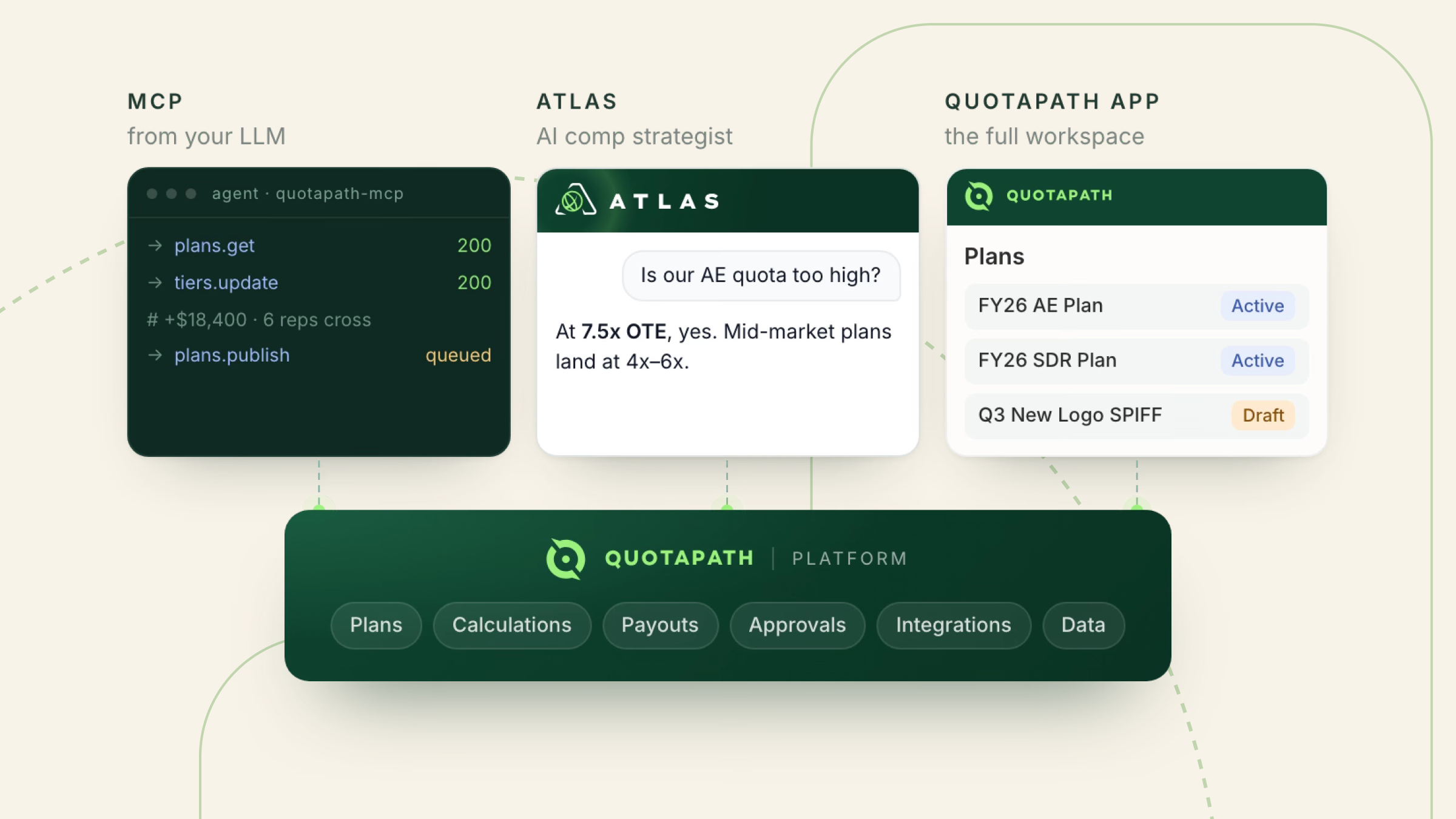
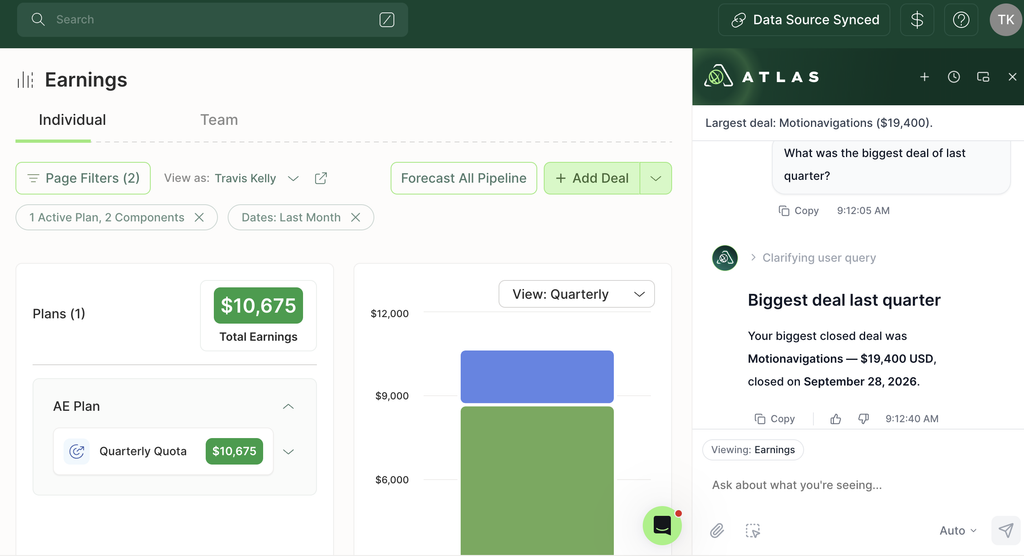
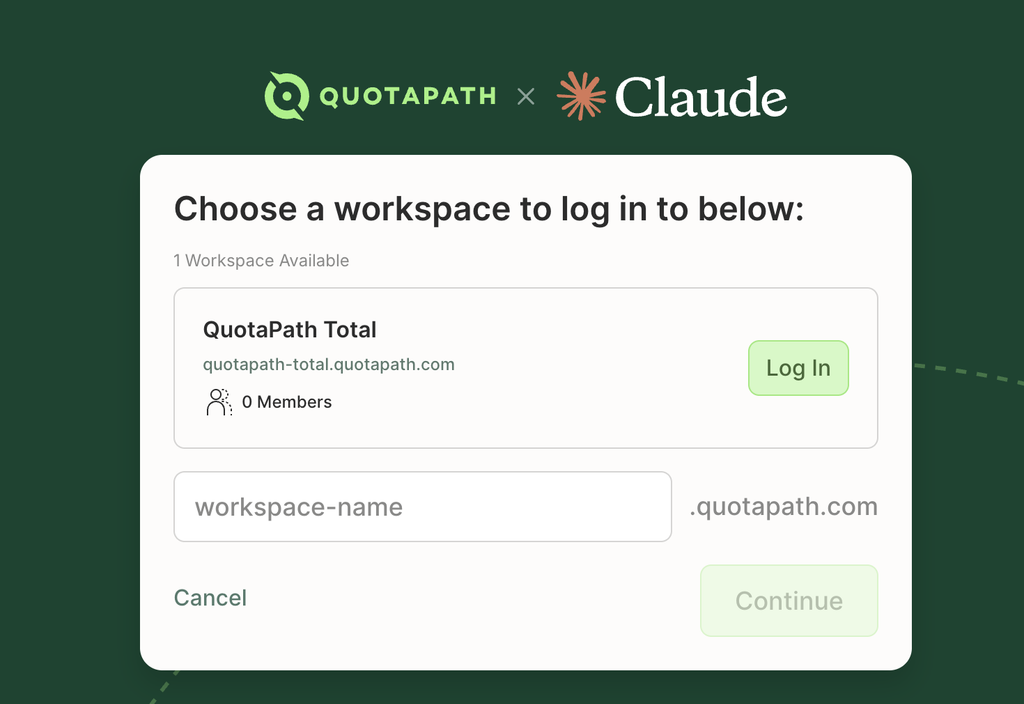
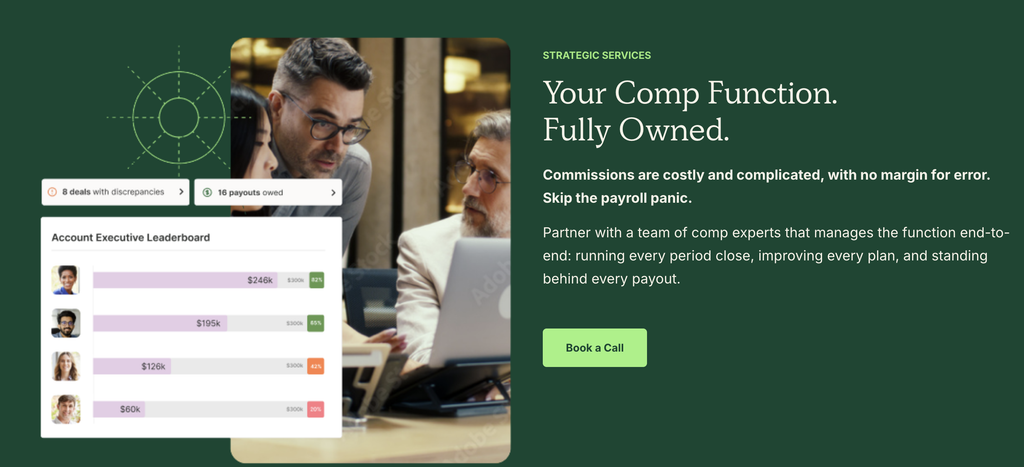

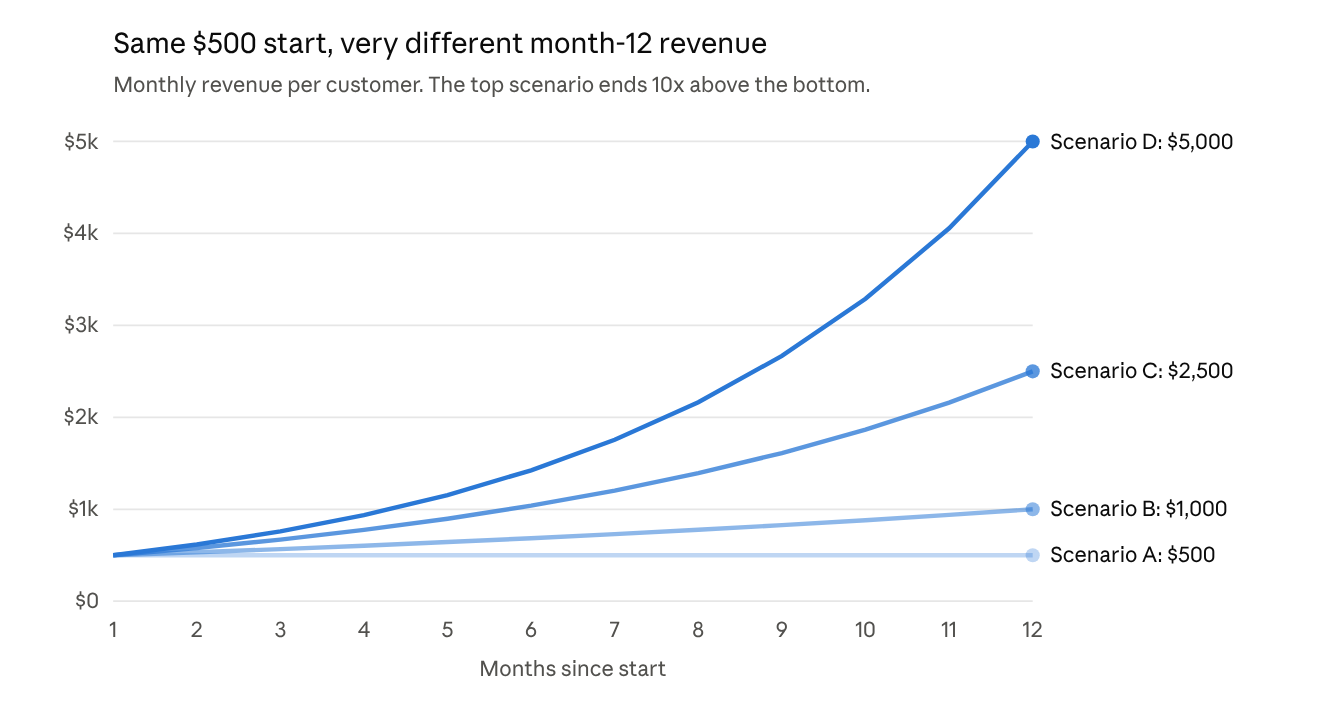
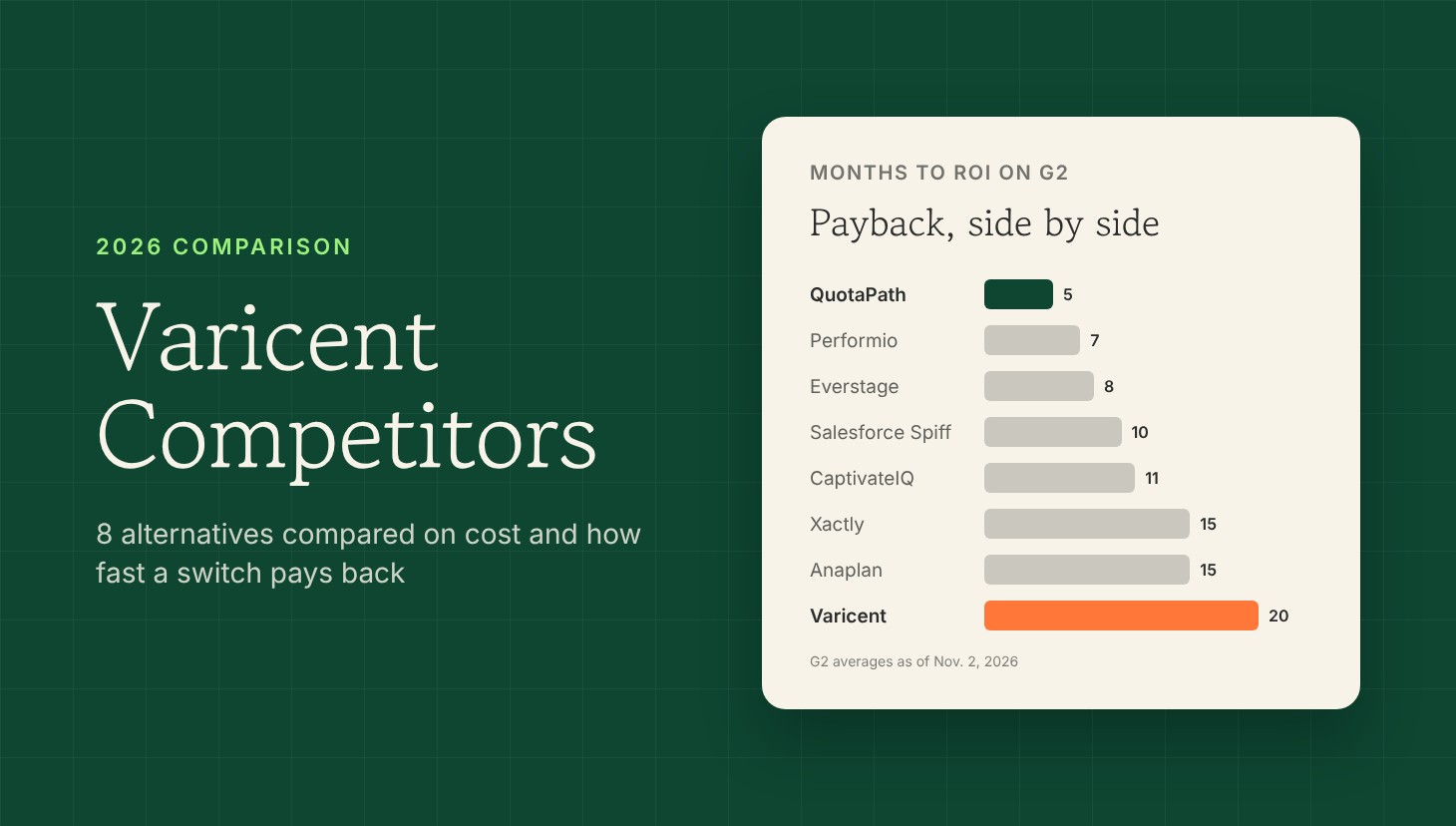
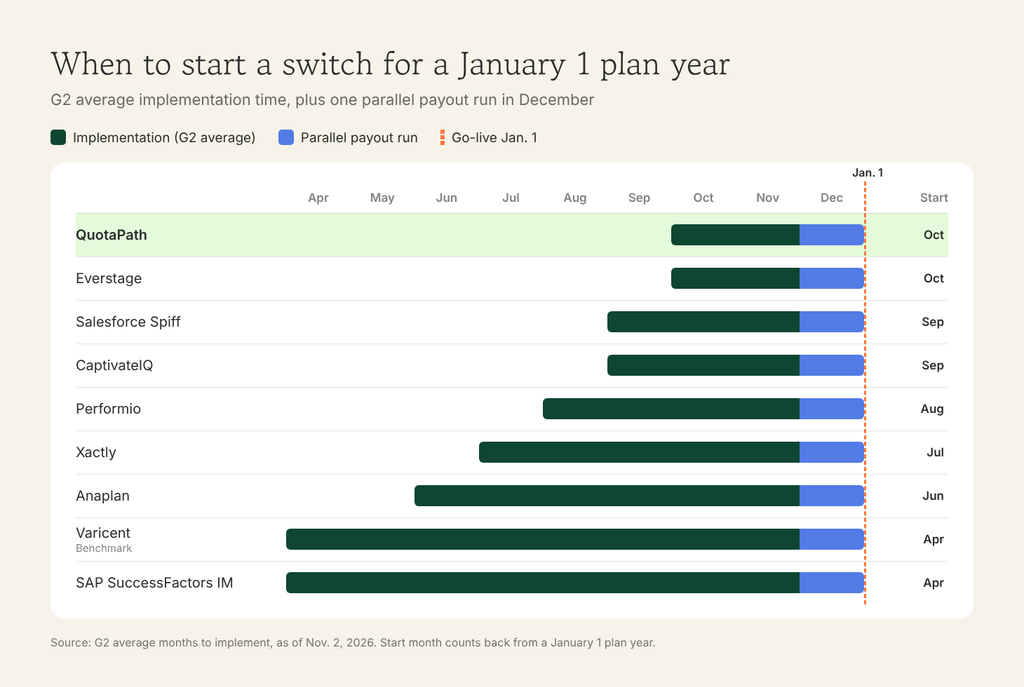
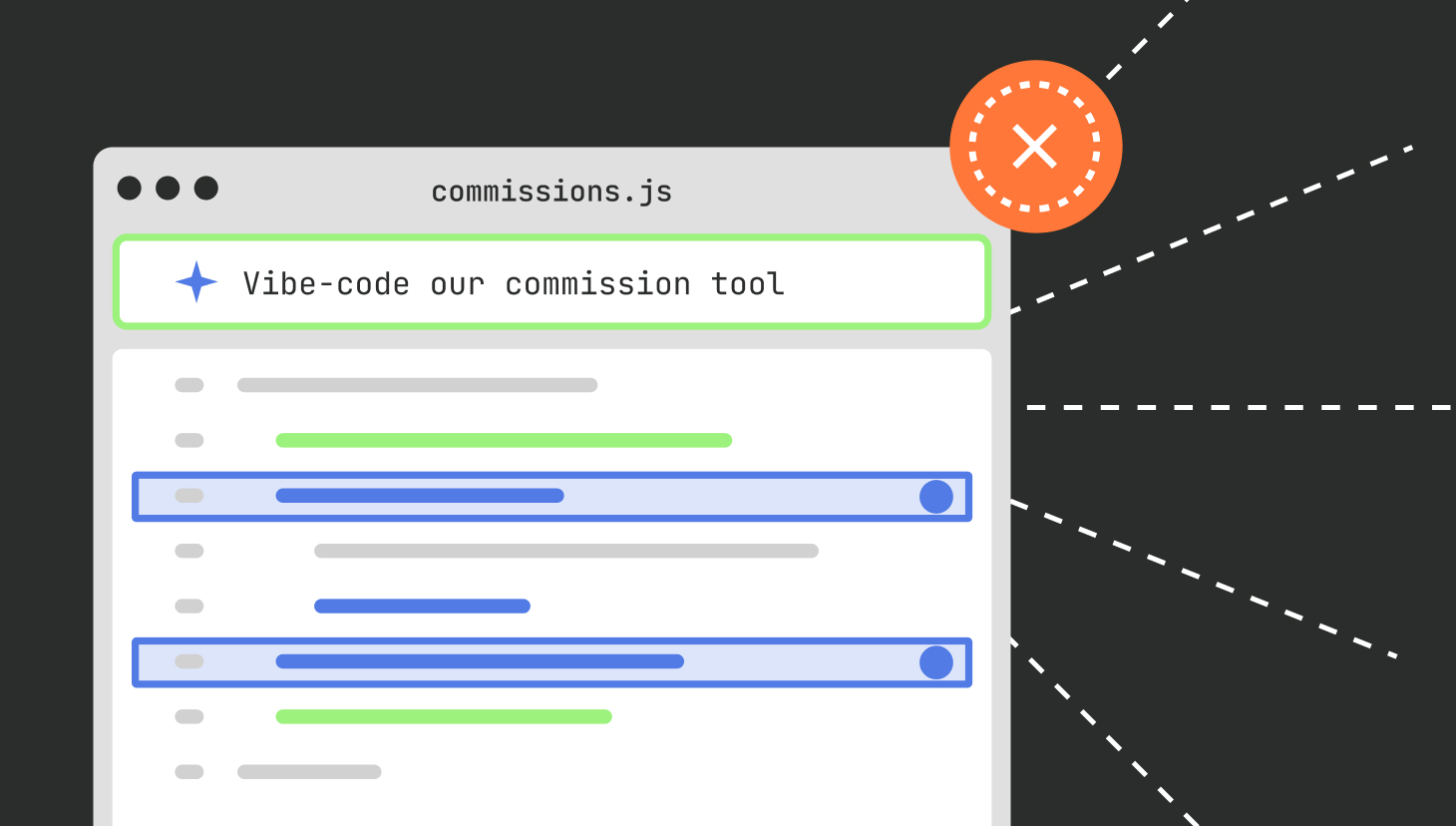
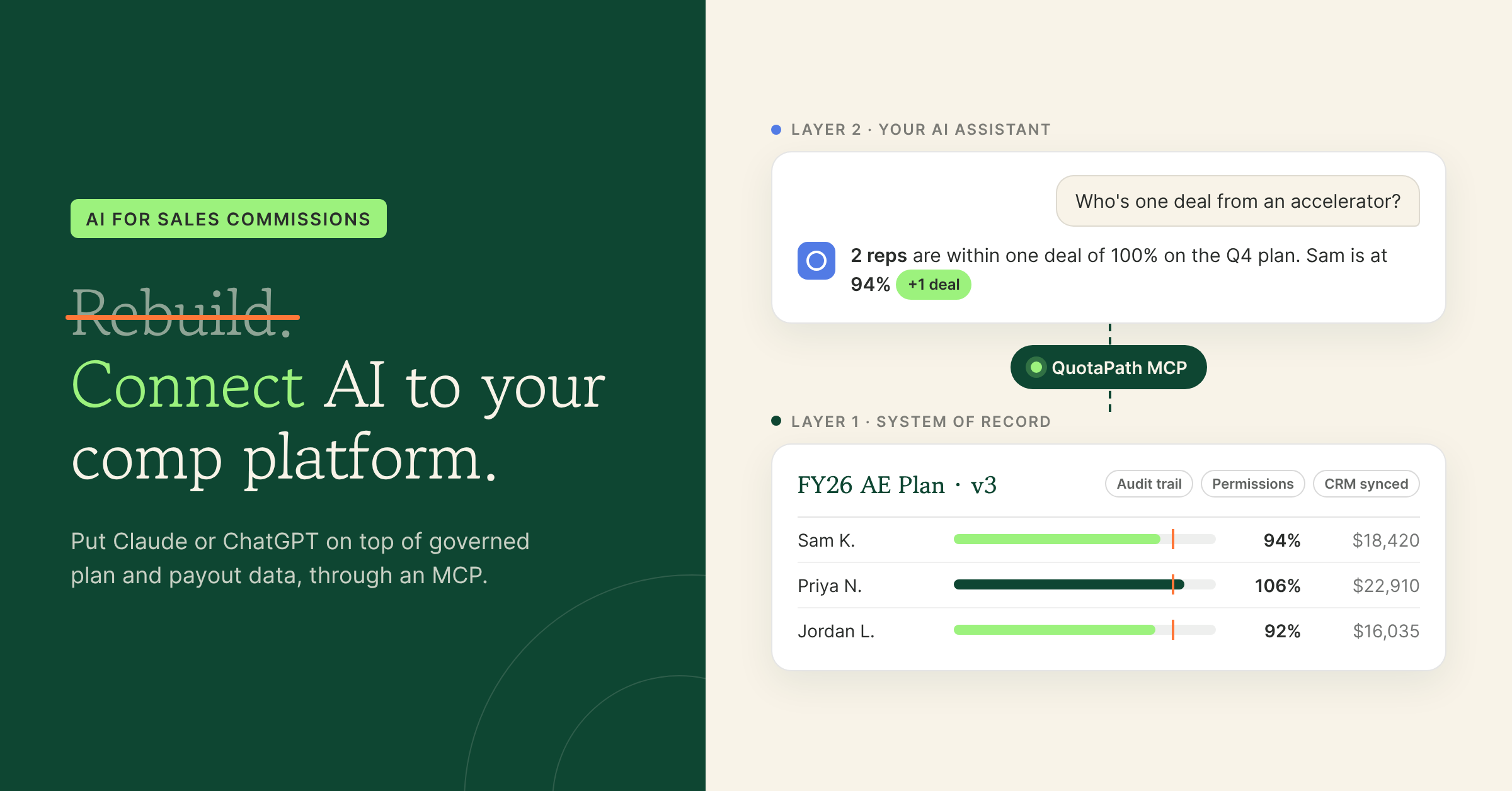
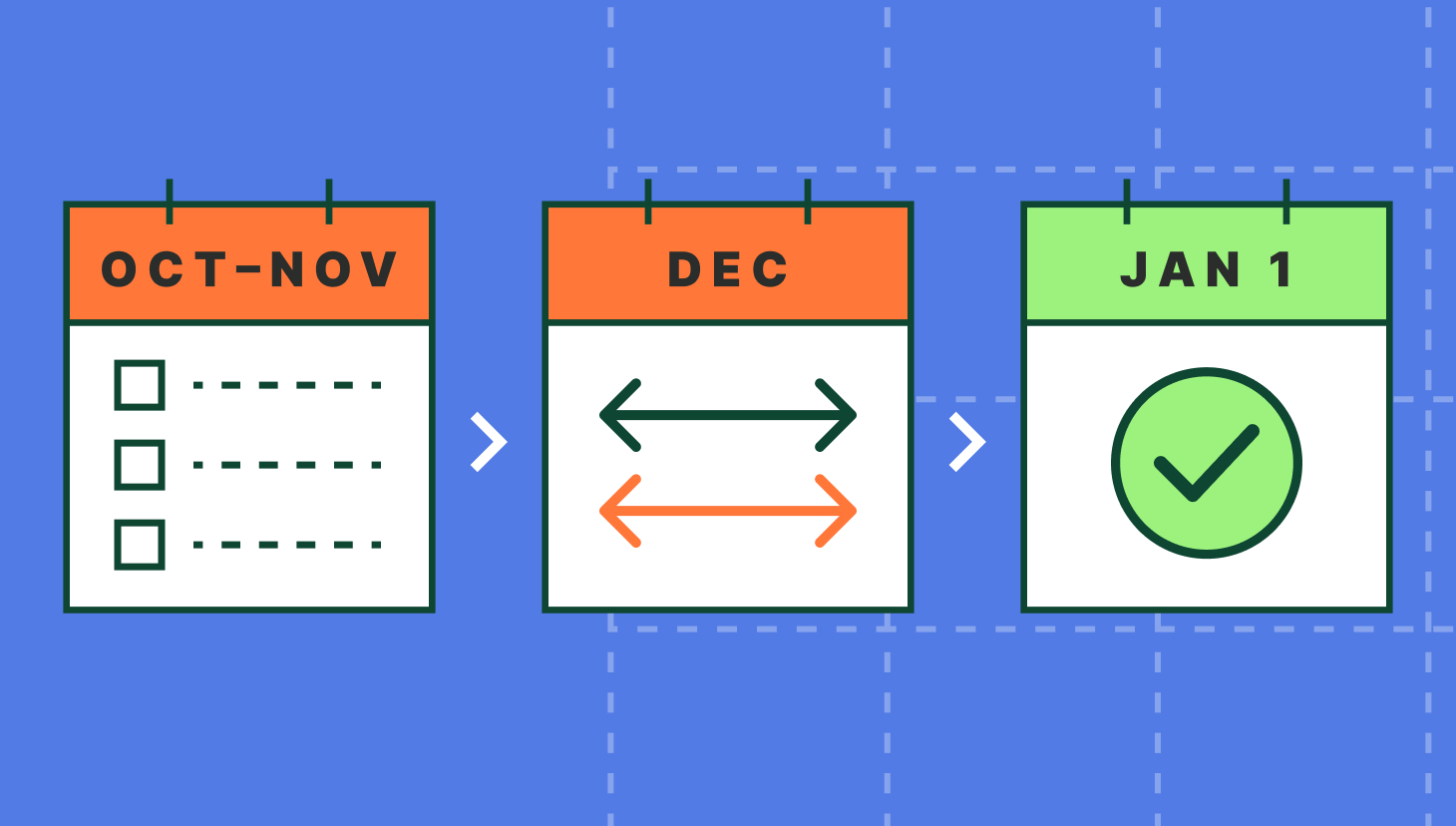

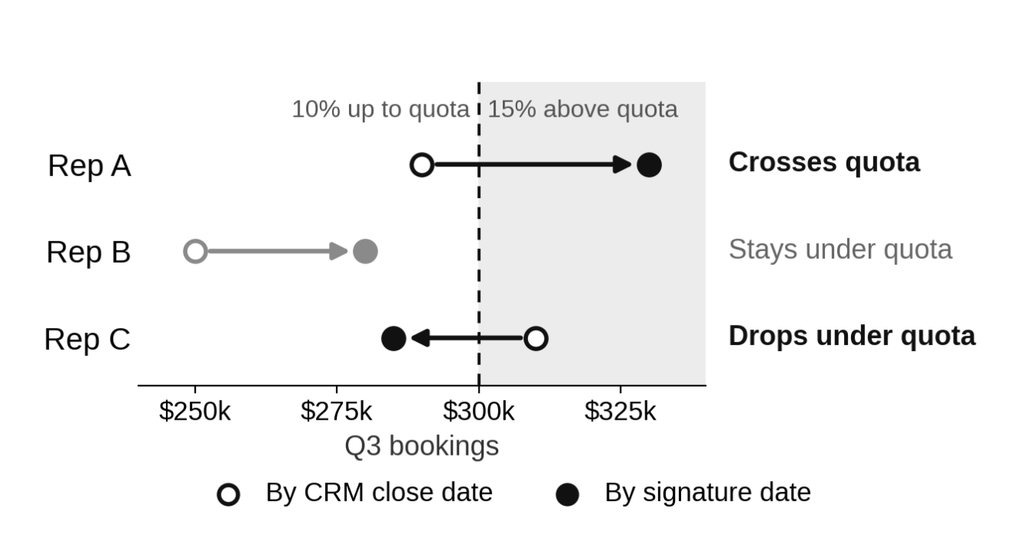
![Timeline of the six-step sales compensation planning runway, from defining outcomes in weeks 12 to 11 through signing and launch in weeks 2 to 1, followed by a first review on day 90 of the plan year.]](https://www.quotapath.com/wp-content/uploads/image-97-1024x252.png)
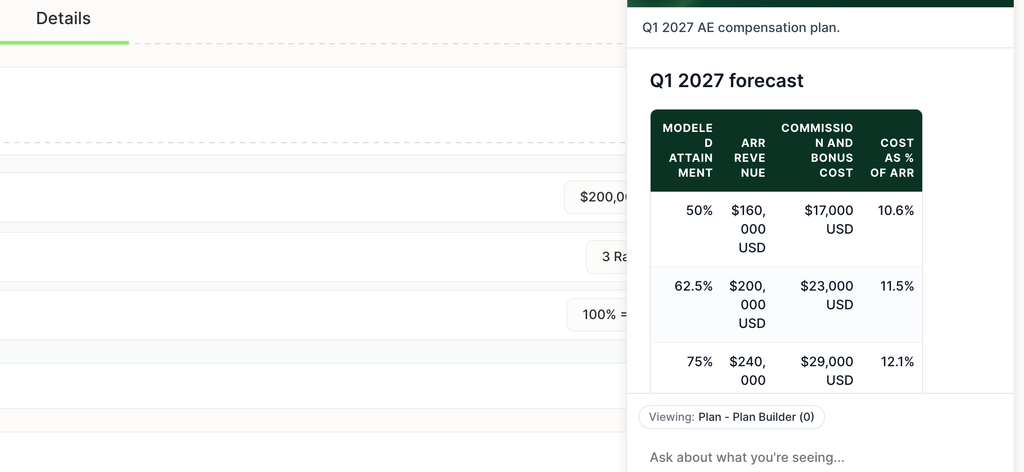
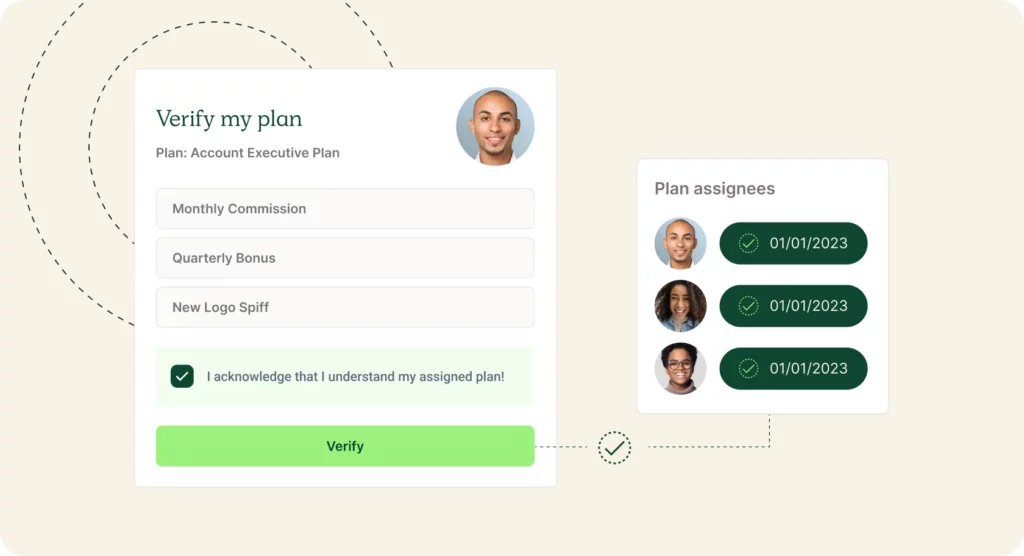
![Line chart of pay as a share of bookings for one AE plan from 50% to 150% attainment. Both lines fall from 33.3% at 50% attainment to 21.7% at quota. Above quota, the 1.5x accelerator line keeps falling to 19.6% at 150%, while the 2.5x line rises to 23.0%. A dashed line marks the 21.7% cost at target.]](https://www.quotapath.com/wp-content/uploads/image-98-1024x576.png "Pay as a share of bookings at five attainment levels")

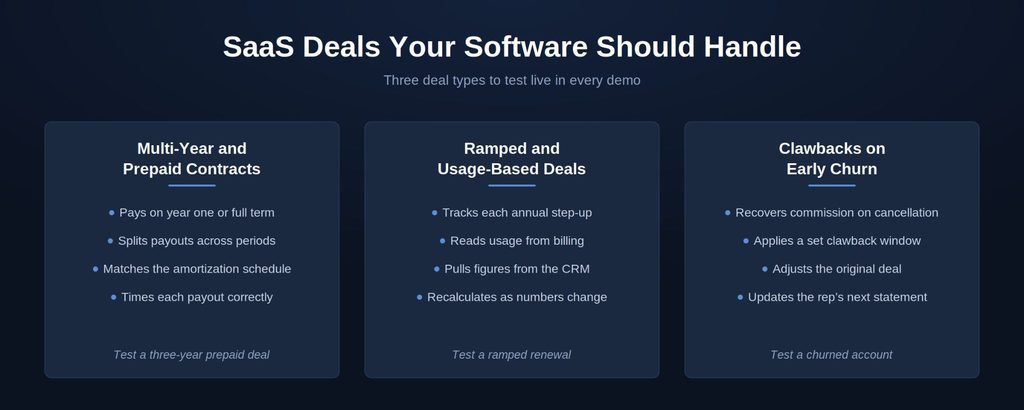

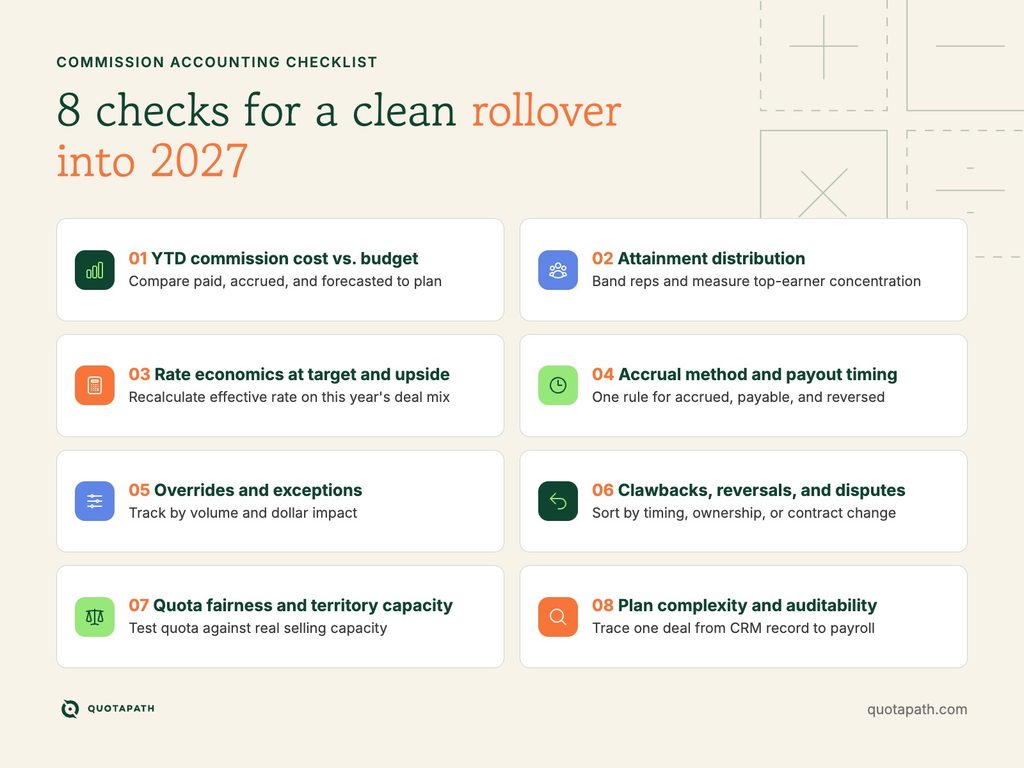

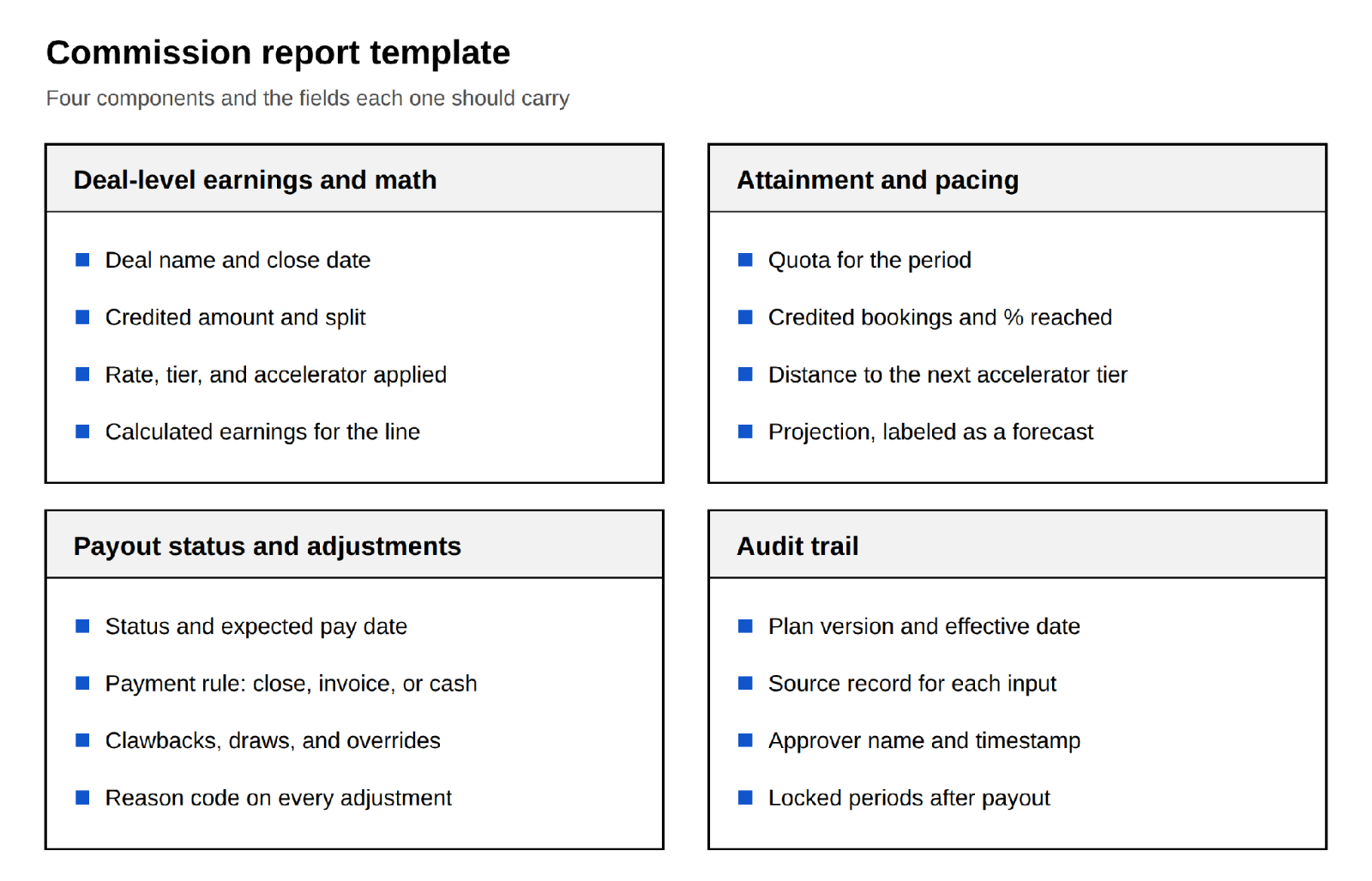
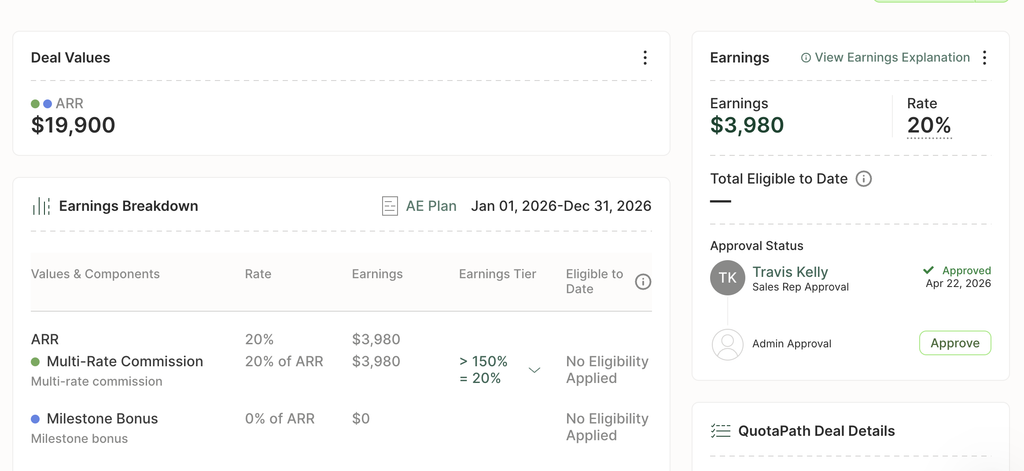
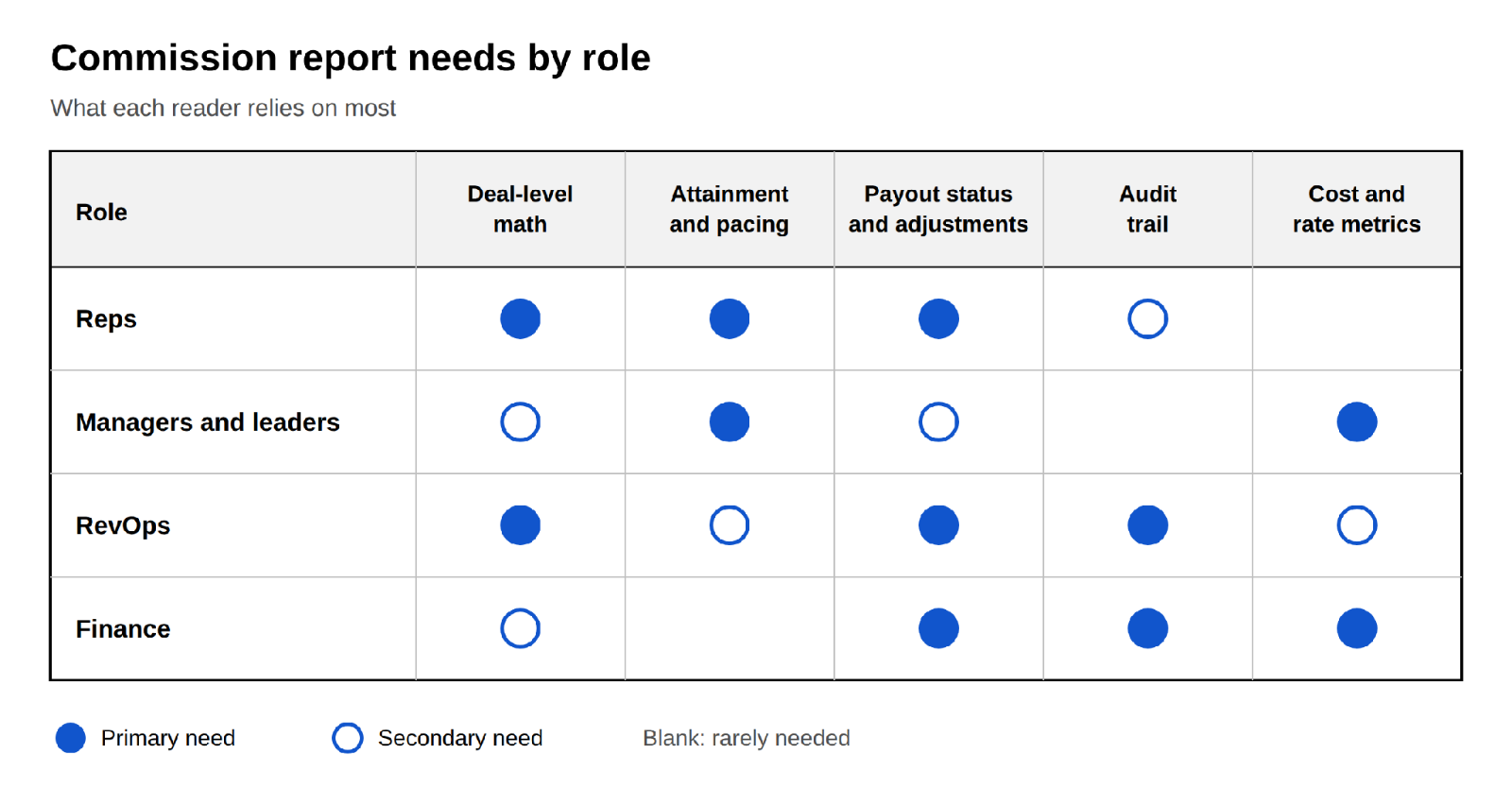

Recent Comments