Key takeaways
- The best sales compensation platform for a SaaS team reads recurring, renewal, and usage revenue from the systems that record it, lets your own team change a plan without vendor involvement, and publishes what it costs.
- Roughly three in five SaaS companies now use some form of usage-based pricing, so a plan built on first-year contract value understates what a deal is worth.
- Customer success teams now carry renewal and expansion revenue alongside sales, which makes attribution and eligibility rules more consequential than commission rates.
- Under ASC 606, commission on a subscription contract sits on the balance sheet and unwinds across the contract term.
- Published per-user pricing runs $35 to $50 per month while most platforms quote custom only, and implementation ranges from roughly six weeks to a full quarter.
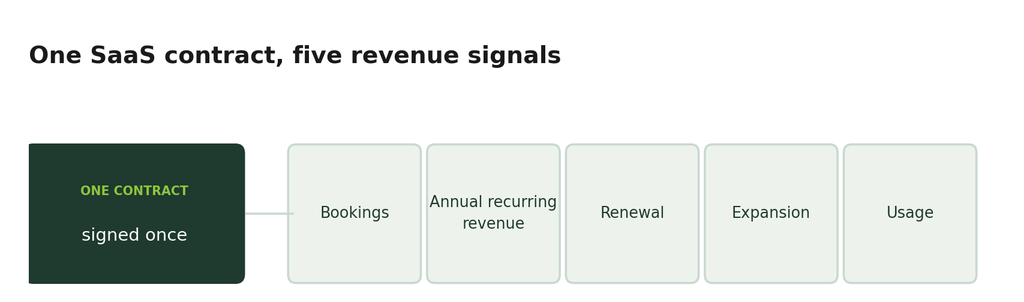
Compensation software built for transactional selling struggles with SaaS revenue. A single contract produces bookings, annual recurring revenue, renewals, expansion, and increasingly usage revenue that arrives months after signature, and each of those needs crediting differently. Calculation is the part every platform in this category handles well, but what separates them is how much of that revenue picture the system can see, and how much of the work your team can do without the vendor.
What makes SaaS compensation harder than other models?
Four mechanics separate it from transactional selling, and the last two are where most tools thin out.
- Recurring revenue against bookings: A three-year contract produces one bookings figure and a different annual recurring revenue figure. Sales teams are usually paid against one number while the board reviews the other, so the plan has to state which one carries quota credit before the first payout rather than after a dispute.
- Shared credit on expansion: Most of an account’s value arrives after the first sale, and the account executive, the customer success manager, and sometimes a renewals specialist all touch it. What matters is not the rate each earns but which dollars each is eligible for, which makes payout eligibility the harder design question.
- Usage-based revenue: A consumption deal signed in January might not reach full run rate until June. Pay at signature against a forecast, and you overpay when usage disappoints, leaving a clawback conversation to follow. Pay monthly against actuals and the number holds up, though the earner waits two quarters for the full amount and the platform has to pull billing data directly. Both choices carry a cost, and the plan should name which one it is accepting.
- Amortization: Commission on a subscription contract is capitalized and amortized across the contract life. Without native handling, finance rebuilds that schedule by hand each month, and the discrepancy usually surfaces during audit.
How do you evaluate a sales compensation SaaS platform?
Four questions decide how compensation runs once the contract is signed, and platforms answer them differently.
Which systems does it read, and how often?
A plan paying against annual recurring revenue, renewals, and usage needs the billing stack connected. Ask which connections are native or routed through a data warehouse, and how frequently each refreshes, since daily and real-time are different answers when someone is checking earnings against a deal that closed this morning.
Who can change a plan?
SaaS pricing changes, and compensation follows it. Establish whether your team edits plans directly or files a request, because that decides whether a mid-year adjustment takes an afternoon or a support cycle. Making the change yourself during the demonstration is the clearest test.
How long until the first commission runs?
Confirm with two reference customers at your size, and ask what implementation requires from your side, since a quoted timeline usually assumes your data is clean and your plan rules are already written down.
What is the total cost, and is any of it published?
Where pricing is not published, budgeting cannot start until a sales conversation does. But where pricing is public, the per-seat rate is still only part of it, so ask for itemized costs across platform, implementation, integrations, and support. Weigh that against what the plan itself costs, since total commission spending across every earner on a deal is usually the larger number.
The 5 best sales compensation SaaS platforms
The table sets out who each platform suits, what it does distinctively, what it costs, and how long it takes to stand up.
| Platform | Best for | Standout capability | Pricing | Implementation |
| QuotaPath | SaaS revenue teams running complex plans at mid-market and enterprise scale | AI-Powered Plan Builder, native billing and payroll connections, Ledger for revenue recognition | $35 to $50 per user per month plus platform fee, published | 45 to 60 days on Growth, 60 to 90 on Premium |
| CaptivateIQ | Mid-market and enterprise teams wanting planning and compensation together | SmartGrid no-code calculation engine | Custom | Roughly three months per G2 |
| Xactly | Large enterprises with global, multi-currency programs | Five-product suite with two decades of compensation benchmarks | Custom | Roughly five months per G2 |
| Everstage | Growth-stage to enterprise teams wanting compensation, quoting, and planning | No-code plan designer with scenario modeling | Per-payee, custom | Roughly two months per G2 |
| Performio | Mid-market and enterprise teams with 70 or more commissionable employees | AI Admin Assistant with vertical-specific deployments | Custom | Roughly four months per G2 |
1. QuotaPath
Best for: Mid-market through enterprise SaaS teams running complex plans across hundreds to several thousand payees.
QuotaPath gives revenue operations, finance, and sales one system to design plans, calculate commissions, route approvals, and pay out, with Atlas layered on top for benchmarking and plan modeling. Managed fully-serviced plans are also available for those looking to outsource the full commissions process.
Revenue systems: Premium and above connect natively to Stripe, Chargebee, Maxio, NetSuite, and QuickBooks alongside eleven CRM systems and five warehouse sources, so recurring and usage revenue reaches the plan directly. Growth covers CRM and spreadsheets only.
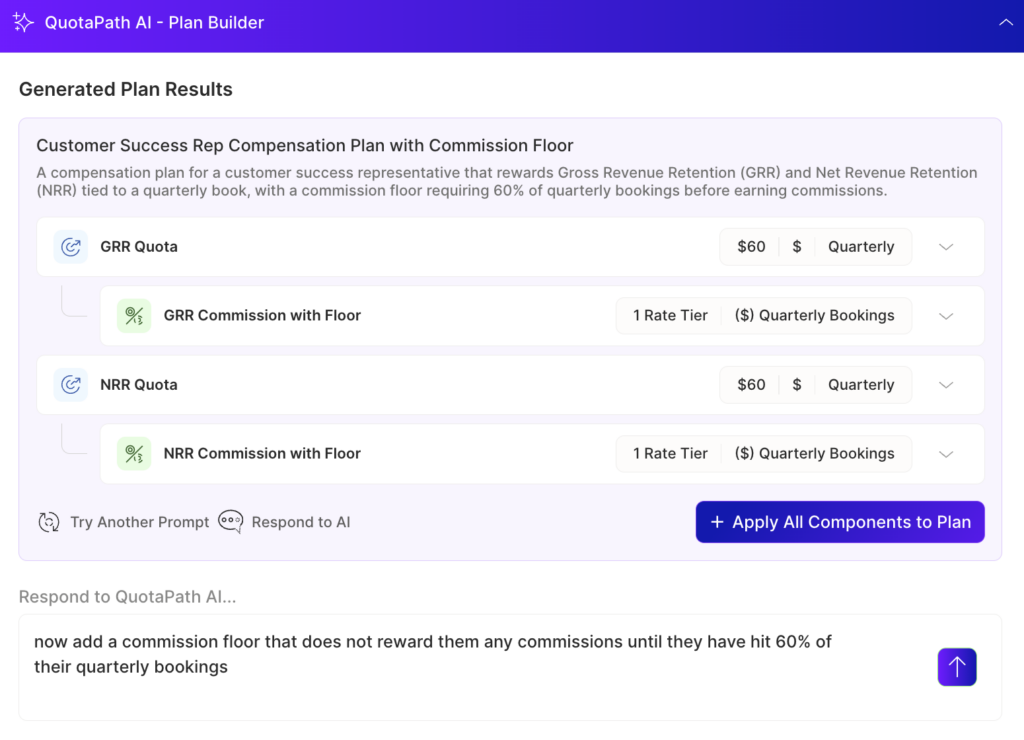
Plan changes: The AI-Powered Plan Builder reads an existing plan document or a plain-language description and writes the calculation logic, so accelerators, ramps, draws, splits, cumulative quotas, and matrix structures can be edited without a vendor ticket. Payout eligibility rules decide which revenue each role earns against, so an account executive, a customer success manager, and a renewals owner can be credited on one account without paying twice on the same dollar.
Time to first run: 45 to 60 days on Growth and 60 to 90 on Premium. The builder works from a written plan, so undocumented rules add time at the front.
Cost: $35 per user per month on Growth or $50 on Premium, billed annually, plus a monthly platform fee, and QuotaPath states it is the only platform in the category publishing rates on its site. Atlas is an add-on from $5,000, and there is a 14-day free trial.
Also worth knowing: Territory carving and capacity modeling sit in Atlas, which suits teams treating compensation as the system of record. Ledger handles revenue recognition with period locks and audit trails, so amortization across multi-year contracts does not become a month-end rebuild.
2. CaptivateIQ
Best for: Mid-market and enterprise teams that want connected planning and compensation in one no-code platform.
CaptivateIQ brings commission management and sales planning together on its SmartGrid extract, load, and transform engine, and was named a Leader in the 2025 Forrester Wave for Sales Performance Management.
Revenue systems: Published integrations cover Salesforce, HubSpot, NetSuite, Workday, and Snowflake. Billing platforms are not named, so teams paying on usage revenue should confirm how that data arrives.
Plan changes: SmartGrid lets administrators build and edit plans in a no-code, spreadsheet-style environment without engineering, though the platform assumes a dedicated compensation or revenue operations resource.
Time to first run: Roughly three months per G2.
Cost: Custom, tied to team size, plan complexity, and integrations.
Also worth knowing: Audit trails and versioning cover every calculation. Reporting draws the recurring reviewer complaint, with dashboard building described as cumbersome and data often exported.
3. Xactly
Best for: Large enterprises with complex, global compensation programs that need a mature sales performance management suite.
Xactly unifies compensation, planning, territory management, and forecasting across a five-product platform, with two decades of historical compensation data behind it.
Revenue systems: CRM and enterprise resource planning connections are extensive, with multi-currency and multi-entity support for companies selling across regions from several legal entities. Billing-level integrations are not published.
Plan changes: Configuration assumes dedicated compensation administration, and reporting is channeled by hierarchy, so an individual manager cannot reformat their own view without affecting others.
Time to first run: Roughly five months per G2.
Cost: Custom and not publicly listed.
Also worth knowing: Mid-cycle recalculation reloads a full period after a change. Reviewers regularly cite slow loading, an aging interface, and a steep administrative learning curve.
4. Everstage
Best for: Growth-stage through enterprise teams that want incentives, quoting, and planning on one platform.
Everstage combines sales compensation with configure, price, quote functionality and sales planning.
Revenue systems: Salesforce, HubSpot, NetSuite, Workday, and a stated forty or more further connections, though billing platforms are not individually published.
Plan changes: Tiered accelerators, payout floors, component-weighted plans, and currency-specific rate tables configure natively, so mid-year changes are configuration. Advanced configuration and custom reporting still take time.
Time to first run: Roughly two months per G2.
Cost: Per-payee licensing, custom, with implementation and support quoted separately.
Also worth knowing: The compliance stack covers SOC 1 and 2 Type II, ISO 27001, ISO 42001, and GDPR. Reviewers note that commission logic can be hard to follow from the earner’s side once several accelerators stack.
5. Performio
Best for: Mid-market and enterprise teams with 70 or more commissionable employees and complex plans.
Performio focuses on commission calculation at scale, pulling from CRM, ERP (enterprise resource planning), human resources, and finance systems without requiring data cleanup first.
Revenue systems: Published connections span Salesforce, HubSpot, Microsoft Dynamics, NetSuite, SAP, Workday, Snowflake, Stripe, and Chargebee.
Plan changes: The AI Admin Assistant handles routine work as plans change, with no-code updates that do not require engineering.
Time to first run: Roughly four months per G2.
Cost: Custom, scaling by team size and capability, with implementation billed separately.
Also worth knowing: Historical commission records support period-over-period comparison. Reviewers identify slow data refreshes, an older interface, and a thin dispute process where a rejected claim carries no explanation.
What migrating a SaaS compensation plan actually involves
Four decisions taken before configuration starts determine whether the timelines above hold, and teams moving off spreadsheets face fewer of them.
Contracts that straddle the cutover
A three-year deal signed eighteen months ago still has quota credit, renewal dates, and in some cases usage revenue attached to it. Decide before migration whether those contracts move with their original plan rules or convert to current ones, because reconstructing that judgment later is far harder than making it once at the start.
Commission already capitalized
Any amount sitting on the balance sheet under ASC 340-40 has an amortization schedule attached, and where those schedules live after the switch is a decision for finance. Settle it alongside the migration plan.
Usage revenue landing across the boundary
Consumption billed after the switch against a deal closed before it is the transaction most likely to fall between systems. Trace one of these end to end during the parallel run.
When to cut over
Period close is the obvious moment, though it is also the busiest. Mid-quarter costs a partial reconciliation but keeps the switch away from payroll deadlines.
Run the old and new systems together for one full period and reconcile before anyone is paid from the new one. That comparison is what earns trust with the people being paid, and it surfaces the edge cases no configuration review catches.
Design, track, and manage variable incentives with QuotaPath. Give your RevOps, finance, and sales teams transparency into sales compensation.
Talk to SalesWhere QuotaPath fits in a SaaS compensation stack
The hard part of SaaS compensation is getting the revenue into the plan correctly. Recurring revenue, renewals, expansion, and usage each arrive from a different system, and the expense has to follow the contract.
QuotaPath connects the CRM and the billing stack, turns modeled quotas, tiers, and accelerators into live plans with sign-off attached. Atlas benchmarks on-target earnings, pay mix, and quota ratios against thousands of SaaS compensation plans, and pricing is published, so you can budget the whole thing yourself.
Book a demo and see how your own plans would run.