Introducing Atlas: Your AI Revenue Strategist

atlas quotapath ai comp consultant

Every company gets exactly the behavior it pays for. Atlas helps you make sure it’s the right one.

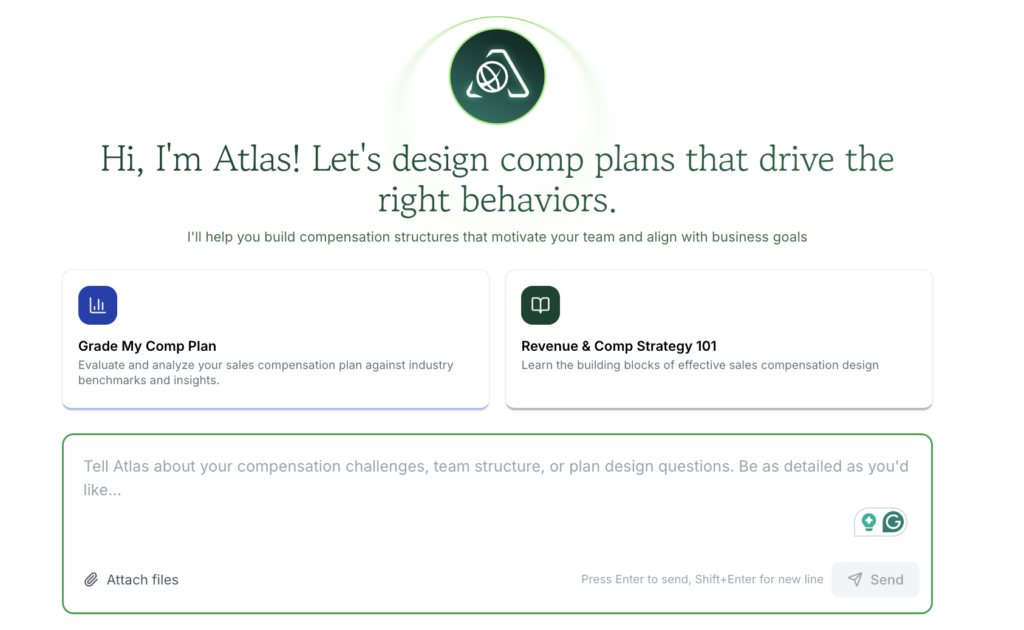
Today, we’re thrilled to announce the full launch of Atlas, our AI Revenue Strategist, powered by proprietary QuotaPath data and tens of thousands of comp plans.

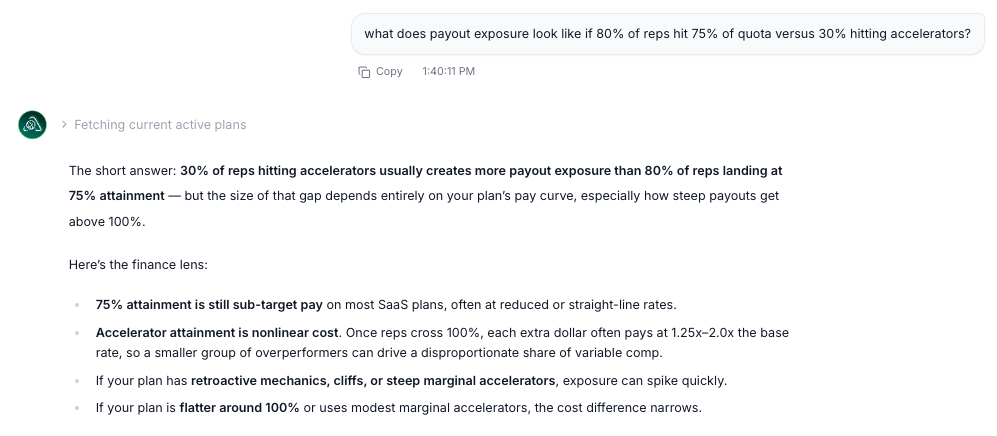
Atlas acts as a comp expert and GTM consultant on demand,  answering whether your comp plans are driving the right behavior and whether your GTM is built to hit the number.

For years, QuotaPath has helped you run commissions accurately and efficiently through automation, with the end-user in mind. But running commissions is only part of the equation. The bigger challenge is in connecting your compensation plans to your GTM motion and designing both to drive the outcomes your business needs.

We built Atlas to help you validate, stress-test, and align your compensation plans to business goals while modeling the GTM strategy required to hit your number.

“From day ONE, QuotaPath’s vision has been to help leaders align company objectives to incentives in order to drive the right behavior,” said Co-founder and CEO AJ Bruno. “We have eight years of data, history, and experience to back the release of our AI Revenue Strategist product, Atlas, and I couldn’t be more thrilled to dynamically help our customers navigate the complexities of their variable comp plans.”

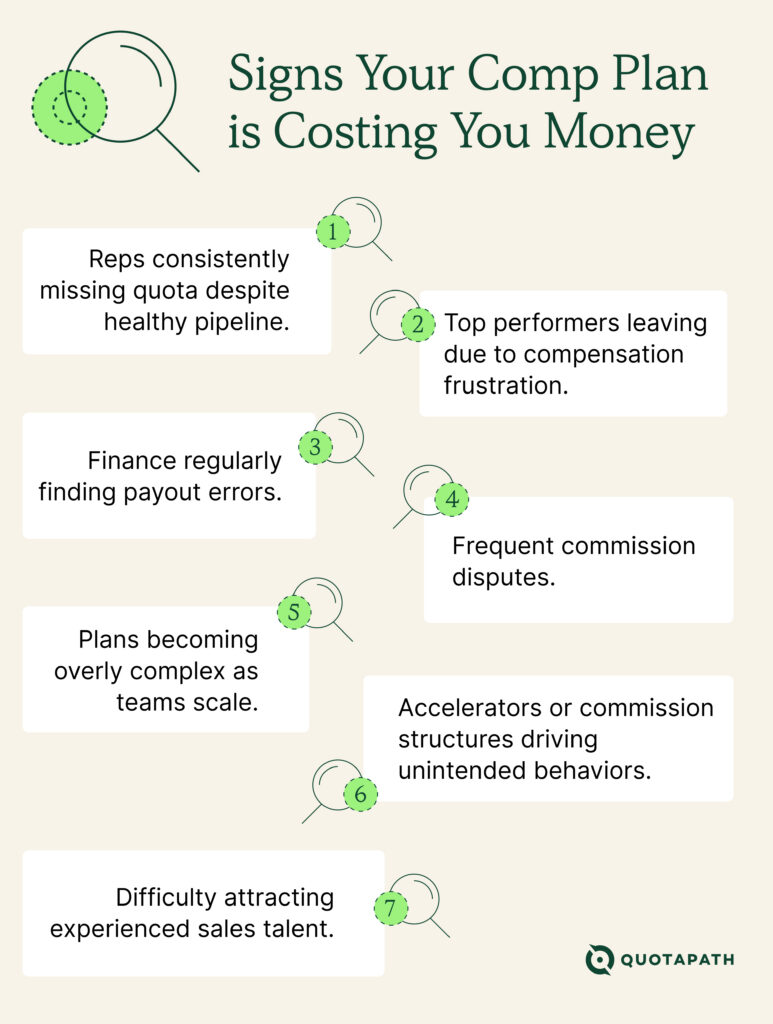
The problem: Most Comp Plans Are Built on Guesswork

If you’ve ever built or adjusted a comp plan, you’ve likely asked:

  • Are we driving the right behaviors?
  • Are we overpaying or underpaying?
  • Will this plan actually achieve our goals?
  • Is our GTM built to hit our number?

The reality is that most teams don’t get clear answers up front.

Instead, they find out after rollout, when the impact on performance, cost, and morale is already felt.

And you’re not alone. We found that nearly 40% of revenue leaders report struggling with misaligned incentives.

Meet Atlas: From Guesswork to Confidence

Atlas changes how compensation planning works.

Built on QuotaPath’s proprietary data, Atlas gives you the ability to design, test, and validate comp plans before they impact your business and model the GTM strategy required to hit your number.

Instead of reacting to problems, you can prevent them.

ai revenue strategist and ai comp consultant

What you can do with Atlas

With Atlas, you can:

  • Validate your plans against benchmarks and best practices: Compare your compensation strategy against benchmarks and best practices—so you know what “good” looks like.
  • Stress-test scenarios before rollout: Model different scenarios to understand the financial and behavioral impacts of your plans.
  • Align incentives with business goals: Design comp plans based on your company objectives (not opinions).
  • Connect comp plans to your broader GTM motion: See if your plan is logically built to support your GTM goals.
  • Get instant, trusted performance insights: Answer questions about team performance quickly, with data you can trust.

Bring RevOps, Finance, and Sales into one shared model, and bid adieu to your spreadsheets and scattered docs.

Built for How Modern Revenue Teams Operate

Using Atlas, you can begin to use comp plans as a strategic lever and collaboratively with your leadership team.

  • RevOps gets faster, more reliable planning
  • Finance gets visibility into cost and risk
  • Sales leaders get clarity on performance and behavior

All powered by the commission and performance data you already trust in QuotaPath.

Streamline commissions for your RevOps, Finance, and Sales teams

Design, track, and manage variable incentives with QuotaPath. Give your RevOps, finance, and sales teams transparency into sales compensation.

Talk to Sales

From execution → strategy

QuotaPath executes your commissions. Atlas makes sure they’re worth executing in the first place.

Get started with Atlas

Atlas is now available. Try it for free here.

Why No One Wants to Own the Comp Process

comp process ownership

Ask a RevOps leader who owns the commission process, and they’ll tell you it’s Finance’s job, since Finance owns the expense line.

Ask Finance, and they’ll tell you it’s RevOps’ job, since RevOps owns the CRM data the calculations run on.

And ask the CRO, and they’ll tell you they thought someone else had already figured this out.

This indicates a structural gap. Incentive pay sits at the intersection of two functions, each with a real, defensible reason not to want the job and a defensible reason they can’t fully do it alone.

Understanding why both sides push back is the first step to building an ownership model that actually holds.

Streamline commissions for your RevOps, Finance, and Sales teams

Design, track, and manage variable incentives with QuotaPath. Give your RevOps, finance, and sales teams transparency into sales compensation.

Talk to Sales

Why RevOps doesn’t want to own it

RevOps has become the team responsible for everything that touches the CRM, which by extension means everyone assumes RevOps also owns whatever touches commissions.

In practice, most RevOps teams are already stretched across territory and quota planning, pipeline hygiene, forecasting, tooling, and enablement, before compensation ever enters the picture. Adding a full incentive pay process on top is less “new project” and more “new full-time job.”

This is exactly the kind of unbounded scope creep that shows up in Forbes’ recent look at “scope leap”, where high performers keep absorbing adjacent responsibilities until the original job is unrecognizable.

There’s a second, sharper reason RevOps resists it: comp is a thankless process to own without financial authority.

When a payout looks wrong, reps go to RevOps first, because RevOps runs the system reps can see. But RevOps rarely has the authority to unilaterally change an accrual policy, override a plan exception a sales leader promised verbally, or decide how a disputed deal should be treated for revenue recognition purposes.

They inherit the blame without holding the decision rights, which is the exact dynamic durity.com’s writeup on the RevOps framework for stopping finance and sales fights over numbers points to as the root of most RevOps-Finance friction: ownership without authority breaks down the first time the numbers are contested.

Internally, this is the same gap covered in QuotaPath’s RevOps guide to sales compensation management and comp plan design for RevOps: RevOps is well positioned to design and operate the plan, but poorly positioned to own its financial consequences.

Why Finance doesn’t want to own it

Meanwhile, Finance’s resistance runs in the opposite direction.

Finance genuinely does own the hard accounting underneath incentive pay. Commission expense has to be accrued correctly, and under ASC 606, sales commissions tied to obtaining a contract typically have to be capitalized and amortized over the expected customer life rather than expensed immediately.

FloQast’s breakdown of how to book a deferred commission journal entry under ASC 606 is a good look at just how much technical accounting judgment sits underneath a number that looks, from the sales floor, like a simple payout. QuotaPath’s own deferred commissions accounting guide covers the same mechanics in more depth.

What Finance lacks is visibility into the deal-level data the calculations depend on, or context on why a plan is structured the way it is.

Finance can tell you whether an accrual is compliant. Finance usually cannot tell you whether a rep’s quota was set correctly, whether a deal was misclassified in the CRM, or whether a plan exception a sales manager approved six months ago ever got documented anywhere.

That gap is part of why analyst firms increasingly treat incentive compensation management as its own discipline rather than a subset of either accounting or sales operations. Gartner’s definition of incentive compensation management frames it explicitly as software and process that spans plan design, calculation, and payout, not just the expense entry at the end of it.

There’s also a role Finance genuinely doesn’t want: being the function that says no.

Capping an over-earning payout, holding a commission pending a deal review, or enforcing a clawback are decisions with real relationship cost with the sales org, and Finance would generally rather not make that call in isolation, without an operational partner who actually understands the deal.

Why the comp process needs both

Our position: comp ownership should be shared across RevOps and Finance.

Ownership stalls because comp isn’t a single decision; it’s a chain of decisions, and RevOps and Finance each hold different links in that chain.

This is the problem Bain & Company’s RAPID framework was built to diagnose: most process breakdowns don’t come from a lack of talent, they come from unclear decision rights, where multiple people can weigh in but no one is clearly accountable for the final call. Bain’s own writeup on why RAPID adoption works better when organizations slow down and actually assign the roles is a useful lens here: comp ownership fights are usually a decision-rights problem wearing a staffing problem’s clothes.

Applied to incentive pay, RevOps has the operational and data context: they know the CRM, the deal data, the quota logic, and the day-to-day questions reps actually ask. Finance is the function with the compliance and financial context: they know what’s defensible under ASC 606, what the accrual exposure looks like, and what an auditor will ask about.

Neither function can responsibly make every call in that chain alone.

Forrester’s analysis on the compensation capabilities inside sales performance management makes a similar point from the vendor-market side: the tooling in this space increasingly has to serve both an operational and a financial user, because the process itself was never meant to sit entirely inside one function.

When ownership isn’t clarified, the failure mode is predictable: a shadow spreadsheet somewhere becomes the “real” numbers, reps stop trusting their statements, disputes escalate to leadership instead of getting resolved at the source, and the accrual finance reports to the board don’t actually reconcile with what operations paid out. None of that is a talent problem. It’s what happens when a cross-functional process has no explicit owner for any of its decisions.

Try QuotaPath for free

Try the most collaborative solution to manage, track and payout variable compensation. Calculate commissions and pay your team accurately, and on time.

Start Trial

What shared ownership actually looks like

The fix isn’t picking a single owner, since neither function can carry the whole process alone. It’s assigning explicit decision rights to each part of the chain, the way QuotaPath’s own look at who owns compensation planning and RevOps and Finance alignment both lay out in practice:

  • RevOps owns plan design, CRM data integrity, and day-to-day calculation logic, since that’s where the operational context lives.
  • Finance owns accrual policy, ASC 606 treatment, and final sign-off on anything with real financial exposure, since that’s where the compliance context lives.
  • Plan changes and disputed payouts route through both, ideally via a standing comp committee rather than an ad hoc email thread. (QuotaPath’s guide to who should sit on a sales compensation committee is a useful starting point for defining that group formally instead of letting it form by accident during the first dispute.)

None of that works well on spreadsheets, because spreadsheets have no audit trail and no way to enforce who approved what. A shared system of record, where RevOps can manage plan logic and data mapping and Finance can see the same numbers with a defensible accrual trail underneath them, is what actually makes joint ownership sustainable instead of aspirational. That’s the gap QuotaPath is built to close: build the compensation plan with the operational logic RevOps needs, backed by the calculation transparency Finance needs to sign off on it, and model the payout scenarios both sides need to see with the sales compensation calculator before a plan ever goes live.

The takeaway

Nobody wants to own the comp process alone because no one function actually can. RevOps has the data and the operational context but not the financial authority. Finance has the compliance obligation but not the deal-level visibility. The organizations that get this right stop looking for a single owner and start assigning clear decision rights across both, backed by a system that gives them a shared source of truth instead of two sets of numbers that don’t agree.

Best Compensation Design Software in 2026

compensation design software

Key takeaways

  • The best compensation design software in 2026 includes QuotaPath, CaptivateIQ, Xactly, Varicent, Forma.ai, Everstage, and Pave. QuotaPath leads on scenario modeling and is one of the few that publishes its rates.
  • Design and administration are different jobs. Payout accuracy proves your calculation engine works, instead of whether the quota was reachable or the accelerator was priced against your margin.
  • Design decisions run on ratios. The Bridge Group puts the median quota-to-OTE multiple for a SaaS account executive at 4.6x.
  • Commissions get capitalized and amortized under ASC 340-40. Workday amortizes over five years and Gartner over the initial contract term, depending on how each pays on renewals.

QuotaPath ranks first in this guide for handling the design decision and the payouts that follow. A plan commits your company to a cost per closed deal for the full fiscal year, and the seven platforms here differ in how much of that pricing work they do for you.

7 compensation design platforms at a glance

The seven platforms compared on design-stage capability, benchmark data, the handoff into live payouts, G2 rating, and published pricing:

PlatformDesign-stage capabilityBenchmark dataDesign-to-payout handoffG2 ratingPublished pricing
QuotaPathAtlas tests scenarios, payout outcomes, attainment sensitivity, and cost exposureTens of thousands of comp plans, 8 yearsAtlas recommendations feed back into QuotaPath4.8 $35 and $50 per user, plus platform fee
CaptivateIQSmartGrid runs what-if scenarios in real time, plans versioned and tested on historical dataNone nativeLogic updated without rebuilding plans4.7Quote only
XactlyXactly Design simulation engine forecasts spend, pay equity, and turnover1,500+ companies, 20+ yearsDesign is a separate module from Incent4.2Quote only
VaricentTerritory changes modeled through to comp cost, GenAI quota and headcount optimizationNone nativeModel, test and deploy in one platform4.5Quote only
Forma.aiPlain-English rules configured by AI, then modeled and merged liveNone nativeModeled change merges into the live plan4.7Quote only
EverstageTime Machine models plans against payee history before publishingNone nativeModels and publishes in the same platform4.8Quote only
PavePave Agent prices ranges and equity against live market data9,000+ companies, salary and equityNo commission engine4.7Free tier, paid quoted

Why payout automation does not fix a bad comp plan 

A design error runs longer than a calculation error before anyone catches it.

Underpay a rep by $400, and you hear about it inside the pay period. An accelerator that fires 15 points early produces no complaint and no exception in the reconciliation.

Two patterns tend to surface around Q3:

  • Attainment clusters tightly at quota with little above it, which points to a target set below what the territory carries.
  • Payout as a percentage of revenue clears the budget by month seven, which points to an accelerator curve priced without a cost model behind it.

Both signals sit in payout data you already hold. Reading them takes reporting on attainment distribution and payout cost, which tools built for calculation accuracy rarely surface. By the time the pattern is clear, correcting it means reopening plans your reps have been selling against for two quarters.

What separates a design tool from a payout tool?

Three capabilities determine what a platform contributes before rollout:

  1. Cost modeling before a plan goes live

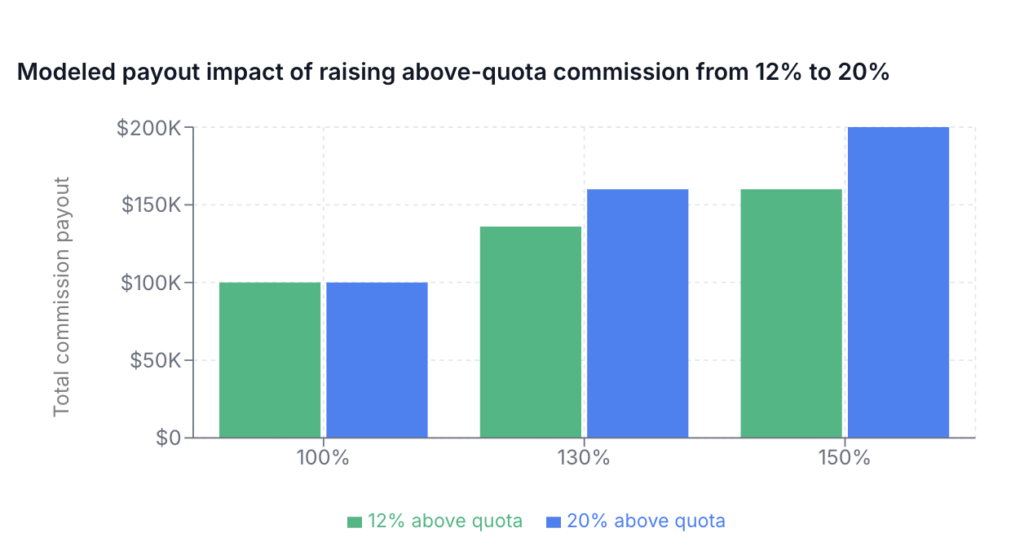
Payout cost does not scale linearly with revenue. Above quota, accelerators pay a higher rate on every incremental dollar, so a handful of reps finishing at 150% moves total cost further than a straight-line forecast predicts. Pricing a plan across several attainment levels exposes that before you commit to it.

Commissions that qualify as incremental costs of obtaining a contract get capitalized and amortized under ASC 340-40, and that treatment is not a policy election. Accelerator and quota-threshold uplifts capitalize alongside the base commission.

The amortization period follows from how the plan pays. Workday told the SEC staff its renewal commissions run at a rate significantly lower than new business, which combined with its technology life to set a five-year period of benefit. Gartner reached the opposite conclusion under the same standard, telling the staff it does not distinguish between a new customer and a follow-on contract when compensating salespeople, so its initial-contract commissions amortize over the initial term only. 

Diagram showing how renewal pay affects commission amortization under ASC 340-40. Workday pays less on renewals and amortizes over five years. Gartner pays the same on renewals and amortizes over the initial term.

2. Benchmark data specific enough to set a number

The Bridge Group‘s 2026 study of 158 B2B companies puts the median quota-to-OTE multiple for a SaaS account executive at 4.6x, up from 4.2x in its 2024 edition.

ICONIQ Growth‘s 2025 survey of software companies puts typical quota-to-OTE ratios at 5x to 8x, running higher at fast-growing companies and widening as reps move up-market. An OTE set precisely at market can still miss when the quota attached to it carries a multiple from the wrong segment. That ratio is set during sales compensation planning.

Usable design data does two things:

  • It reports ratios such as quota-to-OTE multiple and pay mix split.
  • It refreshes continuously from live plans.

3. The handoff from approved design to live payouts

Design in one system and execute in another, and the approved plan drifts from the running plan within a quarter. Every amendment gets entered twice, and the version finance signed stops matching the version paying reps.

A platform carrying a modeled plan into production without a rebuild removes that reconciliation permanently. If they are separate tools, price the recurring effort into your build-versus-buy decision.

Try QuotaPath for free

Try the most collaborative solution to manage, track and payout variable compensation. Calculate commissions and pay your team accurately, and on time.

Start Trial

The 7 best compensation design software platforms

Each platform entry covers what it designs, where it falls short, and what it costs:

1. QuotaPath

QuotaPath fits RevOps and finance teams running variable pay for sales at companies of roughly 20 to 250 employees.

What it does at the design stage

Atlas works through the structure behind a revenue goal, setting quota, pay mix, rates, and accelerators. Those recommendations draw on your own historical attainment alongside benchmarks built from eight years of data and tens of thousands of comp plans running inside QuotaPath, covering OTE, pay mix, and quota-to-OTE ratios.

Sales, RevOps, and finance build the brief together in one workspace, with comments anchored to the section under discussion and sign-off tracked in one place.

Keen Decision Systems duplicated its 2025 plans, adjusted rates for expansion versus renewal, and applied them to new deals for 2026 without rebuilding. Ease of use and customer support are the attributes its reviewers tag most frequently.

Where it falls short

  • Scope and sales compensation are variable. Merit cycles, salary bands, and pay equity analysis belong in an HRIS running alongside it.
  • Territory planning and capacity modeling sit in Atlas, which is a separate purchase.

Rating and pricing

QuotaPath holds 4.8 out of 5 across 367 G2 reviews. 

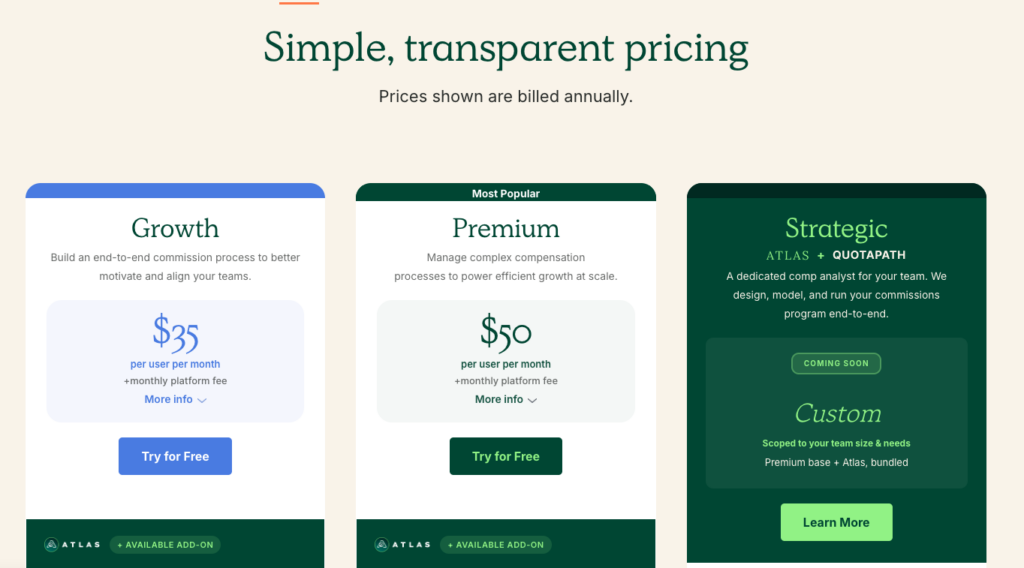
Growth runs $35 per user per month and Premium $50, each with a monthly platform fee covering the first five users, setup, the account team, and ongoing support. Atlas attaches from $5,000. A third tier, Strategic, bundles Atlas with a dedicated comp analyst and is listed as coming soon. 

Billing is annual with a free trial, and QuotaPath is the only platform here that publishes per-user rates.

QuotaPath homepage showing a draft compensation plan with an Atlas panel flagging a quota-to-OTE ratio above benchmark.

2. CaptivateIQ

With more G2 reviews than any other platform here, CaptivateIQ suits mid-market compensation teams with strong spreadsheet skills.

What it does at the design stage

SmartGrid, its no-code modeling and calculation engine, combines spreadsheet-level flexibility with automated calculation and full auditability. Plans can be versioned, tested against historical data and validated before deployment, and what-if scenarios run in real time inside the platform.

Its Planning module extends that to territory carving, quota modeling and capacity planning, covering ramp, seasonality and coverage gaps. 

Where it falls short

  • The learning curve is the most-cited drawback in its G2 reviews, ahead of missing features.
  • Seats are counted as admin users plus every payee, so cost scales with headcount on plan.
  • Pricing requires a custom quote, with a one-time setup fee on top.

Rating and pricing

4.7 out of 5 from more than 3,400 G2 reviews. CaptivateIQ says most customers go live in under eight weeks.

CaptivateIQ homepage positioning the product as a sales performance management platform, with a Gartner Magic Quadrant figure.

3. Xactly

Around 56% of Xactly’s reviewers are at enterprise scale, with native integration into Salesforce, Microsoft Dynamics and NetSuite.

What it does at the design stage

Xactly Design is a dedicated product for this stage. It compares your base and variable split and OTE against industry norms, then runs what-if scenarios to forecast the impact on total spend, pay equity, and turnover. A simulation engine estimates the effect of a change while it is still a draft.

Xactly Intelligence draws on more than 20 years of pay and performance data from over 1,500 companies, benchmarks your base/variable split and OTE against industry norms, and flags plan structures that have historically driven attrition before you roll them out. The base skews enterprise, which matters if your comparators are smaller.

Where it falls short

  • Xactly Design is a separate module from Incent, the commission engine, and modules are layered on as you grow.
  • Every tier and module sits behind a quote request.
  • The benchmark data sits in Incent Ultimate, the top tier.

Rating and pricing

Its 4.2 out of 5 across roughly 1,100 G2 reviews is the lowest rating in this comparison. Every plan on its pricing page is quote-only, and Xactly publishes no implementation timeline.

Xactly homepage describing an AI-driven sales commission and performance management platform, with an administrator workspace screenshot.

4. Varicent

Varicent describes itself as built for mid-sized to large enterprises, and more than two-thirds of its reviewers work at companies above 1,000 employees, concentrated in financial services and banking.

What it does at the design stage

Varicent treats territory, quota, and incentive design as one connected problem. Its planning layer uses GenAI to optimize quotas and headcount at the outset, then models how a change to territory flows through to compensation cost. Plans are identified, modeled, tested, and deployed in the same platform, and the same models feed forecasting and commission accruals.

Intricate incentive structures are configured without engineering involvement. Varicent has been building for this category since 2005, when it launched tools covering incentive compensation alongside territory and quota management.

Where it falls short

  • G2 reviewers note that its advanced features can overwhelm teams without dedicated resources to manage them.
  • Neither pricing nor an implementation timeline is published.

Rating and pricing

4.5 out of 5 across roughly 600 G2 reviews.

Varicent homepage describing a connected platform for quotas, territories, compensation and capacity, with a payout and attainment dashboard.

5. Forma.ai

The one platform here where the vendor’s team is part of the delivery model, Forma.ai is built for complex, global sales organizations.

What it does at the design stage

You describe a compensation rule in plain English, and Forma.ai converts it into configured logic, which removes the technical step that usually sits between deciding something and having a working plan. New designs are financially modeled against different data and parameters. Once the financial impact is understood, the change merges into the live plan.

Its analytical models assess how existing territory, quota, and comp plans are performing. A separate advisory arm covers quota-setting frameworks and cost scenario modeling for teams that want help deciding what the plan should be. 

Where it falls short

  • Pricing is not published, and G2 users report seven months to implement on average, with eleven months to a return.
  • Its reviewer base is among the smallest here, so there is less independent evidence to weigh than for platforms with thousands of reviews.

Rating and pricing

4.7 out of 5 across 63 G2 reviews. Pricing is scoped across three components: a one-time onboarding fee, the platform itself, and the AI configuration layer, with every figure quoted per customer.

Forma.ai homepage describing AI-powered enterprise sales compensation software, with a rep performance dashboard.

6. Everstage

Everstage weights mid-market, with around 61% of its reviewers in that segment.

What it does at the design stage

Time Machine models a plan against the historical performance of one or more payees before you publish it, estimating spend across a selected period so you can see what a structure costs before anyone is paid under it. The drag-and-drop plan designer covers multi-tier accelerators, split credits, and draw-against-commission without writing formulas.

Its planning product tests territory and quota structures as parallel scenarios, visualizes the gap between current capacity and assigned targets, and allocates quota against rep seniority and ramp profile. 

Everstage will also build a free proof of concept on your actual plan before you commit to anything. Modeling and publishing happen on the same platform.

Where it falls short

  • Its pricing page lists ASC 606 compliance as a scoped add-on, alongside the Salesforce app and the Slack and Teams connectors.
  • Cost tracks every payee on plan, so it climbs with the size of the commissionable population.

Rating and pricing

4.8 out of 5 across roughly 2,000 G2 reviews. Everstage prices per payee, with every component scoped at quote. It states most teams go live in four to six weeks.

Everstage homepage promising commissions run on time, showing its G2 and Gartner review ratings.

7. Pave

Pave is the only platform here designed for HR, covering salary bands and merit cycles. It earns a place because the pay mix starts with base salary, and a variable plan built on a band set two years ago inherits that error. Its reviewers are concentrated in mid-market companies.

What it does at the design stage

Pave’s benchmarks come from persistent connections to HRIS, ATS, and equity management systems across more than 9,000 companies, so pay data refreshes as the market moves. The Pave Agent prices salary ranges and equity targets against that data, with geo differentials and level progressions applied.

Merit cycle parameters and recommendation logic are set before the cycle opens, which keeps manager-level decisions inside a budget. Pave reports that Workato cut its annual benchmarking and salary range process from ten weeks to three.

Where it falls short

  • Commission structures sit outside its scope, so accelerators, clawbacks and splits need a separate tool.
  • Its review base is the smallest here at 46, and insufficient detail and limited data are the two drawbacks reviewers cite on G2.

Rating and pricing

4.7 out of 5 across 46 G2 reviews. Paid plans are quoted, and a free Market Data Lite tier covers 200 job families for the US market plus one other of your choice.

Pave homepage describing an AI compensation platform, with benchmark data counts and salary range panels.

Design comp plans that hold through the year with QuotaPath

Ask any shortlisted platform to model your own accelerator at 130% attainment during the demo. Most will show you a template. QuotaPath publishes its rates, so you’ll know the cost before the call.

Talk to sales or start a free trial

Frequently asked questions

  1. How is compensation design software different from compensation management software?

The term covers two different jobs. On the HR side, compensation management means salary bands, merit cycles, and pay equity across every employee. On the revenue side, it means quota, pay mix, and accelerators for people paid on performance. The platforms in this guide do one or the other. Check which job a vendor is built for before you compare feature lists.

  1. Do we need it if we already have an HRIS?

An HRIS stores employee records and runs payroll. It will not price a quota against your margin or show what an accelerator costs when reps overperform. Teams running variable pay usually need both, with the design tool feeding approved plans into payroll.

  1. How much does compensation design software cost?

QuotaPath publishes per-user rates, at $35 and $50 per month depending on tier. The other six quote on request. Ask for the first-year total, including platform fees, one-time implementation charges, and per-payee counting.

How Zapier Pays 80 Sales Reps 10 Days Faster Without Adding Headcount

zapier quotapath customer success story

RevOps leaders often inherit a commission management process built by someone else with complexity and risk built in, such as spreadsheets, exceptions, undocumented rules, and manual workarounds. These complexities create risk—inaccurate payouts, time-consuming reconciliations, audit challenges, and a process that few people fully understand or feel confident changing.

When Zapier‘s commission process moved from Finance to RevOps, Katie Huson inherited a process built entirely in Excel. At that time, Katie was the Manager of Revenue Operations. She already had a full plate and was now taking on the end-to-end compensation management process. She needed an easy-to-use tool to streamline the process.

“I looked at the formulas in the Excel sheet and thought, ‘I will break this so quickly.'”

After implementing QuotaPath:

  • Zapier moved payroll prep from the 15th to the 5th of the month
  • Cut commission processing to about one day per cycle
  • Gave every rep real-time visibility into how they’re paid.
  • Reduced the number of questions, disputes, and spreadsheet audits
  • Made comp plan changes mid-year without breaking history

Excel Was Too Risky to Own

When Zapier’s commission ownership transferred from Finance to RevOps, the existing process was built in Excel. Katie already had a full-time job, so she couldn’t afford this to be a heavy operational lift. After looking at the spreadsheets, Katie said, “That’s not my strength, or my calling in life. I needed something that would make this a lighter lift.”

Alongside the operational challenges of the current commission process, the Excel spreadsheets made it difficult for the reps to understand how or when they were getting paid. As Katie explained it, “It was hard to track down things like, ‘How am I getting paid?’ or ‘Why is this number what it is?’ We knew we needed to increase transparency.”

Zapier needed a system that was easy to run, easy to audit, and easy for reps to understand.

Evaluating Sales Compensation Software: Usability and Handoff-Readiness

Katie first encountered QuotaPath through a live demo at HubSpot’s annual conference, Inbound. That’s when she recognized a solution to the current commission process. “We’re HubSpot users, and I was like, ‘Oh, this is exactly what we’re looking for,'” Katie said.

Although Zapier evaluated a few vendors to understand the landscape, usability quickly became the deciding factor. In fact, Katie’s unique lens for evaluating tools hinged on simplicity.

“One thing that’s really important to me is: if I win the lottery and I’m not coming back tomorrow, could somebody else take this over really easily? QuotaPath felt very drag-and-drop. Very simple to understand.”

What reps can see in QuotaPath

Onboarding: Easier Than Expected

Katie anticipated implementation to be more difficult than promised. She explained, “When you buy software, you’re always sold on ‘this will be so easy,’ and it never is. But this actually was.”

QuotaPath’s onboarding team was super hands-on during setup, building out the framework of a lot of Zapier’s plans for Katie, saving her a ton of time. However, “He didn’t just build it and disappear. He walked me through everything, so I knew how to do it going forward,” said Katie.

ROI: Faster Payroll, Fewer Questions, Less Risk

Implementing QuotaPath resulted in several key wins for Zapier.

The most immediate win was getting commissions to payroll faster. “Previously, we were sending comp to payroll by the 15th of the month. Now we’re able to do it by the 5th. That’s huge,” said Katie. Plus, processes that used to be drawn out, such as audits and cutting checks, now took Katie a day to complete.

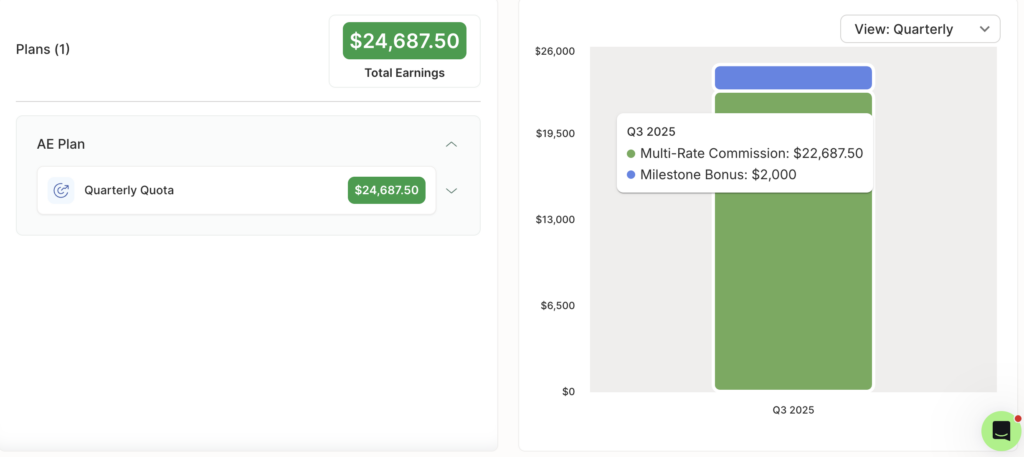
Increased rep earnings visibility led to a less quantifiable but significant win. “The reps know how they’re being paid. They can see every deal, the exact math, and why it’s mathing that way. I rarely get questions now,” Katie explained.

By contrast, Katie used to receive a lot of earnings questions before QuotaPath. The reps would ask her to explain the math on the spreadsheet because they didn’t understand why they were being paid a particular amount instead of what they thought it should be.

Scaling Change Without Breaking History

Zapier made some plan adjustments, including quota adjustments and shifting from an annual to a quarterly goal partway through the year. QuotaPath streamlined the new plan implementation process. “It’s been really easy to log in and change the structure really quickly or set up a new plan and shift people over.”

Katie especially appreciated QuotaPath’s locked plans capability when updating comp plans, which is a complex process in Excel. “In spreadsheets, it’s really hard to do that without everything else breaking. Here, it’s easy to cut off and start something new without breaking everything you’ve already done.”

Support: Answers > Tickets

Katie’s questions were answered quickly. She felt like she never had to wait for a response to her support tickets. She liked the format of the answer too. “Whenever I put in a ticket, I get a Loom back showing me what to do, so I don’t have to ask the same question twice,” Katie said.

Katie appreciated the support model built on empowering the user. Being shown what to do and how versus needing to call in support every time for someone else to do it, so she didn’t have to slow down when encountering the same issue.

Streamline commissions for your RevOps, Finance, and Sales teams

Design, track, and manage variable incentives with QuotaPath. Give your RevOps, finance, and sales teams transparency into sales compensation.

Talk to Sales

A Commission Process Built to Last and Hand Off

Zapier has benefited by implementing QuotaPath. Payroll is now delivered 10 days faster than it used to be, on the 5th of the month rather than the 15th, and commission processing has been reduced to approximately one day per cycle. Real-time rep visibility into deal-level earnings has resulted in fewer questions, disputes, and manual audits, building trust, saving time, and boosting productivity.

Mid-year plan changes that used to be a complex ordeal are now made without breaking historical data, thanks to a handy QuotaPath capability that enables them to lock data before making changes. And all of this is possible because the HubSpot integration enables seamless data flow and sales compensation automation.

Would Zapier recommend QuotaPath?

Without a doubt!

“Nobody loves running commission plans,” said Katie, “The nitty-gritty takes time, and there’s a lot at risk. It’s people’s pay. QuotaPath saves time, limits questions, makes audits easy, and gives everyone confidence. It’s a great way to run comp.”

Schedule a demo to see how much faster you can process commissions with QuotaPath.

Sales Territory Planning: 2027 Guide

sales territory planning, image of globe outline with north america highlighted in orange

Most revenue leaders start with geography when it comes to sales territory planning. And that, my friend, is a big no-no.

Instead, start sales territory management with revenue capacity. Think: equal opportunity for reps per book and a coverage model that finance can build around.

This will help you model territory design with repeatable revenue capacity at the helm, and powered by balanced opportunity, manageable cost, and clear ownership.

In our 2027 sales territory planning guide below, learn:

Happy reading!

Download Sales Territory Scorecard

Download Now

Download our Sales Territory Scorecard

7 Step Framework for Sales Territory Planning

Let’s start with the framework. Please keep in mind that this is the sequence teams should actually follow, versus a checklist to do all at once.

1. Start with the business objective

Before choosing a segmentation model, decide what the territory model needs to optimize. This is the sales planning step everything else in this framework depends on: get the objective wrong, and the math built on top of it won’t hold up.

Common objectives include:

  • New logo growth
  • Expansion in existing accounts
  • Coverage of a new segment or region
  • Lower cost of sales
  • Better rep productivity

Example: If the objective is efficient mid-market growth, design for account density and rep capacity (not state lines). A territory built around geography alone can look balanced on a map and still leave one rep starved for qualified accounts while another sits on more whitespace than they can realistically work.

2. Pick the primary segmentation logic (this is where territory allocation starts)

Territory allocation begins with how accounts get divided in the first place. Most teams lean on one or two core dimensions rather than stacking every option at once:

  • Geography: East / Central / West
  • Segment: SMB / MM / Enterprise
  • Industry / vertical: healthcare, fintech, manufacturing
  • Named accounts vs. pooled accounts
  • Lifecycle: new business vs. expansion/renewals

Example model: A common SaaS setup blends dimensions by segment:

  • SMB: pooled by geography
  • Mid-market: geography + industry
  • Enterprise: named accounts

Mixing dimensions like this is normal. Focus on selecting the combination that matches how each segment actually buys, instead of forcing one model across the whole book.

3. Measure market potential before assigning reps

Before a single account gets assigned, estimate opportunity by territory using:

  • TAM accounts
  • ICP-fit accounts
  • Open pipeline
  • Historical closed-won ARR
  • Average ACV
  • Win rate
  • Sales cycle length

Sample territory scorecard:

MetricTerritory ATerritory B
ICP accounts420390
Open pipeline ARR$1.8M$1.7M
Historical win rate24%22%
Avg ACV$18K$21K
Sales cycle52 days61 days
Last 12 mo closed-won ARR$910K$895K

The goal is comparable earning potential. Download our territory scorecard.

4. Convert opportunity into rep capacity

Ask how much business one fully ramped rep can realistically cover, using inputs like accounts per rep, meetings per month, opportunities per quarter, quota capacity per rep, and expected attainment at plan.

Example: If one mid-market AE can effectively handle 125 active accounts, 20 SQLs a month, and 6 to 8 closes a quarter, then a 500-account patch likely needs 4 reps, not 2.

Formula: Reps needed = Total addressable accounts ÷ Accounts per rep at capacity

5. Build territories around balanced quota capacity

Territories should support similar quota capacity (not just similar account counts).

Sample calculation

  • 400 ICP accounts
  • 8% annual opportunity creation
  • 32 opportunities/year
  • $25K ACV
  • 25% win rate
  • = about $200K expected ARR/year

If the AE quota is $600K, that patch is underpowered unless the team adds more whitespace, raises conversion, or lowers quota.

6. Set ownership and routing rules

This is where sales territory management earns its keep day-to-day.

Define:

  • Who owns inbound
  • Who owns outbound-created deals
  • House accounts / unassigned accounts
  • Expansion ownership
  • Transfer rules when accounts move

Messy routing creates hidden compensation disputes, which is reason enough to write these rules down before launch, not after the first dispute lands in a comp review.

7. Review and rebalance on a fixed cadence

Sales territory management is an ongoing discipline.

Revisit territories:

  • Quarterly for fast-growth SMB
  • Semiannually for mid-market
  • Annually for enterprise named-account models

Watch for drift in:

  • Rep attainment dispersion
  • Pipeline per rep
  • Booked ARR per rep
  • New-account creation
  • Coverage gaps

See how Atlas can help you build smarter territories.

Metrics to Manage Territory Health

So what do you look at to evaluate the success of your territory? We pulled six metrics worth paying attention to monthly or quarterly.

  1. Quota capacity ratio (expected territory ARR ÷ assigned quota), healthy range 0.9x-1.2x
  2. Pipeline coverage (pipeline ÷ quota), healthy range often 3x-5x depending on win rate
  3. ICP account load per rep
  4. Opportunity creation per 100 accounts
  5. Win rate by territory
  6. Attainment dispersion across reps in the same role

The 3 Most Common Mistakes in Sales Territory Planning

Lastly, let’s take a look at where we see mistakes unfold most frequently. Some have already been called out loosely, but below we get a little more in-depth.

1. Using geography alone: First up is tied to geography alone. This happens when you two reps covering the “west.” The problem is that despite the land by geography resembling one another, you’d ignored the density of buyers, leaving opportunities unevenly distributed.

2. Equal account counts instead of equal revenue potential: Something similar happens when leaders ignore revenue potential. So, instead of not paying attention to buyers per capita, you’re assigning equal numbers of accounts but with very mismatched contract sizes.

Example: 100 accounts isn’t a balanced patch if one set averages $50K ACV and the other averages $10K.

3. Recutting too often: And the third biggest mistake occurs when you implement sales territory changes too frequently. Just like with mid-year compensation plan updates, territory changes can hurt morale and make quota fairness more challenging to defend financially. Only make changes when you have clear data showing a territory problem, and line up a clear change management communication plan so your reps don’t feel slighted.

Streamline commissions for your RevOps, Finance, and Sales teams

Design, track, and manage variable incentives with QuotaPath. Give your RevOps, finance, and sales teams transparency into sales compensation.

Talk to Sales

Sales Territory Planning in a Nutshell

If you take anything from this, please remember that sales territory planning works best as an ongoing discipline instead of a once-a-year planning sesh.

Start from revenue capacity, size territories to balanced quota capacity, set clear ownership rules, and revisit the model on a fixed cadence, and sales planning stops being a spreadsheet argument every January and becomes a repeatable process finance can build a forecast around.

Because territories are less about maps and more about creating repeatable revenue capacity with balanced opportunity, manageable cost, and clear ownership.

Lastly, quota capacity, pipeline coverage, and attainment dispersion are easiest to track when they live in the same system reps and finance already use for comp, instead of a spreadsheet that goes stale after the first rebalance.

If that’s the gap you’re running into, see how QuotaPath handles territory and quota capacity planning alongside commission tracking. Learn more today.

Best Sales Compensation SaaS Platforms

Best Sales Compensation SaaS Platforms thumbs up, money signs, and the numbers 1-4 to indicate a list

Key takeaways

  • The best sales compensation platform for a SaaS team reads recurring, renewal, and usage revenue from the systems that record it, lets your own team change a plan without vendor involvement, and publishes what it costs.
  • Roughly three in five SaaS companies now use some form of usage-based pricing, so a plan built on first-year contract value understates what a deal is worth.
  • Customer success teams now carry renewal and expansion revenue alongside sales, which makes attribution and eligibility rules more consequential than commission rates. 
  • Under ASC 606, commission on a subscription contract sits on the balance sheet and unwinds across the contract term.
  • Published per-user pricing runs $35 to $50 per month while most platforms quote custom only, and implementation ranges from roughly six weeks to a full quarter.

Compensation software built for transactional selling struggles with SaaS revenue. A single contract produces bookings, annual recurring revenue, renewals, expansion, and increasingly usage revenue that arrives months after signature, and each of those needs crediting differently. Calculation is the part every platform in this category handles well, but what separates them is how much of that revenue picture the system can see, and how much of the work your team can do without the vendor. 

5 revenue signals on saas contract

What makes SaaS compensation harder than other models? 

Four mechanics separate it from transactional selling, and the last two are where most tools thin out. 

  • Recurring revenue against bookings: A three-year contract produces one bookings figure and a different annual recurring revenue figure. Sales teams are usually paid against one number while the board reviews the other, so the plan has to state which one carries quota credit before the first payout rather than after a dispute.
  • Shared credit on expansion: Most of an account’s value arrives after the first sale, and the account executive, the customer success manager, and sometimes a renewals specialist all touch it. What matters is not the rate each earns but which dollars each is eligible for, which makes payout eligibility the harder design question.
  • Usage-based revenue: A consumption deal signed in January might not reach full run rate until June. Pay at signature against a forecast, and you overpay when usage disappoints, leaving a clawback conversation to follow. Pay monthly against actuals and the number holds up, though the earner waits two quarters for the full amount and the platform has to pull billing data directly. Both choices carry a cost, and the plan should name which one it is accepting.
  • Amortization: Commission on a subscription contract is capitalized and amortized across the contract life. Without native handling, finance rebuilds that schedule by hand each month, and the discrepancy usually surfaces during audit.

How do you evaluate a sales compensation SaaS platform?

Four questions decide how compensation runs once the contract is signed, and platforms answer them differently.

Which systems does it read, and how often?

A plan paying against annual recurring revenue, renewals, and usage needs the billing stack connected. Ask which connections are native or routed through a data warehouse, and how frequently each refreshes, since daily and real-time are different answers when someone is checking earnings against a deal that closed this morning.

Who can change a plan?

SaaS pricing changes, and compensation follows it. Establish whether your team edits plans directly or files a request, because that decides whether a mid-year adjustment takes an afternoon or a support cycle. Making the change yourself during the demonstration is the clearest test.

How long until the first commission runs?

Confirm with two reference customers at your size, and ask what implementation requires from your side, since a quoted timeline usually assumes your data is clean and your plan rules are already written down. 

What is the total cost, and is any of it published?

Where pricing is not published, budgeting cannot start until a sales conversation does. But where pricing is public, the per-seat rate is still only part of it, so ask for itemized costs across platform, implementation, integrations, and support. Weigh that against what the plan itself costs, since total commission spending across every earner on a deal is usually the larger number.

The 5 best sales compensation SaaS platforms

The table sets out who each platform suits, what it does distinctively, what it costs, and how long it takes to stand up.

PlatformBest forStandout capabilityPricingImplementation
QuotaPathSaaS revenue teams running complex plans at mid-market and enterprise scaleAI-Powered Plan Builder, native billing and payroll connections, Ledger for revenue recognition$35 to $50 per user per month plus platform fee, published45 to 60 days on Growth, 60 to 90 on Premium
CaptivateIQMid-market and enterprise teams wanting planning and compensation togetherSmartGrid no-code calculation engineCustomRoughly three months per G2
XactlyLarge enterprises with global, multi-currency programsFive-product suite with two decades of compensation benchmarksCustomRoughly five months per G2
EverstageGrowth-stage to enterprise teams wanting compensation, quoting, and planningNo-code plan designer with scenario modelingPer-payee, customRoughly two months per G2
PerformioMid-market and enterprise teams with 70 or more commissionable employeesAI Admin Assistant with vertical-specific deploymentsCustomRoughly four months per G2

1. QuotaPath

Best for: Mid-market through enterprise SaaS teams running complex plans across hundreds to several thousand payees.

QuotaPath gives revenue operations, finance, and sales one system to design plans, calculate commissions, route approvals, and pay out, with Atlas layered on top for benchmarking and plan modeling. Managed fully-serviced plans are also available for those looking to outsource the full commissions process.

Revenue systems: Premium and above connect natively to Stripe, Chargebee, Maxio, NetSuite, and QuickBooks alongside eleven CRM systems and five warehouse sources, so recurring and usage revenue reaches the plan directly. Growth covers CRM and spreadsheets only.

Plan changes: The AI-Powered Plan Builder reads an existing plan document or a plain-language description and writes the calculation logic, so accelerators, ramps, draws, splits, cumulative quotas, and matrix structures can be edited without a vendor ticket. Payout eligibility rules decide which revenue each role earns against, so an account executive, a customer success manager, and a renewals owner can be credited on one account without paying twice on the same dollar.

ai powered plan builder
AI-powered Plan Builder in QuotaPath

Time to first run: 45 to 60 days on Growth and 60 to 90 on Premium. The builder works from a written plan, so undocumented rules add time at the front. 

Cost: $35 per user per month on Growth or $50 on Premium, billed annually, plus a monthly platform fee, and QuotaPath states it is the only platform in the category publishing rates on its site. Atlas is an add-on from $5,000, and there is a 14-day free trial.

Also worth knowing: Territory carving and capacity modeling sit in Atlas, which suits teams treating compensation as the system of record. Ledger handles revenue recognition with period locks and audit trails, so amortization across multi-year contracts does not become a month-end rebuild. 

2. CaptivateIQ

Best for: Mid-market and enterprise teams that want connected planning and compensation in one no-code platform.

CaptivateIQ brings commission management and sales planning together on its SmartGrid extract, load, and transform engine, and was named a Leader in the 2025 Forrester Wave for Sales Performance Management.

Revenue systems: Published integrations cover Salesforce, HubSpot, NetSuite, Workday, and Snowflake. Billing platforms are not named, so teams paying on usage revenue should confirm how that data arrives.

Plan changes: SmartGrid lets administrators build and edit plans in a no-code, spreadsheet-style environment without engineering, though the platform assumes a dedicated compensation or revenue operations resource.

Time to first run: Roughly three months per G2.

Cost: Custom, tied to team size, plan complexity, and integrations.

Also worth knowing: Audit trails and versioning cover every calculation. Reporting draws the recurring reviewer complaint, with dashboard building described as cumbersome and data often exported.

3. Xactly

Best for: Large enterprises with complex, global compensation programs that need a mature sales performance management suite.

Xactly unifies compensation, planning, territory management, and forecasting across a five-product platform, with two decades of historical compensation data behind it.

Revenue systems: CRM and enterprise resource planning connections are extensive, with multi-currency and multi-entity support for companies selling across regions from several legal entities. Billing-level integrations are not published.

Plan changes: Configuration assumes dedicated compensation administration, and reporting is channeled by hierarchy, so an individual manager cannot reformat their own view without affecting others.

Time to first run: Roughly five months per G2.

Cost: Custom and not publicly listed.

Also worth knowing: Mid-cycle recalculation reloads a full period after a change. Reviewers regularly cite slow loading, an aging interface, and a steep administrative learning curve.

4. Everstage

Best for: Growth-stage through enterprise teams that want incentives, quoting, and planning on one platform.

Everstage combines sales compensation with configure, price, quote functionality and sales planning.

Revenue systems: Salesforce, HubSpot, NetSuite, Workday, and a stated forty or more further connections, though billing platforms are not individually published.

Plan changes: Tiered accelerators, payout floors, component-weighted plans, and currency-specific rate tables configure natively, so mid-year changes are configuration. Advanced configuration and custom reporting still take time.

Time to first run: Roughly two months per G2.

Cost: Per-payee licensing, custom, with implementation and support quoted separately.

Also worth knowing: The compliance stack covers SOC 1 and 2 Type II, ISO 27001, ISO 42001, and GDPR. Reviewers note that commission logic can be hard to follow from the earner’s side once several accelerators stack.

5. Performio

Best for: Mid-market and enterprise teams with 70 or more commissionable employees and complex plans.

Performio focuses on commission calculation at scale, pulling from CRM, ERP (enterprise resource planning), human resources, and finance systems without requiring data cleanup first.

Revenue systems: Published connections span Salesforce, HubSpot, Microsoft Dynamics, NetSuite, SAP, Workday, Snowflake, Stripe, and Chargebee. 

Plan changes: The AI Admin Assistant handles routine work as plans change, with no-code updates that do not require engineering.

Time to first run: Roughly four months per G2.

Cost: Custom, scaling by team size and capability, with implementation billed separately.

Also worth knowing: Historical commission records support period-over-period comparison. Reviewers identify slow data refreshes, an older interface, and a thin dispute process where a rejected claim carries no explanation.

What migrating a SaaS compensation plan actually involves 

Four decisions taken before configuration starts determine whether the timelines above hold, and teams moving off spreadsheets face fewer of them.

Contracts that straddle the cutover

A three-year deal signed eighteen months ago still has quota credit, renewal dates, and in some cases usage revenue attached to it. Decide before migration whether those contracts move with their original plan rules or convert to current ones, because reconstructing that judgment later is far harder than making it once at the start.

Commission already capitalized

Any amount sitting on the balance sheet under ASC 340-40 has an amortization schedule attached, and where those schedules live after the switch is a decision for finance. Settle it alongside the migration plan.

Usage revenue landing across the boundary

Consumption billed after the switch against a deal closed before it is the transaction most likely to fall between systems. Trace one of these end to end during the parallel run.

When to cut over

Period close is the obvious moment, though it is also the busiest. Mid-quarter costs a partial reconciliation but keeps the switch away from payroll deadlines.

Run the old and new systems together for one full period and reconcile before anyone is paid from the new one. That comparison is what earns trust with the people being paid, and it surfaces the edge cases no configuration review catches.

Streamline commissions for your RevOps, Finance, and Sales teams

Design, track, and manage variable incentives with QuotaPath. Give your RevOps, finance, and sales teams transparency into sales compensation.

Talk to Sales

Where QuotaPath fits in a SaaS compensation stack 

The hard part of SaaS compensation is getting the revenue into the plan correctly. Recurring revenue, renewals, expansion, and usage each arrive from a different system, and the expense has to follow the contract.

QuotaPath connects the CRM and the billing stack, turns modeled quotas, tiers, and accelerators into live plans with sign-off attached. Atlas benchmarks on-target earnings, pay mix, and quota ratios against thousands of SaaS compensation plans, and pricing is published, so you can budget the whole thing yourself.

Book a demo and see how your own plans would run. 

Best Compensation Management Software

best compensation management software 2026

Comp plans that live in spreadsheets often lead to inaccurate payout calculations due to disconnected data sources, formula errors, version control issues, and manual overrides. Manual payroll processes tend to result in a nearly 20% error rate, costing businesses an average of $291 per correction.

These errors erode rep trust, leading them to adopt shadow accounting and potentially increase rep turnover. In fact, 53% of employees said they’d consider leaving if payroll problems continued.

Additionally, Finance loses days each month reconciling payouts, toggling between data systems and manual spreadsheet matching, while addressing rep payout disputes.

This guide compares the five leading compensation management platforms for 2026.

Key Takeaways

The best compensation management software for most revenue teams is QuotaPath.

    • What compensation management software does and why spreadsheets break at scale.

    •  When enterprise platforms (Xactly, CaptivateIQ) make sense and when they’re overkill.

    • How to run a 5-step evaluation with your own comp plans and data.

Best compensation management software at a glance

The following comparison highlights the best compensation software 2026 has to offer, making it easy to compare the leading platforms before diving into the details.

VendorCategoryBest forStandout capabilityStarting priceG2 rating
QuotaPathSales compensation managementSMB & mid-market revenue teams that want fast setup and transparent pricingSelf-serve plan building with AI assist; no implementation fees$35/user/mo4.7
CaptivateIQIncentive compensation mgmt (ICM)Mid-market & enterprise teams with complex, custom comp logicSmartGrid no-code calculation engineCustom (median ~$35K/yr)4.7
XactlyEnterprise SPM suiteLarge enterprises needing full sales performance managementDeep benchmarking data & multi-module SPM suite~$60/user/mo (quote-based)4.2
EverstageSales commission softwareMid-market teams prioritizing rep-facing visibility & gamificationRep engagement layer (earnings visibility, gamification)Custom (median ~$41K/yr)4.8
Salesforce SpiffCommission mgmt (Salesforce-native)Salesforce-centric orgs, 51–1,000 employeesNative Salesforce ecosystem + spreadsheet-like modeling$75/user/mo (annual)4.6

The best compensation management software platforms

Every compensation management software has different strengths, tradeoffs, and ideal use cases. The summaries below highlight those differences to help you identify the best solution for your organization.

QuotaPath (top pick)

Best for: 

SMB and mid-market revenue teams, especially small businesses outgrowing spreadsheets and needing compensation software for small businesses without the complexity of enterprise implementation cycles.

Standout capabilities

  • Self-serve plan builder with AI assist enables admins to build and adjust comp plans without services engagements.
  • Native CRM integrations (Salesforce, HubSpot) with real-time deal syncing and push-to-payroll via Rippling.
  • AI Revenue Strategist, Atlas, to model and pressure test plans, make ongoing recommendations, and feed directly into QuotaPath for ease, adaptability and optimization.
  • Transparent published pricing – unique among the five.
  • Rep-facing earnings visibility that eliminates shadow accounting.
  •  Voted Best ROI and Easiest to Use in commission software on G2.

Where it falls short

  •  Not built for global enterprise SPM needs. Teams needing a full SPM suite may look to Xactly.

Pricing / G2 rating: 

From Growth $35; Premium $50. Free trial / G2: 4.7★

CaptivateIQ

Best for: 

Mid-market and enterprise teams with highly customized comp logic and dedicated comp admins.

Standout capabilities

  • SmartGrid no-code, spreadsheet-like calculation engine that models unusual comp structures without engineering.
  • Strong reporting and modeling depth.
  • Scales to support complex compensation programs across multiple products, territories, business units, and incentive structures.
  • SOC 1 and SOC 2 compliance supports enterprise security and audit requirements.

Where it falls short

  • Custom quote-only pricing (median contract ~$35K/yr; implementation fees $5K–$100K+).
  • Reviewers consistently report onboarding takes longer and requires more internal lift than expected.

Pricing / G2 rating: 

Custom pricing; median ~$35K/yr. / G2: 4.7★.

Xactly

Best for:

Large enterprises that need enterprise compensation management software as part of a full sales performance management (SPM) suite.

Standout capabilities

  • Deepest SPM suite of the five, including incentives, territory planning (AlignStar), forecasting, and benchmarking.
  • Decades of comp benchmarking data unavailable elsewhere.
  • AI-powered forecasting and sales planning help organizations align quotas, territories, and incentive strategies.
  • Supports global compensation programs with enterprise-scale governance, multiple currencies, and complex organizational structures.

Where it falls short

  • Longest implementations and highest admin burden of the group; often requires ongoing services.
  • Costs scale quickly: mid-market deployments commonly $60K–$200K/yr; enterprise $200K–$ 750 K/yr+.

Pricing / G2 rating: 

Quote-based, starting around $60/user/mo. / G2: 4.2 ★.

Everstage

Best for: 

Mid-market teams that prioritize the rep experience: earnings visibility, gamification, and adoption.

Standout capabilities

  • Highly rated rep-facing layer: real-time earnings visibility and gamification.
  • AI Agent Core centralizes business logic to power AI-driven incentive compensation management (ICM).
  • Enterprise-grade security and compliance, including SOC1 and 2 Type II, ISO 27001, ISO 42001, and GDPR.
  • Time Machine scenario-modeling feature enables finance and RevOps teams to test new commission structures or revisit past payouts.

Where it falls short

  • No published pricing (observed deals ~$30K–$107K/yr; median ~$41K).
  • Less established for complex enterprise logic than Xactly/CaptivateIQ.

Pricing / G2 rating: 

Custom pricing; median ~$41K/yr. / G2: 4.8★.

Salesforce Spiff

Best for: 

Salesforce-centric organizations, with 51–1,000 employees, that want commission management within the Salesforce ecosystem.

Standout capabilities

  • Native Salesforce integration and familiar spreadsheet-like plan modeling.
  • Real-time rep dashboards, including Commission Estimator, help sellers track earnings and estimate commissions on open opportunities.
  • Spiff Designer simplifies configuring complex compensation plans, including accelerators and tiered payouts.
  • Finance teams can generate ASC 606 and IFRS 16-compliant expense reports without manual prep.

Where it falls short

  • $250/mo. per additional connector beyond Salesforce; Premium Support adds 30% of license cost; TCO climbs fast.
  • Some reviewers report slower support responsiveness post-acquisition.

Pricing / G2 rating: 

$75/user/mo. Billed annually; connectors and support extra. / G2: 4.6★.

quotapath trial apge

How to choose the right compensation management software

Choosing the best compensation management software is about more than comparing features and pricing. A structured evaluation process will help you identify the platform that addresses your current challenges while supporting your future growth. Use these five steps to guide your selection.

Step 1: Audit where your current process breaks

Before evaluating compensation management tools, identify where your current process fails. Look for common failure points such as manual spreadsheet calculations, commission payout disputes, slow month-end close, and reps resorting to shadow accounting to verify earnings.

Many of these problems can be traced back to manual spreadsheet processes. Research shows that at least 86% of spreadsheets contain errors, while 56% of companies regularly experience commission errors. Understanding where these breakdowns occur will help you prioritize the capabilities your compensation management system needs.

Step 2: Define your must-haves and dealbreakers

Convert your audit into 3-5 must-have capabilities and 1-2 dealbreakers.

Must-haves might be CRM integration depth, payroll connection, rep visibility, approval workflows, and a transparent audit trail. Dealbreakers might be required professional services, no free trial, or limited customer support options.

Keep your evaluation criteria on a single page for easy reference.

Step 3: Shortlist by team size, category, and complexity

Narrow your options by mapping vendors to buyer profiles. Mid-market teams that prioritize a positive rep experience often choose QuotaPath, while complex enterprise organizations typically select Xactly or CaptivateIQ. Salesforce-native teams gravitate to Spiff, and mid-stage teams often favor Everstage. A clear shortlist should consist of 3-5 vendors, rather than 12, to keep it simple.

Step 4: Test with your real data and plans

Generic vendor demos don’t help you properly evaluate the total compensation management software experience for each platform. Push every vendor on your shortlist to model your comp plans in the demo, rather than canned examples. Then ask them to model more complex scenarios than you manage today to see how well the platform scales as your compensation plans evolve. QuotaPath’s free self-serve setup is the fastest path to a real test.

Step 5: Pressure-test cost and implementation

Subscription pricing seldom represents the total cost of compensation planning software. Ask every vendor about implementation fees, connector surcharges, support tiers, and time to first payout, since these costs can significantly increase the total investment.

While many enterprise platforms rely on custom quotes and implementation services, QuotaPath publishes its pricing upfront, making it easier to estimate costs and compare options before engaging with sales.

Streamline commissions for your RevOps, Finance, and Sales teams

Design, track, and manage variable incentives with QuotaPath. Give your RevOps, finance, and sales teams transparency into sales compensation.

Talk to Sales

Choose the Best Compensation Management Software

The right compensation management software depends on your team’s size, compensation complexity, and long-term growth plans. While enterprise organizations may benefit from platforms designed for global scale, QuotaPath delivers the fastest path to accurate, trusted payouts for most revenue teams.

Ready to retire the commission spreadsheet? Schedule time with our team to see QuotaPath with your own comp plans.

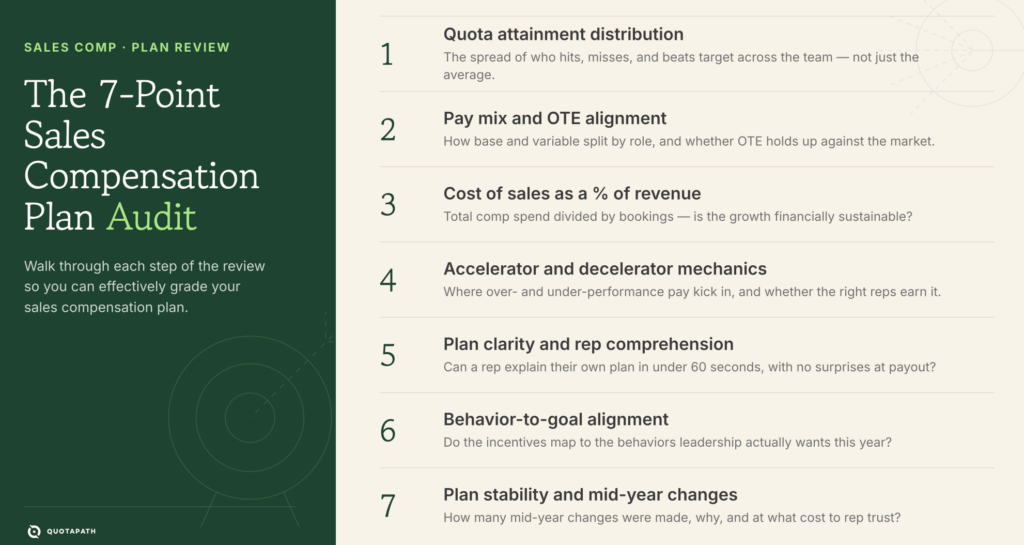
AI Won’t Run Your Comp Planning. Here’s What It Should Do Instead.

how to use ai in comp planning

“I’m not letting an algorithm decide how my reps get paid.”

If that’s your reaction to AI showing up in compensation planning conversations, you’re being reasonable, because comp plans are ultimately a trust exercise.

They tell your team what the company actually values, and they show up in paychecks every month. Get that wrong and risk employee retention, motivation, and potentially a legal battle.

So the skepticism is fair. But it’s usually aimed at the wrong question.

The question isn’t whether AI should run comp planning. The real question is narrower and more useful: where does AI actually earn a seat at the table, and where does it need to stay out of the room entirely?

That’s the question we built Atlas, QuotaPath’s AI revenue strategist, around. (It’s also what this post is about!)

Finance leaders are carefully leaning into AI

This isn’t a hypothetical debate. According to The F Suite Braintrust Summary, CFOs are actively exploring practical AI applications across finance, with strong interest in tools such as Claude, AI enablement, and implementation strategies to improve productivity and decision-making.

At the same time, finance leaders continue to rely on peer benchmarking, revenue performance data, and 2026 budgeting assumptions to make strategic calls, and the same Braintrust community they turn to for AI guidance is also the trusted source they use to validate critical business decisions.

Put those two things side by side, and a pattern emerges.

Finance leaders want AI to make their judgment faster and better informed.

That distinction is the whole ballgame for comp planning, and it’s the exact problem Atlas was built to solve: nearly 40% of revenue leaders report misaligned incentives today, and most find out the hard way after a plan is already live (2024 Sales Compensation Report).

What AI should do in comp planning

AI is genuinely good at three jobs, and none of them involve deciding what a rep gets paid. We built Atlas to address these three:

Testing assumptions fast. Plan design used to mean building a scenario in a spreadsheet, waiting for someone to check the formulas, then doing it again for the next “what if.” Atlas lets teams stress-test payout outcomes, attainment sensitivity, and cost exposure across dozens of quota, ramp, or accelerator scenarios in minutes, using real attainment patterns and payout behavior instead of guesses.

That means you can pressure-test a plan before it goes live, not after the first commission run raises questions.

Surfacing blind spots. Plan design has failure modes that are easy to miss when you’re deep in the details: a quota cliff that punishes reps for closing one deal too early, a cap that discourages your best performers from closing more, a structure with no upsell credit that quietly tells your team expansion revenue doesn’t count.

Atlas validates plans against QuotaPath’s own market benchmarks, drawn from tens of thousands of real comp plans and their revenue outcomes, and flags patterns like these before finance hears about them from an upset rep three months into the plan year.

Accelerating planning cycles. Annual planning, especially heading into a new budgeting cycle, tends to eat weeks of finance and RevOps time on first-draft modeling before the real conversation even starts.

Atlas gives teams a shared workspace to draft, comment on, and align on quota, rates, and accelerators together, replacing the scattered spreadsheets and docs that usually eat that time. The planning meeting ends up spent on the decisions that actually require people in the room, not on rebuilding the same model for the fifth time.

Where human judgment still matters most

Here’s the other half, and it’s the half that doesn’t change no matter how good the tooling gets. It’s also the half QuotaPath built directly into how Atlas works, not just how we talk about it.

Fairness and morale calls are human calls.

What a plan structure signals about company priorities, whether a change feels like a bait-and-switch to the team, how a rep with an unusual ramp or tenure situation should be handled: these are judgment calls (not calculations).

And, it’s a judgment call informed by context that an algorithm lacks. That’s why Atlas is built as a collaborative workspace, not a single-user drafting tool. RevOps, finance, and sales leadership build, review, and comment on plans together, with governance and rollout controls that keep human sign-off in the loop before anything goes live.

Organizational context is also something AI can’t see. A leadership mandate to prioritize a specific product line, a one-off market condition, or the fact that a particular team just went through a reorg: a human planner knows to weigh these factors. A model doesn’t, unless someone tells it to, and by then it’s not really the model making the call anymore.

Then there’s negotiation. Sales wants one thing, finance needs another, and the plan that actually gets built is a negotiated outcome between departments with different incentives. That’s a conversation, not an output, which is exactly why Atlas is designed for RevOps, finance, and sales to work in it side by side instead of handing one person a black-box recommendation.

That’s why the Braintrust Summary’s other findings matter here.

Benchmarking “remains essential for strategic decisions,” and the community itself functions as “a trusted source for validating critical business decisions.” Atlas doesn’t replace that validation step. It gives finance and RevOps leaders a stronger, benchmarked first draft to bring into it.

What this looks like in practice

A RevOps leader modeling a new accelerator structure uses Atlas to run it against three different payout curves and see the attainment sensitivity and cost exposure for each, before choosing which one to build.

A CFO reviewing a proposed plan gets flagged by Atlas’s benchmarking against market and historical attainment data that the top 10% of reps hit a soft cap on upside two months into the year, and adjusts the structure before it goes to the board.

A finance team heading into 2026 budgeting uses Atlas’s shared workspace to compress what used to be a multi-week assumption-gathering exercise into a couple of working sessions, because the first-pass model, complete with OTE and quota engineering, is already built and ready to argue about.

In every case, Atlas did the modeling, followed by a person who made the call.

Capital discipline hasn’t gone anywhere

None of this is happening in a vacuum where financial rigor takes a back seat to new tools.

The Braintrust Summary makes the same point about the broader finance function: capital planning and financial discipline remain top priorities, with high engagement around M&A banker fees, equity structures, 409A processes, and AP automation, all signs of teams focused on scaling efficiently without loosening the guardrails.

Comp planning should follow the same logic. Using Atlas to move faster on plan design isn’t in tension with financial discipline. Done well, it reinforces that discipline, because you’re testing more scenarios, catching more blind spots, and validating more assumptions against real benchmarks before a plan goes live, not fewer.

AI plus expertise, not automation in a black box

The instinct to distrust AI in comp planning usually isn’t really about AI. It’s about black boxes: tools that hand you a number with no visibility into how they got there, in a process where the “how” is the entire point.

That’s the line QuotaPath drew deliberately when we built Atlas. It’s trained on proprietary QuotaPath data, attainment patterns, payout behavior, and revenue economics from tens of thousands of real comp plans, not a generic model guessing at what a “good” plan looks like. It sits atop transparent calculations and plan logic your team can see and review, with role-based architecture and rollout controls that keep governance in human hands. When Atlas flags a blind spot or models a scenario, the rep, the manager, and the CFO can all see the why behind the output, not just the output itself.

That’s also what the CFOs in the Braintrust Summary are actually asking for when they talk about AI enablement and implementation strategy: tools that make their teams faster and more confident, not tools that quietly take the decision out of their hands.

AI’s job in comp planning is speed, benchmarking, and visibility. The human’s job is judgment and trust. Keeping those separate, on purpose, is what makes Atlas worth using at all.

See what AI-assisted plan design looks like without losing visibility into the math. Use Atlas to model your next comp plan, or talk to sales to see it on your own comp structure.

What to Look for in Modern Compensation Planning Software (Hint: It’s Not Just Commission Accuracy)

modern comp planning software

Every compensation software vendor will tell you their platform calculates commissions accurately.

Let’s just get this out of the way. That claim is table stakes and not a differentiator.

If two platforms can both handle a tiered accelerator correctly, what actually separates the RevOps and Finance teams who love their tool from the ones still fighting spreadsheets at 9pm before payroll runs?

It comes down to six things that rarely make the front page of a vendor’s website:

  • how usable the tool is for everyone who touches it
  • how transparent the pricing is
  • how fast and consistent the support is
  • whether the services model fits your team’s bandwidth
  • whether the AI is built on data you can trust
  • and whether the platform actually talks to the tools you already run on

Zapier’s then Manager of Revenue Operations, Katie Huson, put it well when she was evaluating vendors: “One thing that’s really important to me is: if I win the lottery and I’m not coming back tomorrow, could somebody else take this over really easily?”

That question has nothing to do with whether the math is correct and everything to do with whether the software works for the humans using it.

So, here’s what to look for, backed by what actual customers have said.

Usability: Can Anyone on the Team Actually Use It?

Commission software fails quietly.

It’s rarely a calculation error that sinks a tool. It’s the admin who’s the only person who understands the formulas, or the rep who has to email Finance every cycle to ask “why is this number what it is.”

On G2, QuotaPath customers consistently point to this first.

Genevieve M., a Revenue Operations Sr. Manager, wrote: “The ease of use of the platform is excellent. I love the transparency it provides on how earnings are calculated for a deal… The UI is informative and very usable by administrators and salespeople alike.”

Chris S., a Sales Operations Manager, echoed the same thing: “I love how easy the UI is for me in Admin, and for the reps.”

And Jacob L., a Sr. Sales Operations Manager, noted that “deployment was so easy that I was able to get around 99% complete with some niche items requiring minimal support.”

Katie from Zapier said usability was the deciding factor when she evaluated vendors after first seeing QuotaPath at HubSpot’s INBOUND conference: “QuotaPath felt very drag-and-drop. Very simple to understand.”

The payoff shows up in day-to-day operations. Reps at Zapier can now see “every deal, the exact math, and why it’s mathing that way,” and Katie says she “rarely gets questions” anymore.

At Forthright Capital Partners, RA Principal Charles Nguyen saw the same gap when comparing tools.

“Even with other software like Spiff or Salesforce-native tools, it was hard for agents to understand their payouts,” said Charles. “But with QuotaPath, they can just pick it up.”

When you’re evaluating a platform, test usability from three seats:

  1. The admin building the plan
  2. The rep checking their earnings
  3. The person who’d have to take the whole thing over if you left tomorrow.

Pricing Transparency and a Low-Risk Way to Try It

Buyers are tired of opaque, sales-led pricing that only shows up after three demo calls and a “let me check with my manager” email. Look for vendors who publish pricing and let you try the product before committing to a contract.

Jay Wallace, Sales Founder & VP of Worldwide Sales at runZero, said this shaped his entire evaluation: “We buy from companies that look and feel like us. Free trial. Easy to install. No professional services… The no professional services was a hard requirement.”

His team went from signed contract to fully automated commissions in less than two months, and 24 weeks without a single sales compensation error.

David Taub, Senior Director of Revenue Operations at HydroCorp, chose QuotaPath in part because of the reduced risk of the investment: “A big driver of it was the level of investment into QuotaPath was less, a lot less risk than going into some of the more legacy players.”

The payoff was immediate. Rebuilding a past comp plan in QuotaPath surfaced enough costly errors that, as David put it, “we essentially paid for QuotaPath in one month.”

At Three Point Mortgage, Connor Adkisson named pricing as one of three deciding factors against Everstage and mortgage-specific tools that were “prohibitively expensive or too rigid.”

Transparent pricing paired with a free trial signals something important: a vendor confident enough to let the product sell itself before the contract is even on the table.

Streamline commissions for your RevOps, Finance, and Sales teams

Design, track, and manage variable incentives with QuotaPath. Give your RevOps, finance, and sales teams transparency into sales compensation.

Talk to Sales

Support That Actually Responds

Support quality only becomes visible after you’ve signed.

That’s exactly why it’s worth asking pointed questions in advance: how fast does the team respond, and will you be talking to the same person twice, or starting over with a new rep every time?

Katie described QuotaPath’s support as “answers, not tickets”: “The chat is the easiest thing ever. Whenever I put in a ticket, I get a Loom back showing me what to do, so I don’t have to ask the same question twice.”

Charles said the same thing about response speed: “Each time I use a chat bubble, I get a response back within 30 minutes. Any formula issues are always fixed same day.” When he had an implementation emergency, he emailed the team directly and got a reply “within an hour every time.”

When you’re checking references, ask how fast and reliable support is.

A Services Model That Matches Your Team’s Bandwidth

It’s also important to remember that no two RevOps or Finance teams have the same in-house capacity.

The best comp platforms offer a spectrum of support, from fully self-serve to white-glove build-and-manage, rather than forcing every customer into the same delivery model.

Three Point Mortgage, for example, needed the white-glove end of that spectrum.

Their commission structure involved multiple role-based plans, overrides, recoverable draws, and branch-level P&L carve-outs, complexity that had broken their previous vendor’s rigid framework.

QuotaPath’s implementation specialist “logged every payment method, mapped out all the possible combinations, and guided the team through key decisions,” and the company’s co-founder personally built a custom workflow to solve their trickiest problem: calculating draws intelligently based on actual pay-period earnings instead of a blanket assignment.

Virtuous took a similar hands-on path when they joined the beta for QuotaPath’s Rippling integration.

Director of Accounting Joan Schiffer got direct support through setup, and her feedback during the beta directly shaped product features like bulk-send. “It was a no-brainer,” she said. “It only made sense to have these systems communicate.”

At the other end of the spectrum, runZero explicitly wanted the opposite: “no professional services needed” was a hard requirement for a lean, fast-moving SaaS team.

Both approaches worked because QuotaPath let each customer choose. The question worth asking any vendor is simple: what happens in week one if your comp plans are more complex than a template? The answer tells you whether their services model is real or just a line on a pricing page.

AI That Understands Compensation, Not Generic AI

Next up is AI, a checkbox now on every vendor’s homepage (some mention it more than others).

What matters is not the number of agents they offer but what the AI actually reasons over.

For instance, is a solution’s AI a wrapper around a public LLM that can guess at compensation best practices? Or is it a tool trained on proprietary comp data that can tell you something specific and defensible?

Atlas, QuotaPath’s AI Revenue Strategist, runs on proprietary QuotaPath data and benchmarks from roughly 10,000 real comp plans, not generic internet text.

Its “Grade My Comp Plan” tool evaluates an existing plan against those benchmarks, flags structural fixes before rollout, and predicts how the plan will shape rep behavior and GTM motion.

It also solves a familiar RevOps problem: getting analysis in front of leadership.

Atlas generates shareable, C-suite-ready briefs, so an evaluation doesn’t stay buried in a spreadsheet.

One more thing worth asking any AI comp vendor: does it train on your data?

(Atlas doesn’t; your data stays private.)

Native Integrations With the Tools You Already Run On

Lastly, some RevOps leaders may argue this is the most important factor: a vendor’s integration capabilities.

Look for direct, native integrations with your CRM and your payroll system.

On the CRM side, runZero automated commissions by syncing directly with HubSpot, reaching 100% adoption across 33 reps and five-plus comp plans, and going 24 weeks without a single commission error.

On the payroll side, Virtuous connected QuotaPath directly to Rippling to close the loop from commission calculation to payout. “Thanks to the Rippling integration, I’m confident our payouts are accurate and faster. No more triple checks,” said Joan, who now saves roughly 30 minutes per pay run across 70 commissionable employees.

Three Point Mortgage got a similar result, even though the Rippling integration wasn’t part of their original purchase decision. “It wasn’t part of the original sales conversation,” Connor said, “but it became one of the most meaningful parts of the relationship… We just load QuotaPath and hit send.”

Native integrations remove the two riskiest manual steps in the entire comp process: pulling deal data in, and pushing payout data out to payroll.

That’s exactly where copy-paste errors and trust problems start. When you’re evaluating a shortlist, ask any vendor to show you the integration live.

A Quick Evaluation Checklist

Before you sign anything, run your shortlist through six questions:

  1. Can a non-technical rep understand their own commission math without help?
  2. Is pricing published, and is there a free trial with no forced professional services?
  3. What’s the average support response time, and will you have a consistent point of contact?
  4. What does onboarding look like if your comp plans don’t fit a template?
  5. What data trains the AI features, and can it produce something leadership-ready?
  6. Which CRM and payroll systems have native, two-way integrations today, not on a roadmap?

The Bottom Line

Commission accuracy is the price of entry.

Revenue teams who are genuinely happy with their compensation software point to the same handful of things: software their whole team can actually use, pricing they understood before they signed, support that answers instead of routes them to a ticket queue, a services model that flexes to their complexity instead of the other way around, AI they can trust with sensitive data, and integrations that remove manual work instead of adding a new spreadsheet to reconcile.

Ready to see how it holds up for your team?

Try QuotaPath for free or talk to sales to walk through your own comp plans.

Sales Compensation Consulting Guide

sales consulting guide

Key Takeaways

Sales compensation consulting is the practice of designing, benchmarking, and managing sales incentive programs.

  • Sales compensation consulting can help solve expensive plan design mistakes.
  • Not every company needs a consultant.
  • Consulting costs vary significantly by scope and company size.
  • Traditional consulting often delivers point-in-time recommendations.
  • AI can dramatically reduce analysis time and cost.
  • Human expertise still matters in certain scenarios.
  • Atlas offers an alternative approach for many SaaS teams.

AI Comp Consultant

Use Atlas at anytime to model, benchmark, or build compensation plans from proprietary QuotaPath data.

Try Atlas

Do You Actually Need a Sales Compensation Consultant?

Compensation design impacts sales rep motivation and retention, business profitability, and forecasting. Many teams wonder whether they truly need outside help or simply better internal processes.

Signs Your Comp Plan Is Costing You Money

Compensation is often the largest controllable sales expense. Even small flaws in a plan can lead to six-figure consequences at scale, such as overpaying on low-margin deals. Misaligned incentives frequently create hidden revenue leakage. For instance, accelerators or commission structures that drive unintended behaviors such as reps prioritizing contract size over retention, or incentives that encourage discounting.

Plans becoming overly complex, as teams scale, present additional challenges. For example, reps consistently missing quota despite a healthy pipeline, Finance regularly finding payout errors, frequent commission disputes, and top performers leaving due to compensation frustration. Your comp plan can not only influence rep retention rates but also increase the difficulty of attracting experienced sales talent.

According to a McKinsey study, companies with transparent, well-designed variable compensation structures report up to 30% lower turnover rates than those with confusing or opaque plans. And more than 75% of sales professionals base their decision to accept a new role on the perceived fairness and opportunity offered by the compensation plan.

When In-House RevOps Is Enough

Internal teams at early-stage companies and teams with experienced RevOps leaders can successfully manage compensation without assistance. Likewise for businesses with small sales organizations, stable compensation structures, and access to benchmark data and modeling.

Hiring a consultant shouldn’t be the default answer. Strong revenue operations (RevOps) teams can often solve many compensation challenges internally. However, sometimes it’s best to enlist external expertise to address complex sales compensation questions.

When It’s Worth Bringing in Outside Help

As organizations grow, compensation plans evolve from simple quotas to multi-dimensional programs, triggering complexity in plan administration, data tracking, and compliance. This shift transforms compensation from a straightforward reward mechanism into a complex strategic lever that requires careful design to avoid unintended consequences.

External expertise can be especially valuable during periods of significant change, such as major compensation redesigns, rapid scaling, IPO preparation, mergers and acquisitions, and geographic expansion. Multi-product sales organizations, companies transitioning to usage-based pricing, or those requiring assistance resolving compensation disputes between Sales and Finance, may also benefit from external support.

A sales compensation consultant can bring industry benchmarks, objective analysis, and experience across multiple compensation models to these decisions. This outside perspective can also help align stakeholders around a compensation strategy that balances sales incentives with the company’s broader financial and business objectives.

How Much Does Comp Consulting Cost, and Is It Worth It?

Once leaders determine they need help, the next question is typically cost versus business impact.

Typical Pricing (Project, Hourly, Retainer)

Compensation consulting services typically use three common pricing structures: hourly consulting rates, project-based engagements, and ongoing advisory retainers. Hourly rates are often for ad hoc guidance or smaller, less well-defined needs, while project-based fees cover a defined scope and deliverables. Retainers provide ongoing access to consulting expertise and are typically best suited for organizations requiring continuous strategic support.

Market pricing varies widely by provider and scope of engagement. Independent consultants may charge approximately $250 to $500 per hour, while focused projects with boutique firms may range from $25,000 to $60,000. Enterprise-wide engagements with large consulting firms can cost $100,000 to $250,000 or more.

The difference often comes down to specialization and scale. Boutique compensation consulting firms typically offer specialized expertise and more tailored support for focused compensation challenges, while larger firms bring broader resources and capabilities to complex, enterprise-wide engagements. As a result, the right pricing model and provider depend largely on the scope and complexity of the compensation challenge.

What Moves the Price

Sales compensation consulting costs increase with the size and complexity of the engagement. Key factors include company size, the number and complexity of compensation plans, geographic coverage, technology integrations, and the number of stakeholder interviews required.

Data cleanup requirements can also significantly affect the scope and cost of an engagement. Organizations often underestimate the time required to gather and validate compensation data from disparate systems before consulting work even begins.

How To Calculate ROI

The ROI of sales compensation consulting can be measured through outcomes such as fewer commission errors and improved rep retention. For instance, 22% of sales reps experience at least one commission dispute each year, and 9% quit as a result. Improving compensation accuracy and rep retention translates into significant savings: a rep earning a $50K base salary costs $150K or more to recruit, hire, and ramp.

Additionally, improved quota attainment and sales productivity help eliminate costly redesign cycles when compensation fails to drive the intended performance. Better forecast accuracy can help prevent overpayment, while faster compensation plan rollout and reduced administrative workloads create additional time and cost savings.

comp plan costs

Where Traditional Comp Consulting Falls Short

Traditional consulting remains valuable, but it also comes with tradeoffs that many mid-market SaaS teams struggle with.

Cost and Speed for Mid-Market Teams

Traditional consulting engagements can take weeks or months to move from discovery and analysis to final recommendations. For growing SaaS organizations with budget constraints and rapidly changing priorities, that investment of time and money may be difficult to justify. There’s also an opportunity cost while waiting for recommendations when compensation challenges require faster decisions or adjustments.

Static, Point-in-Time Advice

Recommendations are often based on a snapshot in time. However, markets, territories, and compensation benchmarks change rapidly. Consequently, plans require ongoing iteration to keep current, which is why a compensation plan is rarely “finished.” In fact, according to WorldatWork, 97% of survey respondents reported making changes to their sales comp plans for 2026, compared to 86% last year.

Handing Sensitive Comp Data to Outsiders

Modern revenue teams increasingly want secure, internal-first solutions. Working with external consultants may require sharing sensitive compensation data, including employee earnings and performance information, creating additional security and confidentiality considerations.

Organizations must also consider how compensation data is accessed, shared, and protected to maintain employee trust and meet internal governance requirements. Keeping sensitive information within controlled systems can provide teams with greater oversight of their compensation data while limiting unnecessary external exposure.

How AI Changes Sales Compensation Consulting

Advances in AI are creating a new category between DIY compensation planning and expensive consulting engagements.

On-Demand Benchmarks Instead of Weeks of Analysis

AI-powered compensation analysis can deliver immediate, always-on access to insights that traditionally require weeks of discovery and analysis. By continuously learning from evolving benchmark datasets, AI can provide benchmark-driven recommendations as compensation trends and market conditions change. This gives teams faster access to relevant insights while reducing their dependency on lengthy discovery processes.

Continuous Modeling vs. One-Time Reports

AI supports the ongoing need to adjust sales compensation plan design in response to evolving business and market conditions. It enables recurring compensation plan modeling, scenario planning, on-target earnings (OTE) analysis, pay mix adjustments, and testing of quota attainment outcomes to keep plans current. With AI-assisted scenario planning, teams can explore questions such as: 

  • What happens if quota increases by 20%?
  • What happens if accelerators change?
  • What happens if expansion revenue becomes a priority?

Rather than relying on a one-time report that reflects a single set of assumptions, continuous modeling allows teams to test different scenarios and adjust the sales incentive plan as business priorities and conditions change.

When AI Replaces a Consultant, and When It Doesn’t

The best sales compensation consulting solution depends on organizational size, budget, and desired outcome. AI is well-suited for benchmarking, plan grading, scenario modeling, compensation analysis, and first drafts of plan recommendations. However, there are scenarios where a human consultant is the better solution.

Human consultants remain valuable when compensation decisions involve executive alignment, organizational politics, M&A situations, large-scale transformations, and change management. AI can accelerate the analysis behind compensation decisions, while human expertise remains essential when those decisions require nuanced judgment, stakeholder alignment, and the ability to navigate organizational complexity. 

Meet Atlas, Your AI Compensation Plan Consultant

Traditional consulting and AI-driven alternatives each have their place. Atlas offers modern revenue teams a practical solution to compensation planning that combines AI-powered guidance with proprietary compensation data and benchmarks.

Grade Your Existing Plan in Minutes

Atlas helps finance and RevOps teams assess existing sales compensation plans against proprietary QuotaPath data and benchmarks to identify potential risks and evaluate plan simplicity and fairness. These insights help leaders understand whether their plan is competitive and aligned with business goals.

Build and Test Plans Against Proprietary Benchmarks

Leaders can move from intuition to evidence-based compensation planning with Atlas. Powered by proprietary QuotaPath data and benchmarks, Atlas facilitates compensation plan modeling, OTE validation, and pay mix recommendations to enable benchmark-informed design. Teams can build compensation plans with greater confidence while preventing costly financial surprises.

Leadership-Ready Briefs You Can Share Upward

RevOps teams often spend significant time packaging recommendations for leadership. Atlas streamlines this process by turning compensation insights and recommendations into clear, executive-ready summaries that communicate key findings and recommended actions. These structured outputs facilitate Finance alignment and give leaders the information they need to bring compensation decisions into board discussions with greater clarity and confidence.

Secure By Design for Sensitive Comp Data

Atlas prioritizes data security by keeping sensitive compensation information private and never using it to train external AI models. This approach supports internal ownership for reduced exposure of compensation data and information. Maintaining greater control over how sensitive data is accessed and used strengthens employee trust and supports internal governance requirements.

Try Atlas Free

Atlas offers a fast evaluation of your compensation plan and immediate insights without committing to a consulting engagement. Teams can test Atlas for free before deciding whether it’s the right approach for their compensation planning needs.

FAQ Section

    What does a sales compensation consultant do?

A sales compensation consultant helps organizations design, benchmark, evaluate, and optimize sales incentive programs. They may analyze compensation structures, quotas, OTE, pay mix, and performance data to identify potential issues and recommend changes that align incentives with business objectives.

    How much does sales compensation consulting cost?

Sales compensation consulting can cost anywhere from approximately $250 per hour to $250,000 or more per consulting engagement. While independent consultants may charge $250 to $500 per hour, boutique firms may charge $25,000 to $60,000 for focused projects, and enterprise-wide engagements with larger firms typically cost $100,000 to $250,000 or more. Final costs depend on factors such as company size, plan complexity, project scope, and data requirements.

    Is sales compensation consulting worth it?

Sales compensation consulting can be worth the investment when compensation challenges are complex or costly enough to require outside expertise. Consultants can help organizations prevent expensive plan design mistakes, improve quota attainment and sales productivity, reduce commission errors, and align stakeholders around compensation decisions. However, organizations with simpler compensation structures and experienced internal RevOps teams may be able to manage these needs without external support.

    Can AI replace a sales compensation consultant?

AI can replace a sales compensation consultant for many analytical and planning tasks, but not in every scenario. AI is well-suited for benchmarking, plan grading, scenario modeling, compensation analysis, and developing initial recommendations quickly and cost-effectively. Human consultants remain valuable when complex organizational challenges require nuanced judgment, executive alignment, change management, or navigating stakeholder dynamics.

    How often should compensation plans be reviewed?

Sales compensation plans should be formally reviewed at least annually and monitored throughout the year to ensure they continue driving the intended outcomes. Additional reviews may be necessary when business priorities, market conditions, territories, products, pricing models, or sales roles change significantly. Ongoing monitoring can help teams identify performance or cost issues early rather than waiting until the next annual planning cycle.

    What is the difference between compensation consulting and compensation software?

Compensation consulting provides external expertise and strategic guidance, while compensation software provides technology for designing, managing, and analyzing compensation programs. Consultants typically help with complex decisions, plan design, benchmarking, and stakeholder alignment, while software can automate sales compensation processes, model scenarios, track performance, and provide ongoing insights. AI-powered solutions increasingly bridge the gap by combining software capabilities with on-demand analysis and strategic guidance.

Book a demo with QuotaPath to benchmark, model, and optimize your compensation plans with AI-powered guidance.
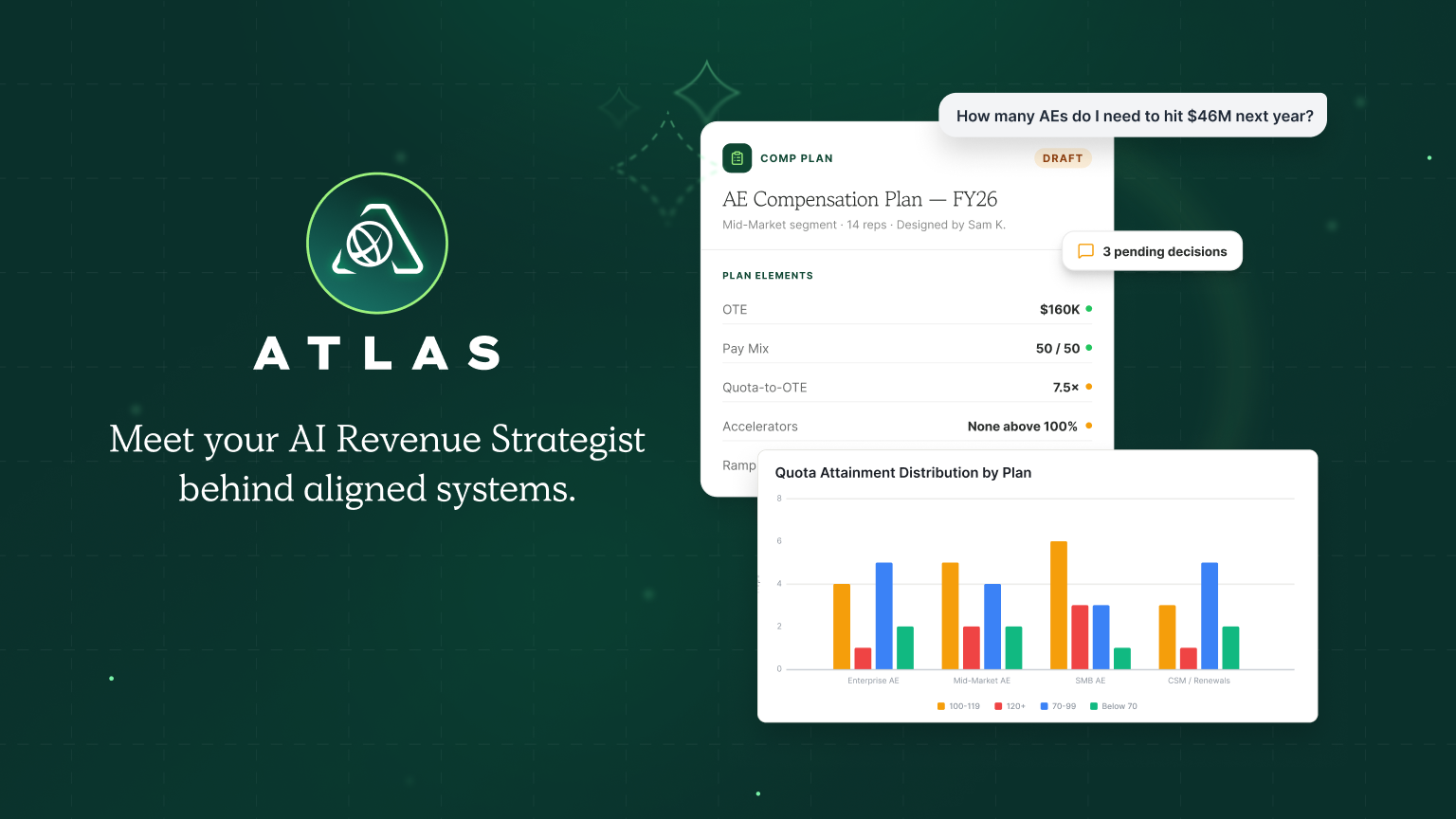
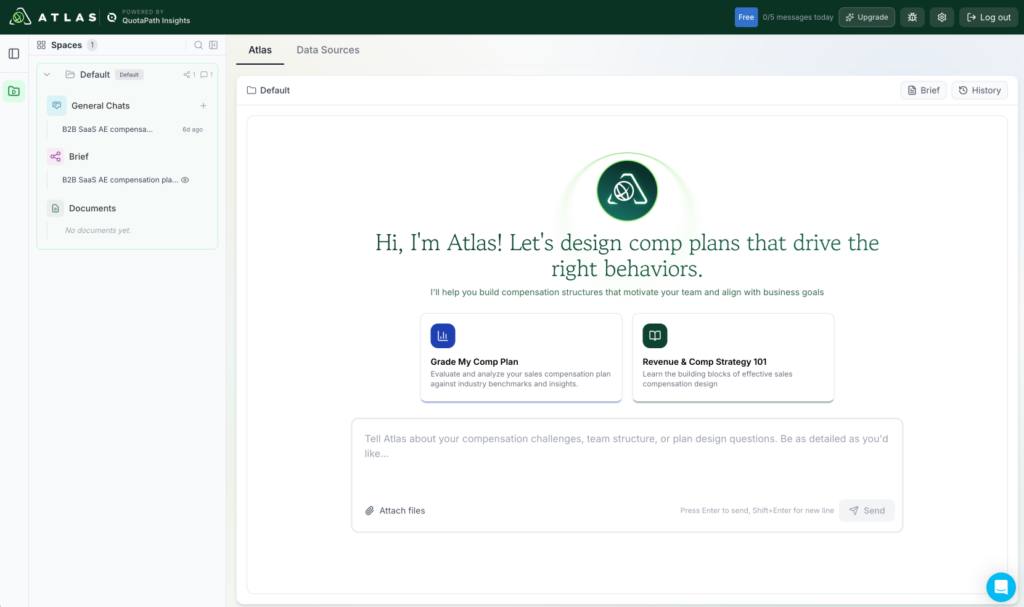
QuotaPath’s Earnings & Attainment App Pages Are Now Live Inside HubSpot

hubspot commission tracking

Exciting news for our HubSpot and QuotaPath users!

Our two-way integration now includes full QuotaPath Earnings and Attainment views directly in HubSpot. 

Called App Pages, the newest addition to our HubSpot integration, reps and admins can check where they stand in the same place they’re already managing pipeline.

Learn more below.

What are App Pages?

App Pages are essentially a mirror of the Earnings and Attainment pages you already use in QuotaPath, rendered natively inside HubSpot. That means the same aggregated views, the same filtering, and the same pipeline forecasting, without a separate login or a second browser tab.

With App Pages, reps and admins can:

  • View aggregated Earnings inside HubSpot, filtered the same way they would in QuotaPath
  • View Attainment inside HubSpot, across owners, plans, or components
  • Forecast pipeline directly from the Earnings and Attainment views
  • See QuotaPath data inside HubSpot regardless of which object (Deals, custom objects, etc.) their workspace uses as its data source

This rounds out QuotaPath’s presence inside HubSpot alongside our App Cards and App Objects, which surface deal-level earnings and attainment data. App Pages zoom out to give the aggregate, period-over-period view reps and managers rely on to know where they stand.

Why it matters

Sales reps and managers already spend most of their day in HubSpot. 

Every extra login, tab, or app switch is friction, and friction is exactly what keeps reps from checking in on their numbers regularly.

By putting the same Earnings and Attainment pages reps know from QuotaPath directly inside HubSpot, App Pages remove that friction entirely, so checking commission standing becomes part of the workflow instead of an extra errand.

Streamline commissions for your RevOps, Finance, and Sales teams

Design, track, and manage variable incentives with QuotaPath. Give your RevOps, finance, and sales teams transparency into sales compensation.

Talk to Sales

Nothing extra to set up

App Pages work regardless of your QuotaPath workspace’s data source, and they’re turned on by default for any workspace connected to HubSpot. If you’re already syncing QuotaPath and HubSpot, there’s nothing to configure; your team can start using App Pages today.

How to find App Pages in HubSpot

App Pages appear alongside your other HubSpot navigation once your workspace is connected. For a full walkthrough of setup and access, visit our Help Center article on the HubSpot integration.

Not yet running QuotaPath and HubSpot together? See why QuotaPath is the most installed commission app on the HubSpot Marketplace and explore the full integration.

What High-Performing RevOps Teams Do in August That Everyone Else Delays Until October

high-performing revops teams

September is consumed by board prep. October brings the close crunch. By November, Finance and RevOps are in a panic, untangling commission disputes that surface at the worst possible time – during board prep or audit- and trying to reconcile accruals from H2 compensation that no one modeled before they went live.

Teams that struggle in Q4 aren’t unlucky; they’re unready. The difference isn’t effort—it’s when certain decisions get made. If October exposes operational weaknesses, the real question is what happened in August before the pressure started to build.

Summary

The strongest RevOps and Finance teams don’t leave commission health to chance. They use August to identify risks early, strengthen financial controls, and prepare for a smoother Q4 by leveraging the five tactics listed below. 

  1. Treat commission data as a financial risk, not an ops inconvenience
  2. Run a mid-year comp audit before it’s urgent
  3. Model payout exposure before approving plan changes
  4. Fix accruals before they become an audit problem
  5. Set up visibility before reps start asking questions
Streamline commissions for your RevOps, Finance, and Sales teams

Design, track, and manage variable incentives with QuotaPath. Give your RevOps, finance, and sales teams transparency into sales compensation.

Talk to Sales

1. They Treat Commission Data as a Financial Risk, Not an Ops Inconvenience

The first behavioral split happens in how Finance frames the problem. Most teams treat commission disputes as a sales problem. However, commission processing errors constitute 3-8% of total incentive payouts.

This dirty commission data creates accrual issues that don’t surface until close, and it can create potential ASC 606 implications. Misstated commission expense isn’t just inconvenient; it’s a potentially costly compliance exposure.

Finance teams that own it differently catch it upstream, before it hits the books. As Kenza Sebbar, Director of RevOps at Actabl, said, “For FP&A, it was about trusting the numbers and being audit-ready.”

2. They Run a Mid-Year Comp Audit Before It’s Urgent

Knowing data is a risk is one thing. Building the habit that catches it is another.

The audit isn’t about finding mistakes — it’s about understanding what the plan is actually doing to cost, behavior, and trust. What a comp audit actually checks is:

  • Attainment health: Determines whether a realistic percentage of a sales team consistently meets or exceeds their quota within a reasonable timeframe, while quotas remain aligned with business objectives.
  • Commission cost vs. margin: Commission expenses help prevent overspending and ensure profitability by reviewing the commission payout ratio, the effective commission rate per deal, and total commissions per product line.
    Payout disputes and resolution rate: The number of discrepancies or pay questions per pay period, and how quickly they are successfully addressed or clarified to the rep’s satisfaction.
  • Whether incentives still match H2 goals: Verifies that the comp plan motivates behaviors that drive the achievement of current business objectives.

August is the best window of time. It’s before H2 ramp, before board prep, and before it’s time for plan changes again. When they finally look, teams find issues such as version control chaos, undocumented overrides, and plan assumptions that expired in March.

compensation scenario modeling
Model payout exposure ahead of changes using QuotaPath’s AI Revenue Strategist, Atlas.

3. They Model Payout Exposure Before Approving Plan Changes

After audit comes the harder conversation — what to change, and what it’ll cost. The question isn’t just “does this comp change make sense for sales?” It’s “do we know what this change will cost across every attainment scenario?”

Mid-year comp changes that skip modeling create worse problems than the ones they fix. For instance, the effective commission rate per deal across accelerators and all earners, such as AEs, BDRs, and managers, can add up. “You blink, and you’re paying 35% of a deal in total commissions once you add up everyone involved. That’s a hidden cost finance leaders need to track,” said Ryan Milligan, GTM Leader at QuotaPath.

When plan changes go live without scenario testing, you end up with surprise payouts, misaligned accruals, and forecasting gaps. Testing across attainment bands proactively answers the question: What does payout exposure look like if 80% of reps hit 75% of quota versus 30% hitting accelerators?

AI modeling tools that simulate payout exposure across scenarios before any plan change is approved streamline this process. Finance gets a number before they greenlight the change, not after it hits payroll. The result is better forecasts, cleaner audits, and fewer surprises.

4. They Fix Accruals Before They Become an Audit Problem

The comp audit and scenario modeling only matter if the underlying data is clean enough to trust. Clean accruals aren’t just an efficiency win. They’re a risk-mitigation story that Finance should own.

Manual accruals rely on disconnected data sources, introducing version control issues and formula drift. The handoff between commission calculation and Finance reporting is where those inconsistencies are most likely to surface, delaying the close and increasing the risk of payout errors. Mismatched numbers result in delayed closings and payout errors. These inaccuracies frustrate reps and increase compliance risk.

Audit-readiness actually requires clean trails, documented logic, and defensible calculations. That’s the difference between a spreadsheet someone “knows” and a system Finance can confidently stand behind. Commission accounting automation ensures compliance by fulfilling these requirements in a fraction of the time. For instance, one customer reduced accrual time by 90% — from 3–4 days to 20–40 minutes.

The teams left scrambling in October usually have an accrual problem they didn’t catch in August.

5. They Set Up Visibility Before Reps Start Asking Questions

The operational side of commissions is only half the story. The other half is trust, and transparency is how you build it.

When reps can’t see how they’re paid, they resort to building shadow spreadsheets. Dispute volume distracts Finance during close and reduces credibility as they address rep payout questions and discrepancies. Real-time rep visibility minimizes disputes. “I rarely get questions about commissions anymore,” said Liza of Rootly.  

This isn’t a rep satisfaction feature — it’s a Finance time-saving feature. Fewer disputes = fewer pulls on Finance’s attention at the worst possible moment.

For Finance, the benefits of rep transparency extend beyond fewer distractions at close. When reps can see how they’re paid and trust the calculations, Finance spends less time resolving disputes and more time supporting forecasting, financial reporting, and strategic planning.

“The only two times I think about commissions now are when payroll is due and during annual planning. That’s it,” said Kenza Sebbar, Director of RevOps at Actabl.

The Real Cost of Waiting Until October

If you choose to wait, it’s not a capability difference; it’s a timing one. Teams that scramble in Q4 usually had the same intention in August. The difference lies in whether the commission infrastructure was treated as ongoing work or a year-end task.

“Delaying until October” compresses the financial close, increases audit risk, and forces Finance and RevOps to untangle undocumented plan changes and rep disputes during one of the busiest periods of the quarter. Problems that could have been addressed proactively in August become a reactive scramble when the business can least afford it.

Commission health isn’t a project; it’s a posture. The teams that finish Q4 clean usually didn’t work harder; they just didn’t let August pass without looking.

Conclusion

If there’s one thing to do this August, don’t wait until October to hear what your commission data has been trying to say all along. Audit it. Model it. Validate it.

Book a demo to see how QuotaPath can streamline your August comp plan audit.

The Hidden Cost of “Good Enough” Commission Tracking for Finance Teams

The Hidden Cost of "Good Enough" Commission Tracking for Finance Teams

Your commission process probably works.

 Reps get paid, close eventually happens, and the spreadsheet only breaks a few times a year. That’s the problem … “works” and “good enough” are exactly what keep commission tracking off Finance’s risk register.

But the financial risk in commissions is equally high: paying your reps incorrectly when they already distrust Finance AND misstating variable compensation expense, slowing close, and losing confidence in the forecast (all at once).

In this blog, learn:

  • Where “good enough” commission tracking actually costs you: forecasting, close, audit readiness, and rep trust
  • Why spreadsheets fail hardest mid-year, right when plans change
  • The exposure model Finance should require before approving any comp change
  • How AI makes payout scenario modeling practical
  • The metrics to track to know if your process is quietly taxing the business
Streamline commissions for your RevOps, Finance, and Sales teams

Design, track, and manage variable incentives with QuotaPath. Give your RevOps, finance, and sales teams transparency into sales compensation.

Talk to Sales

The costs don’t show up as commission errors

It’s important to note that the costs don’t actually show up as commission errors. Instead, they show up everywhere else (!).

Like in your forecast. When accruals are built on a wrong earned-to-date base, every forecast layered on top inherits the error. Expense timing distorts monthly S&M and EBITDA, and true-ups bunch into later periods, so forecast variance starts looking like performance variance, and nobody can tell which is which.

Or in your close. Manual commission reconciliation means tying out bookings, payroll, and accrued liabilities by hand, chasing exceptions, and holding sign-off until disputes resolve. Teams running spreadsheet-heavy processes routinely lose two to five business days of close to commissions alone.

How about your audit file. Auditors flag the process: no effective-dated plan documentation, no clean tie-out from the approved plan to source deals to payout, weak evidence of accrual methodology, and no way to reproduce a historical payout exactly as of the pay period. If you capitalize commissions under ASC 340-40, errors flow into deferred contract costs and amortization, where they can hide for one to four quarters before a true-up or variance review surfaces them.

And of course, in your reps’ trust. A single dispute burns 2–10 hours across Finance, RevOps, payroll, and a manager. The compounding cost is worse: once reps believe the math is unreliable, every statement becomes contested.

Why spreadsheets fail exactly when you need them most

Spreadsheets fail mid-year when plans change, which is precisely when the stakes are highest.

A new SPIF introduces effective-date logic. 

Accelerators require cumulative attainment math, not simple rate lookups. 

Territory shifts break credit rules. 

Quota adjustments raise retroactivity questions. 

The failure modes are predictable: a lookup still pointing at the old rate table after an accelerator change, a split credit applied on one tab but not the payout tab, a SPIF that keeps paying after the promo ended, a clawback keyed to close date instead of churn date.

Operationally, teams respond by creating new tabs instead of controlled versions, hardcoding exceptions, and carrying “shadow adjustments” outside the model, until nobody is sure which file is authoritative. 

Static tools handle tables well. They handle event history and rules that change over time poorly. 

Comp plans are the latter.

The Finance move: model exposure before the plan changes

Here’s where Finance can shift from cleanup crew to gatekeeper. Before any comp change is approved, require a payout exposure model, mnot a single cost estimate at 100% attainment.

A plan can look cost-neutral at target and still get expensive above it. 

Consider a change from 12% to 20% commission above quota to “reward outsized performance.” At 100% attainment, cost looks unchanged. But if top reps finish at 130–150% (especially after territories also improved) payout on the overage cohort can rise 30–50% or more. 

That’s the kind of change that looks small in a spreadsheet and expensive once fully modeled.

Before signing off, a Controller should ask: 

  • What does this cost at 100%, 110%, 125%, and 150% attainment? 
  • What’s the downside if the top quartile overperforms? 
  • Is anything retroactive? 
  • Does this change our accrual methodology? 
  • Can payroll reproduce the result from system logic, not manual edits?
Atlas ai modeling for commissions
Model payout scenarios using Atlas, QuotaPath’s AI Revenue Strategist

Where AI changes the equation

The reason most teams skip scenario modeling is the effort involved. 

Building attainment scenarios across roles, segments, ramp status, and deal mix in a spreadsheet is a project. 

This is where AI earns its place in the comp stack: feed it plan rules, quotas, headcount, and historical attainment distributions, and it can model both deterministic scenarios (“what if 30% of reps hit 120%?”) and probabilistic exposure ranges.

The payoff for Finance is seeing where the payout curve bends, because that’s where budget risk lives, and it’s exactly what a static model at target attainment will never show you.

Start measuring “good enough”

You don’t need industry benchmarks to know if you have a problem. 

Track your own: commission true-up percentage versus accrual, dispute rate per pay cycle, manual adjustment count, off-cycle payroll runs, and days to close variable comp.

 If those numbers are trending up, or you can’t produce them, your commission process is quietly taxing your forecast, your close, and your audit readiness.

That’s the hidden cost of good enough. The fix isn’t working the spreadsheet harder; it’s moving commissions into a system built for changing rules, effective dates, and auditability. 

See how QuotaPath automates commission tracking and models payout exposure before plan changes roll out; schedule a demo.